

Auto Clicker & Auto Tapper
Tools In-app purchases Contains ads
Auto clicker super fast - automate taps & swipes for all games and tasks
- Rating
- 4.2
- 1.2K ratings
- Downloads
- 1.5M+
- on Google Play
- Price
- Free
- In-app purchases
- Updated
- Oct 9
- 2026 · v1.0.36
Screenshots


About Auto Clicker & Auto Tapper
Tired of endless tapping? Auto Clicker & Auto Tapper made automation easy! Perfect for gamers, testers, and anyone who wants a faster way to tap. Whether you're playing Roblox, testing CPS, or automating tasks, this automatic clicker has you covered!
Key Features of auto clicker super fast:
• No Root Required to use automatic tapper
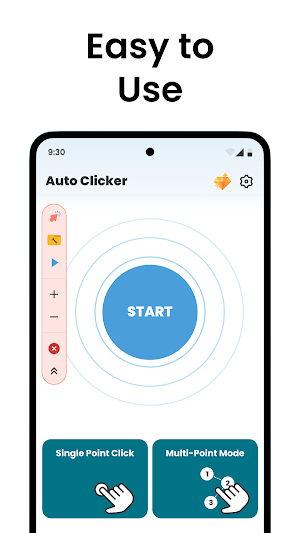
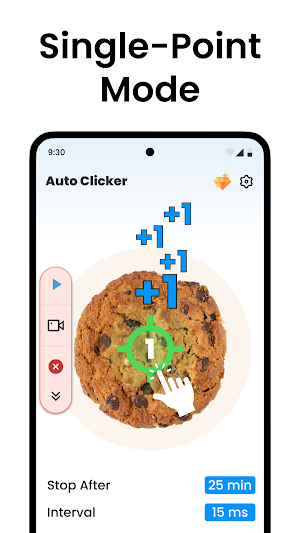
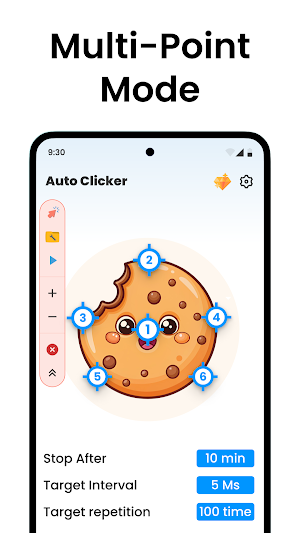
• Supports multiple modes: Single point, multi-point, sync points, and more
• Auto start with your favorite apps/games like an auto clicker for games
• Avoid detection with random click intervals
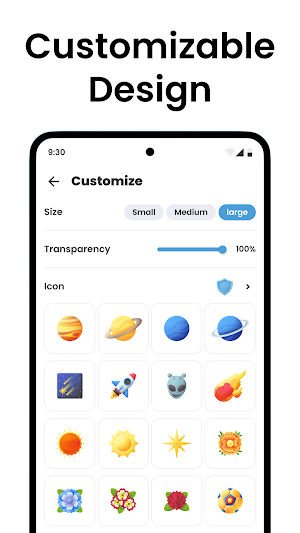
• Customizable control bar and target point design
• Built-in click counter to track your taps
• CPS test to measure your click speed
• Enjoy easy auto scroll for short video (Shorts)
Powerful Modes for Every Need
Click Assistant offers you a range of modes to suit any task. Choose single point for simple clicks, multi-point for complex patterns, or sync points for perfectly timed taps. Gamers will love game mode, while long press, edge mode, and swipe mode make it a flexible auto swiper and automatic tapper. Even record your actions with record mode for seamless playback—perfect as an auto clicker for Roblox (Disclaimer: This app is not affiliated with or endorsed by Roblox Corporation) or any app!
Auto Click Timer: Control Your Clicks
Set it and forget it! The click counter timer lets you run your automatic clicker after a specific duration, so you stay in control without overdoing it. Ideal for quick tasks or testing, this feature ensures your click assistant works exactly when you need it.
Usage Report: Know Your Clicks
Curious about your tapping habits? The usage report tracks your activity, giving you insights into how you use this clicker app. Combined with the CPS test, it’s a fun and practical way to measure performance whether you’re a gamer or just love stats.
FAQs and Support
Are you new to auto-clicking or automatic tap app? The built-in FAQs answer all of your questions, making this auto clicker app for games easy to master. From setup tips to mode explanations, you’ll be tapping like a pro in no time.
Why Accessibility Service?
We use the AccessibilityService API to provide essential tap automation functions.
Additionally, no private data is collected.
Download Auto Clicker & Auto Tapper app today and update the way you tap.
Key Features of auto clicker super fast:
• No Root Required to use automatic tapper
• Supports multiple modes: Single point, multi-point, sync points, and more
• Auto start with your favorite apps/games like an auto clicker for games
• Avoid detection with random click intervals
• Customizable control bar and target point design
• Built-in click counter to track your taps
• CPS test to measure your click speed
• Enjoy easy auto scroll for short video (Shorts)
Powerful Modes for Every Need
Click Assistant offers you a range of modes to suit any task. Choose single point for simple clicks, multi-point for complex patterns, or sync points for perfectly timed taps. Gamers will love game mode, while long press, edge mode, and swipe mode make it a flexible auto swiper and automatic tapper. Even record your actions with record mode for seamless playback—perfect as an auto clicker for Roblox (Disclaimer: This app is not affiliated with or endorsed by Roblox Corporation) or any app!
Auto Click Timer: Control Your Clicks
Set it and forget it! The click counter timer lets you run your automatic clicker after a specific duration, so you stay in control without overdoing it. Ideal for quick tasks or testing, this feature ensures your click assistant works exactly when you need it.
Usage Report: Know Your Clicks
Curious about your tapping habits? The usage report tracks your activity, giving you insights into how you use this clicker app. Combined with the CPS test, it’s a fun and practical way to measure performance whether you’re a gamer or just love stats.
FAQs and Support
Are you new to auto-clicking or automatic tap app? The built-in FAQs answer all of your questions, making this auto clicker app for games easy to master. From setup tips to mode explanations, you’ll be tapping like a pro in no time.
Why Accessibility Service?
We use the AccessibilityService API to provide essential tap automation functions.
Additionally, no private data is collected.
Download Auto Clicker & Auto Tapper app today and update the way you tap.
What’s new
Version 1.0.36 · Updated October 9, 2026
Thanks for using Auto clicker app! What's New: Improved ad management for a smoother user experience. Enhanced app performance and stability. Fixed bugs and improved overall reliability.
Alternatives to Auto Clicker & Auto Tapper
Looking for apps like Auto Clicker & Auto Tapper? Here are 6 similar Android apps on Google Play. The highest rated is Cast to Chromecast, Roku, & TV (4.9/5), and all 6 are free to download.
-
Full Battery 100% Alarm 4.1
-
Animal sounds & wallpaper 4.3
-
Cast to Chromecast, Roku, & TV 4.9
-
Caller Name Announcer - SMS 4.2
-
Find My Phone Anti Theft Alarm 4.1
-
Music Player: Mp3 Player
| App | Rating | Price | Installs | Last updated | Compare |
|---|---|---|---|---|---|
| Auto Clicker & Auto Tapper | 4.2 / 5 | Free | 1,000,000+ | Oct 9, 2026 | |
| Full Battery 100% Alarm | 4.1 / 5 | Free | 5,000,000+ | Nov 30, 2025 | Compare |
| Animal sounds & wallpaper | 4.3 / 5 | Free | 5,000,000+ | – | Compare |
| Cast to Chromecast, Roku, & TV | 4.9 / 5 | Free | 500,000+ | Sep 25, 2026 | Compare |
| Caller Name Announcer - SMS | 4.2 / 5 | Free | 10,000,000+ | Sep 28, 2026 | Compare |
| Find My Phone Anti Theft Alarm | 4.1 / 5 | Free | 10,000,000+ | Sep 30, 2026 | Compare |
| Music Player: Mp3 Player | – | Free | 5,000,000+ | Sep 29, 2026 | Compare |