

Auditor Site Capture
BAS - Building Audit Solutions Productivity In-app purchases
Offline photo and data capture for building inspections linked to your assets.
- Downloads
- 39+
- on Google Play
- Price
- Free
- In-app purchases
- Updated
- Sep 27
- 2026 · v3.5.1
Screenshots


About Auditor Site Capture
WHY SITE CAPTURE
• Photo-first workflow — the camera is always ready, so you capture first and organise later.
• Works offline. Everything you capture is stored on your device; no account or sign-in.
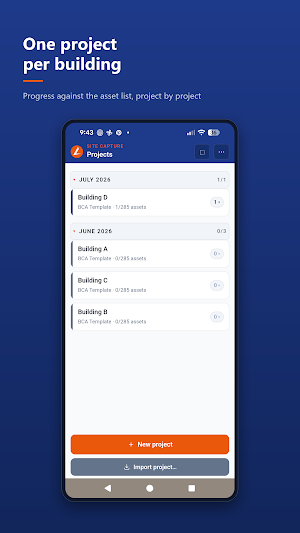
• Built for real inspections: hundreds of assets across categories, one project per building.
CAPTURE ON SITE
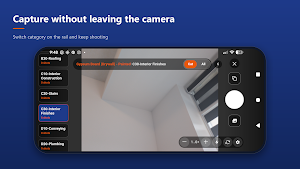
• Data Capture camera: keep shooting while you switch categories from a side rail.
• Tag each photo to an asset, or drop it under a category as "Unknown" to sort later.
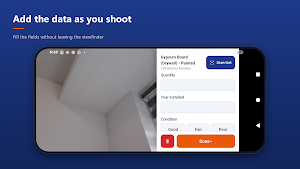
• Add per-photo fields: condition, quantity, manufacturer, model, serial, notes and more.
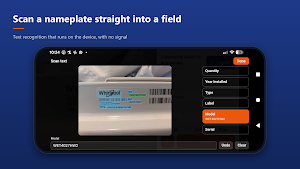
• Scan text: read a label or nameplate straight into a field, on the device, with no internet.
• Front and rear cameras, pinch zoom, and a torch for dark plant rooms.
• Optional GPS geotagging of every photo.
MARK UP A PHOTO
• Draw, box, circle and arrow to point at what matters, or add a measurement or a caption.
• Crop keeps the photo's shape, or free-crop to any shape. Rotate a quarter turn either way.
• Everything you draw is stored separately, so the original photo is never overwritten.
STAY ORGANISED
• Review, retake, duplicate, reassign or delete any photo from one menu.
• Duplicate an asset while you shoot, so three identical rooftop units become three assets.
• Search, expand and collapse the asset tree, and track progress per category as you go.
• Asset Match, an AI photo sorter: point it at photos you filed as unknown and it suggests which asset they belong to, ranked by confidence, then files them in one tap.
WHERE A PHOTO WAS TAKEN
• Open any photo's location in Google Maps, or every photo of a project in Google Earth.
• The export includes a map file with one labelled pin per asset.
EXPORT AND HAND OFF
• Export a project, or several at once, as a single zip: every photo, the field data, and a spreadsheet.
• The spreadsheet has a row per photo, a row per asset, your project information and your notes.
• Choose per field whether repeated answers are listed once or every time.
• File photos into folders by category, asset or any field, with an optional second level.
• Open it on the desktop to finish the assessment and build your report.
TEMPLATES
• A built-in building assessment template is included and always available.
• Import a template pack from the desktop Auditor app.
• No desktop app? Build your own template from a three-tab Excel file — project information, asset list, and data fields. An example file is included.
FREE AND PAID
Capture as many photos and projects as you like on the free version, with the built-in template, and export them in full. Importing your own templates, and starting projects from templates you imported, needs either a Site Capture subscription (monthly or yearly) or your desktop Auditor licence key.
YOUR DATA
Everything you capture is stored on your device. There are no ads, no analytics and no trackers, and nothing is collected in the background. You choose when and where to export.
Two optional features use the internet, and only at the moment you tap them: Asset Match sends the photo being matched to Google's Gemini API using an API key you supply, and Search with Google Lens hands a photo to the Google app. Everything else in the app works with no signal.
Full privacy policy: https://soanfe90.github.io/sitecapture-privacy/privacy-policy.html
What’s new
Version 3.5.1 · Updated September 27, 2026
General notes can start from a template now: sections and prompts set on the template, so every building comes back answering the same questions. It only ever fills an empty box. Delete a photo you just took without leaving the camera - tap the photo count and pick Recent. Edit everything an asset carries, not just its name. Tag projects. Group them, and their photo folders follow. Quick shot answers the moment you tap.
Alternatives to Auditor Site Capture
Looking for apps like Auditor Site Capture? Here are 6 similar Android apps on Google Play. The highest rated is Gaggle Paragliding, Ultralight (4.7/5), and all 6 are free to download.
-
AirDroid: File & Remote Access 3.8
-
Sportvibez
-
Orion Intelligence 4.2
-
TAP Kiln Control Mobile 4.1
-
Gaggle Paragliding, Ultralight 4.7
-
Intellifi by Adtran® 4.2
| App | Rating | Price | Installs | Last updated | Compare |
|---|---|---|---|---|---|
| Auditor Site Capture | – | Free | 10+ | Sep 27, 2026 | |
| AirDroid: File & Remote Access | 3.8 / 5 | Free | 50,000,000+ | Aug 13, 2026 | Compare |
| Sportvibez | – | Free | 1,000+ | Aug 29, 2026 | Compare |
| Orion Intelligence | 4.2 / 5 | Free | 100,000+ | Apr 5, 2026 | Compare |
| TAP Kiln Control Mobile | 4.1 / 5 | Free | 5,000+ | – | Compare |
| Gaggle Paragliding, Ultralight | 4.7 / 5 | Free | 50,000+ | Sep 28, 2026 | Compare |
| Intellifi by Adtran® | 4.2 / 5 | Free | 10,000+ | Oct 21, 2026 | Compare |
Similar apps on Google Play
- AirDroid: File & Remote Access
- Sportvibez
- Orion Intelligence
- TAP Kiln Control Mobile
- Gaggle Paragliding, Ultralight
- Intellifi by Adtran®
- CompanyCam
- SleekFlow
- Control+
- Parental Control App- FamiSafe
- Parental Control - Kidslox
- SkillCat: HVAC & EPA 608
- Hermit — Lite Apps Browser
- Stylework: Explore Workspaces
- Quitch
- Ente Photos - Encrypted Backup
- Plann: Preview for Instagram
- Family Nest: Private Locator
- IronVest - Security & Privacy
- mcpro24fps manual video camera
- Magnifier
- fooView - FV Float Viewer
- Yubii Home
- Crowdsource
- Socie
- FastField: Field Service Forms
- Agorify
- Simpro Mobile
- Hookle: Social Media Manager
- Norwex Consultant App
- OnePageCRM - Simple CRM System
- BlackVue
- Kisi
- MindMeister - Mind Mapping