
Bulk image cropper
Tools In-app purchases Contains ads
Quickly crop multiple images at once for free, now image compression is included
- Downloads
- 4.1K+
- on Google Play
- Price
- Free
- In-app purchases
- Updated
- Oct 3
- 2026 · v1.0.24
Screenshots


About Bulk image cropper
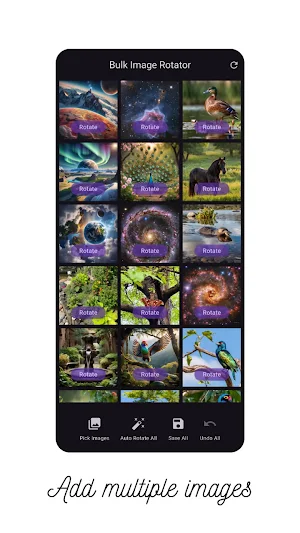
Bulk Image Cropper is a powerful and easy-to-use tool designed to help you crop multiple images in one go. Whether you're working with a large batch of photos for social media, e-commerce, documentation, or personal projects, this tool streamlines the entire cropping process and saves you hours of manual effort.
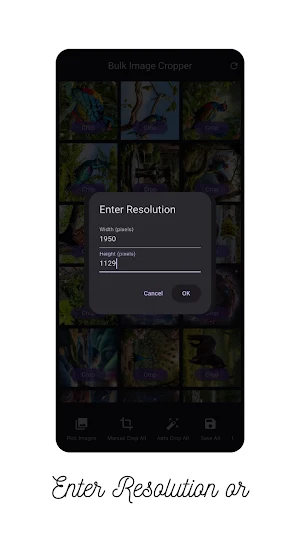
With Bulk Image Cropper, you simply select your images, define your crop area, and let the tool handle the rest. All your selected images will be cropped automatically with consistent dimensions and alignment — no more repetitive editing!
🔥 Key Features:
Batch Processing – Crop dozens or hundreds of images at once.
Custom Crop Area – Set the crop region exactly the way you want (fixed ratio, freeform, etc.).
Fast & Efficient – Optimized for quick processing without compromising image quality.
Preview Before Cropping – Check how your cropped images will look before applying changes.
User-Friendly Interface – Clean, simple UI that makes cropping easy for everyone.
Supports Common Image Formats – JPG, PNG, and more.
Lightweight & Offline – No internet required, works smoothly even on low-end devices.
📸 Ideal For:
Content creators
Social media managers
Online sellers (e-commerce product images)
Designers and developers
Anyone dealing with bulk images regularly
Take control of your image workflow with Bulk Image Cropper — save time, stay consistent, and get professional results effortlessly!
With Bulk Image Cropper, you simply select your images, define your crop area, and let the tool handle the rest. All your selected images will be cropped automatically with consistent dimensions and alignment — no more repetitive editing!
🔥 Key Features:
Batch Processing – Crop dozens or hundreds of images at once.
Custom Crop Area – Set the crop region exactly the way you want (fixed ratio, freeform, etc.).
Fast & Efficient – Optimized for quick processing without compromising image quality.
Preview Before Cropping – Check how your cropped images will look before applying changes.
User-Friendly Interface – Clean, simple UI that makes cropping easy for everyone.
Supports Common Image Formats – JPG, PNG, and more.
Lightweight & Offline – No internet required, works smoothly even on low-end devices.
📸 Ideal For:
Content creators
Social media managers
Online sellers (e-commerce product images)
Designers and developers
Anyone dealing with bulk images regularly
Take control of your image workflow with Bulk Image Cropper — save time, stay consistent, and get professional results effortlessly!
What’s new
Version 1.0.24 · Updated October 3, 2026
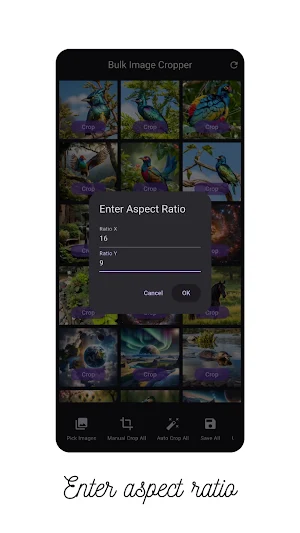
Custom ratio is back: type any shape you want, like 3 : 2 or 1.91 : 1. The app remembers your last ratio for the next batch.
User reviews

best app l have ever seen I was cropping 190 images for my project it will make it very easy thank you 🙂🙂❤️❤️❤️
Alternatives to Bulk image cropper
Looking for apps like Bulk image cropper? Here are 6 similar Android apps on Google Play. 5 of the 6 are free to download.
-
GLB AR Viewer 3D
-
Bulk image rotator
-
Multiple PDF Parallel Viewer
-
IMGAC - A4 Size Crop Image PDF
-
GLB AR Viewer 3D PRO
-
ID / Business Card to PDF
| App | Rating | Price | Installs | Last updated | Compare |
|---|---|---|---|---|---|
| Bulk image cropper | – | Free | 1,000+ | Oct 3, 2026 | |
| GLB AR Viewer 3D | – | Free | 10,000+ | – | Compare |
| Bulk image rotator | – | Free | 1,000+ | Sep 26, 2026 | Compare |
| Multiple PDF Parallel Viewer | – | Free | 5+ | May 1, 2025 | Compare |
| IMGAC - A4 Size Crop Image PDF | – | Free | 10,000+ | Sep 1, 2026 | Compare |
| GLB AR Viewer 3D PRO | – | 0.99 USD | 100+ | Oct 26, 2026 | Compare |
| ID / Business Card to PDF | – | Free | 50,000+ | Oct 17, 2026 | Compare |
Compare Bulk image cropper with the top alternatives: ratings, updates, ASO score and keyword gaps →