AR Master Drawing:Trace&Sketch
Trace & sketch with your camera! Draw like a pro using AR templates.
About AR Master Drawing:Trace&Sketch
🎨 AR Master Drawing: Trace & Sketch – Master the Art of Drawing!
Unleash your creativity with AR Master Drawing – the ultimate sketching and tracing app that transforms your phone into a virtual art assistant! Whether you're a beginner or an experienced artist, this app helps you draw better using augmented reality and camera guidance.
📱 What is AR Master Drawing?
AR Master Drawing is an innovative drawing tool designed for artists, learners, and creative hobbyists. It lets you trace and sketch over any image with your phone’s camera using AR (augmented reality) technology. Choose from a vast collection of built-in drawing templates, or upload your own photo to begin your sketching journey.
✨ Top Features:
✅ AR Camera Drawing
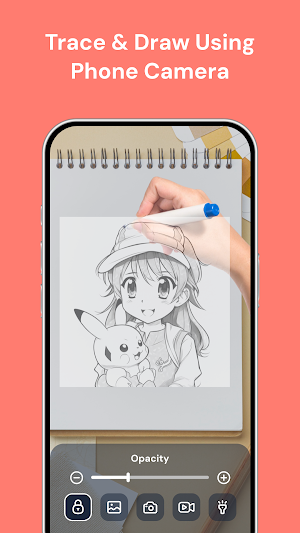
Use your phone camera to trace and sketch any image in real-time. Just hold your device over your drawing surface and follow the outlines displayed on your screen!
✅ Extensive Drawing Templates
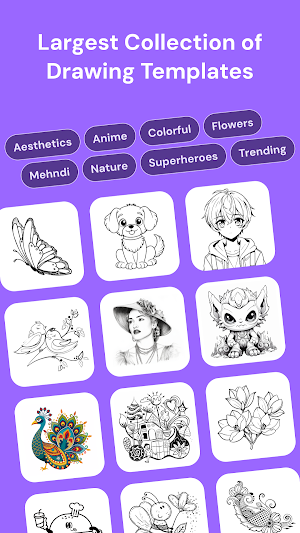
Access the largest collection of drawing templates, including characters, animals, anime, cartoons, and more. New templates are regularly added!
✅ Upload or Capture Your Own Image
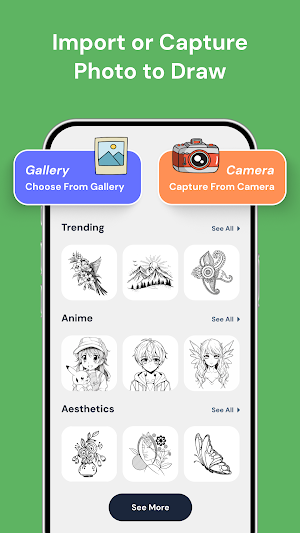
Import images from your phone’s gallery or take a new photo with your camera to trace and sketch directly.
✅ Template Lock & Unlock Feature
Lock your drawing template in place to keep it steady while you sketch or unlock to reposition it as needed.
✅ Flashlight Support
Drawing in a dark room? No problem! Turn on your phone’s flashlight for clear visibility while tracing.
✅ Record & Share Your Drawing Process
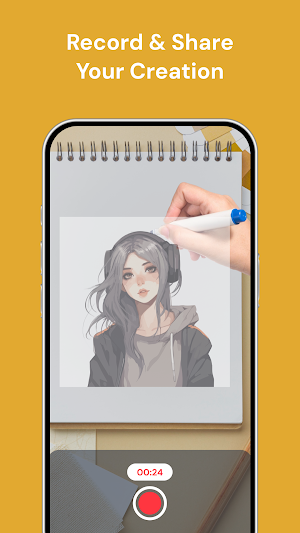
Capture your drawing movement in real time. Record your screen while sketching and share your creative process with friends or on social media.
✅ Multi-language Support
Available in multiple languages to support users around the world. Drawing is for everyone!
✅ Helpful Drawing Guide
Learn how to set up your phone for tracing using a tripod, stack of books, or a clear glass surface for the best drawing experience.
📌 How to Use AR Master Drawing:
1. Choose a template or upload a photo from your gallery.
2. Position your phone on a tripod, a stack of books, or over a glass surface.
3. Look through your phone screen and start tracing the image shown on your paper.
4. Lock the template if needed for stability.
5. Use the flashlight in low light or dark environments.
6. Record your progress and share your masterpiece!
🎯 Who is This App For?
- Beginner artists who want to improve their drawing skills
- Students practicing for art exams or assignments
- Teachers looking for an easy teaching tool
- Professionals sketching concepts quickly
- Hobbyists and doodlers wanting to trace for fun
🔒 Privacy & Permissions
We respect your privacy. The app only uses your camera and gallery access with your permission. No personal data is collected or stored.
👍 Easy to Use – No Drawing Skills Needed!
Start your artistic journey today! With AR Master Drawing, you don’t need to be a professional. Just follow the outlines and enjoy the satisfaction of drawing beautiful art.
💬 Support & Feedback
We’re constantly improving. If you have any suggestions or feedback, do not hesitate to contact us at [email protected]
Similar Apps
Easy Draw - AR Camera Sketch
Trace, sketch, and paint! Turn your camera into a canvas for easy drawing.

FUT 26 Card Creator & Video
FUT 26 card creator & football squad builder — make EA FC cards & lineups
PG Drawing Perfected
Transform photos into outlines and practice your drawing skills by tracing!
Marsam
Digital museum

FB Polissage
Metal polishing in Alsace: quotes, services and professional projects
Industrial Data Watch Face
Data-driven digital Watch Face