

AR Chitram: Draw Sketch Paint
Art & Design In-app purchases Contains ads
Learn drawing with AR camera. Trace images, sketch, color & create art
- Downloads
- 2.3K+
- on Google Play
- Price
- Free
- In-app purchases
- Updated
- Jul 9
- 2026 · v0.0.7
Screenshots


About AR Chitram: Draw Sketch Paint
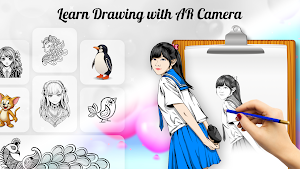
AR Chitram is an advanced AR drawing app that helps you learn drawing, trace images, and create sketches easily. This powerful drawing app lets you use your camera to draw sketch, practice anime sketch, and follow step-by-step drawing tutorials.
Whether you are learning drawing tutorials, exploring fine art techniques, or working toward mastering in drawing, AR Chitram makes the process simple, fun, and effective.
🎨 AR Drawing & Trace Images
Use the AR camera drawing feature to trace images directly on paper. Simply place your phone above the page and follow the outline to create perfect sketches.
This makes it easy for beginners to learn drawing quickly and start building their own art gallery of creative work.
✏️ Sketch & Drawing Practice
Improve your artistic skills with different drawing modes:
• Sketch drawing
• Creative drawing
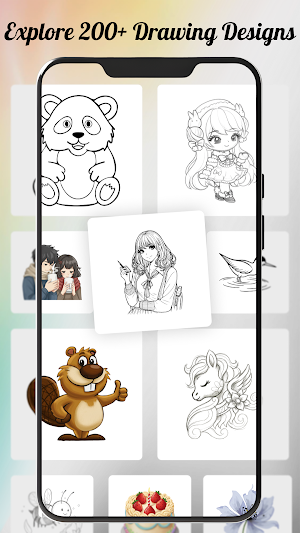
• Anime sketch practice
• Step-by-step drawing tutorials
Practice drawing characters, objects, animals, and more while progressing toward mastering in drawing and sketching skills.
🌈 Coloring & Pattern Art
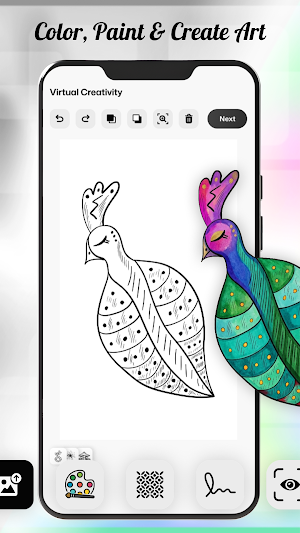
Add colors and creative patterns to your artwork and explore your creativity in fine art and digital painting styles.
Features include:
• Coloring tools
• Pattern drawing
• Creative painting tools
• Easy coloring interface
Perfect for both beginners and advanced artists who want to improve their skills and create professional-level artwork.
🖼 Build Your Art Gallery
Create and manage your own art gallery inside the app by saving your drawings. Track your progress and showcase your creativity with a collection of sketches, paintings, and designs.
🚀 Why Choose AR Chitram?
✔ Easy AR drawing experience
✔ Learn drawing step-by-step
✔ Trace images using camera
✔ Sketch, color & paint like a pro
✔ Improve skills in fine art
✔ Build your own art gallery
✔ Perfect for mastering in drawing
✏️ Perfect For
• Beginners using AR drawing and trace images
• Anime sketch lovers and digital artists
• Creative drawing and fine art enthusiasts
• Students mastering drawing and sketching skills
• Anyone who enjoys painting, coloring, and art creation
AR Chitram is perfect for anyone looking for a drawing app, sketch app, or AR drawing tool to improve their skills.
✏️ Start your journey in creative drawing, fine art, and mastering in drawing with AR Chitram: Draw Sketch Paint App today!
Whether you are learning drawing tutorials, exploring fine art techniques, or working toward mastering in drawing, AR Chitram makes the process simple, fun, and effective.
🎨 AR Drawing & Trace Images
Use the AR camera drawing feature to trace images directly on paper. Simply place your phone above the page and follow the outline to create perfect sketches.
This makes it easy for beginners to learn drawing quickly and start building their own art gallery of creative work.
✏️ Sketch & Drawing Practice
Improve your artistic skills with different drawing modes:
• Sketch drawing
• Creative drawing
• Anime sketch practice
• Step-by-step drawing tutorials
Practice drawing characters, objects, animals, and more while progressing toward mastering in drawing and sketching skills.
🌈 Coloring & Pattern Art
Add colors and creative patterns to your artwork and explore your creativity in fine art and digital painting styles.
Features include:
• Coloring tools
• Pattern drawing
• Creative painting tools
• Easy coloring interface
Perfect for both beginners and advanced artists who want to improve their skills and create professional-level artwork.
🖼 Build Your Art Gallery
Create and manage your own art gallery inside the app by saving your drawings. Track your progress and showcase your creativity with a collection of sketches, paintings, and designs.
🚀 Why Choose AR Chitram?
✔ Easy AR drawing experience
✔ Learn drawing step-by-step
✔ Trace images using camera
✔ Sketch, color & paint like a pro
✔ Improve skills in fine art
✔ Build your own art gallery
✔ Perfect for mastering in drawing
✏️ Perfect For
• Beginners using AR drawing and trace images
• Anime sketch lovers and digital artists
• Creative drawing and fine art enthusiasts
• Students mastering drawing and sketching skills
• Anyone who enjoys painting, coloring, and art creation
AR Chitram is perfect for anyone looking for a drawing app, sketch app, or AR drawing tool to improve their skills.
✏️ Start your journey in creative drawing, fine art, and mastering in drawing with AR Chitram: Draw Sketch Paint App today!
What’s new
Version 0.0.7 · Updated July 9, 2026
Bug fix and improvements
User reviews
Loved using this app. Smooth performance and creative idea. Highly recommended.

Amazing app. The AR experience is smooth and fun to use. Really creative concept 👌
Alternatives to AR Chitram: Draw Sketch Paint
Looking for apps like AR Chitram: Draw Sketch Paint? Here are 3 similar Android apps on Google Play. All of them are free to download.


| App | Rating | Price | Installs | Last updated | Compare |
|---|---|---|---|---|---|
| AR Chitram: Draw Sketch Paint | – | Free | 1,000+ | Jul 9, 2026 | |
| Photomontage | – | Free | 50+ | – | Compare |
| Gigglam:Real Time Photo Editor | – | Free | 10+ | Feb 17, 2026 | Compare |
| DailySync : Reminder Scheduler | – | Free | 50+ | Aug 3, 2026 | Compare |