

RPI SSH Pro - for Linux/Debian
Parti Albert - App system Code Tools In-app purchases Contains ads
Manage Linux, Windows, and Raspberry Pi servers over SSH.
- Downloads
- 2.8K+
- on Google Play
- Price
- Free
- In-app purchases
- Updated
- Oct 15
- 2026 · v1.3.1
Screenshots


About RPI SSH Pro - for Linux/Debian
RPI SSH PRO – fast SSH-based server management
RPI SSH PRO is a modern, fast, and intuitive SSH client that lets you manage your servers easily from your mobile device.
It supports Raspberry Pi, Linux, Debian, Synology (Linux-based) systems, and Windows servers with OpenSSH, providing quick access to system status, maintenance tasks, and command execution.
⸻
System Overview (Dashboard)
View the most important system information at a glance:
• Uptime
• CPU usage
• Temperature
• Disks and total storage
• Mounted file systems
• Number of connected drives
Designed for fast diagnostics and everyday server monitoring.
⸻
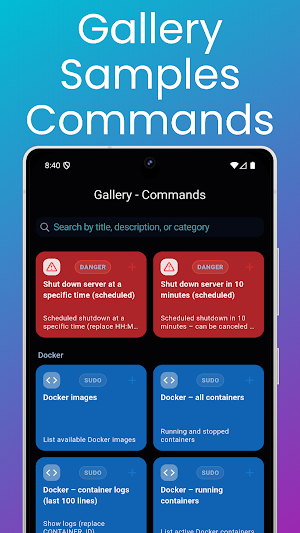
Command Gallery (Samples)
A wide range of prebuilt command templates:
• can be quickly added to your own Command Cards
• perfect for maintenance, diagnostics, and administration tasks
• works across Linux-based systems and Windows PowerShell environments
⸻
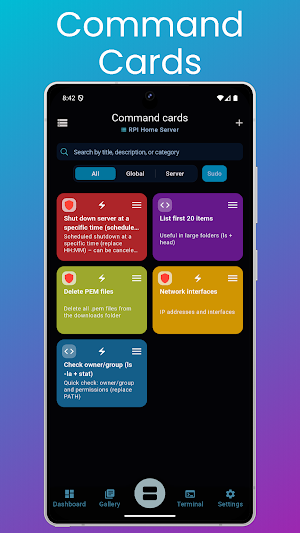
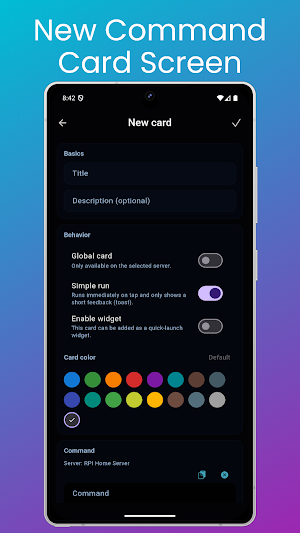
Command Cards
Manage your custom commands using cards:
• add, edit, and search command cards
• drag & drop reordering
• Quick Run mode for one-tap execution
• global cards or server-specific cards
• reusable commands across multiple servers and platforms
⸻
Widget Quick Launch
Your most important command cards can be added as widgets:
• run commands without opening the app
• ideal for frequently used maintenance and monitoring tasks
• instant access to your most important server actions
⸻
Multi-server support
• add and edit multiple servers
• switch between servers quickly
• secure connections using SSH host key verification
• manage mixed environments (Linux + Windows) from one app
⸻
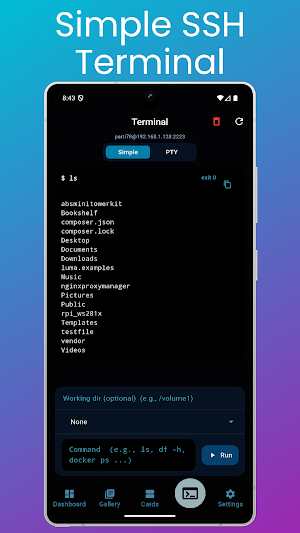
Terminal Modes
Choose the terminal experience that best fits your workflow:
• Simple terminal for basic commands and quick actions
• Full PTY terminal for interactive shell usage
The Ping screen is also directly accessible from the terminal view, allowing you to:
• quickly check network connectivity
• test latency and host availability
• perform targeted ping tests toward the selected server
Ideal for troubleshooting and network diagnostics directly within the SSH workflow.
Windows PTY Support
• Full PTY SSH terminal for Windows servers
• Supports PowerShell and interactive commands
• Proper handling of interactive tools, prompts, and real shell behavior
• Ideal for Windows Server administration over SSH
⸻
Settings & Customization
The application is fully customizable:
• dark / light / colorful / system default themes
• language selection
• command card size adjustment (compact or large card layout)
• SSH and PTY terminal logging
• Ping feature settings and configuration
• configurable SSH timeout settings
• optimized for touch interaction and extended terminal usage
Tools section in Settings
• Ping – TCP/ICMP network test
• LAN Scan – Discover devices on your local network
• Port Scan – Scan common ports or custom ranges
⸻
Full Version
All features of the application are available with the Full version purchase.
The purchase is one-time only, no subscription required, and helps support further development.
RPI SSH PRO is a modern, fast, and intuitive SSH client that lets you manage your servers easily from your mobile device.
It supports Raspberry Pi, Linux, Debian, Synology (Linux-based) systems, and Windows servers with OpenSSH, providing quick access to system status, maintenance tasks, and command execution.
⸻
System Overview (Dashboard)
View the most important system information at a glance:
• Uptime
• CPU usage
• Temperature
• Disks and total storage
• Mounted file systems
• Number of connected drives
Designed for fast diagnostics and everyday server monitoring.
⸻
Command Gallery (Samples)
A wide range of prebuilt command templates:
• can be quickly added to your own Command Cards
• perfect for maintenance, diagnostics, and administration tasks
• works across Linux-based systems and Windows PowerShell environments
⸻
Command Cards
Manage your custom commands using cards:
• add, edit, and search command cards
• drag & drop reordering
• Quick Run mode for one-tap execution
• global cards or server-specific cards
• reusable commands across multiple servers and platforms
⸻
Widget Quick Launch
Your most important command cards can be added as widgets:
• run commands without opening the app
• ideal for frequently used maintenance and monitoring tasks
• instant access to your most important server actions
⸻
Multi-server support
• add and edit multiple servers
• switch between servers quickly
• secure connections using SSH host key verification
• manage mixed environments (Linux + Windows) from one app
⸻
Terminal Modes
Choose the terminal experience that best fits your workflow:
• Simple terminal for basic commands and quick actions
• Full PTY terminal for interactive shell usage
The Ping screen is also directly accessible from the terminal view, allowing you to:
• quickly check network connectivity
• test latency and host availability
• perform targeted ping tests toward the selected server
Ideal for troubleshooting and network diagnostics directly within the SSH workflow.
Windows PTY Support
• Full PTY SSH terminal for Windows servers
• Supports PowerShell and interactive commands
• Proper handling of interactive tools, prompts, and real shell behavior
• Ideal for Windows Server administration over SSH
⸻
Settings & Customization
The application is fully customizable:
• dark / light / colorful / system default themes
• language selection
• command card size adjustment (compact or large card layout)
• SSH and PTY terminal logging
• Ping feature settings and configuration
• configurable SSH timeout settings
• optimized for touch interaction and extended terminal usage
Tools section in Settings
• Ping – TCP/ICMP network test
• LAN Scan – Discover devices on your local network
• Port Scan – Scan common ports or custom ranges
⸻
Full Version
All features of the application are available with the Full version purchase.
The purchase is one-time only, no subscription required, and helps support further development.
What’s new
Version 1.3.1 · Updated October 15, 2026
New: Connect to servers using an SSH private key. Import your key into the app and use it with an optional passphrase. Password sign-in remains available.
Alternatives to RPI SSH Pro - for Linux/Debian
Looking for apps like RPI SSH Pro - for Linux/Debian? Here are 6 similar Android apps on Google Play. The highest rated is MyAccountability Plus (4.8/5), and 5 of the 6 are free to download.
-
All Data Transfer: Phone Clone
-
CyberTrophy
-
MyAccountability Plus 4.8
-
Shield – AI Scam Detector
-
CodeGym: learn Java 4.6
-
CompTIA Security+ Prep 2026 4.6
| App | Rating | Price | Installs | Last updated | Compare |
|---|---|---|---|---|---|
| RPI SSH Pro - for Linux/Debian | – | Free | 1,000+ | Oct 15, 2026 | |
| All Data Transfer: Phone Clone | – | Free | 100,000+ | Sep 29, 2026 | Compare |
| CyberTrophy | – | Free | 5,000+ | Sep 24, 2026 | Compare |
| MyAccountability Plus | 4.8 / 5 | Free | 10,000+ | Jul 13, 2026 | Compare |
| Shield – AI Scam Detector | – | – | – | Feb 17, 2026 | Compare |
| CodeGym: learn Java | 4.6 / 5 | Free | 100,000+ | Sep 28, 2026 | Compare |
| CompTIA Security+ Prep 2026 | 4.6 / 5 | Free | 50,000+ | May 27, 2026 | Compare |