
App Lock - AppLock Fingerprint
Opportunity Appclube Productivity Contains ads
Lock apps with fingerprint, PIN, or pattern. Hide photos and capture intruders.
- Rating
- 4.2
- 1.3K ratings
- Downloads
- 414K+
- on Google Play
- Price
- Free
- No in-app purchases
- Updated
- Sep 23
- 2026 · v1.8
Screenshots


About App Lock - AppLock Fingerprint
Keep your private apps, photos and personal information protected with App Lock - AppLock Fingerprint. Create a safer space on your phone when sharing it with friends, family or coworkers.
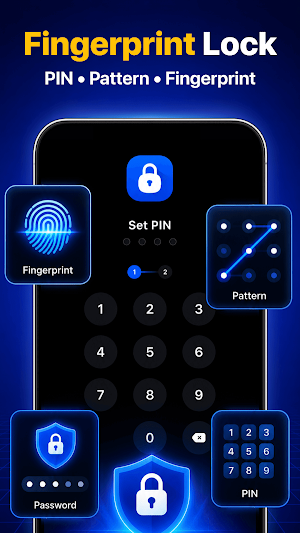
Choose fingerprint, PIN, pattern or password to open protected apps. You can also hide personal media in Photo Vault and use Intruder Selfie to record failed unlock attempts.
Protect Apps Your Way
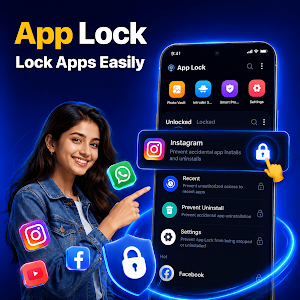
Choose the apps you want to protect, enable App Lock, and open them only after the correct fingerprint, PIN, pattern or password. The app gives you flexible control without changing how you normally use your phone. Protect WhatsApp, Instagram, Facebook, Gallery, Gmail, Settings and more.
Fingerprint, PIN, Pattern or Password
Use Fingerprint Lock for convenient access on supported devices. You can also choose PIN Lock, Pattern Lock or Password Lock based on your preference.
Hide Photos and Videos
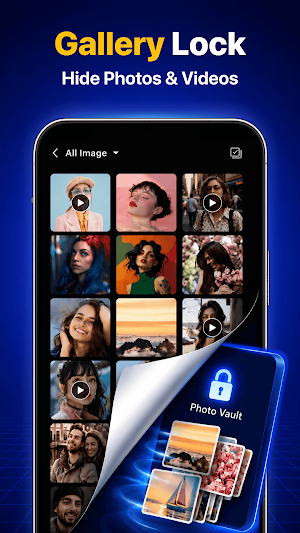
Use Gallery Lock to keep personal media away from the regular gallery. Move selected photos and videos into Photo Vault and protect them with your chosen lock method. Photo Lock helps protect private pictures, while Gallery Lock keeps photos and videos together in one protected space.
Catch Unlock Attempts
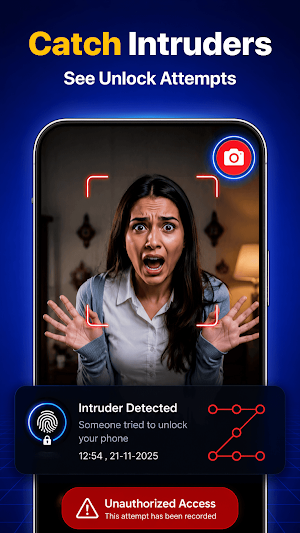
Intruder Selfie can capture a photo after an incorrect unlock attempt, helping you see who tried to open protected apps. Review failed attempts whenever you need more awareness around your privacy.
Protect Important Apps and Settings
Use AppLock to protect chats, social apps, photos, email and selected system areas. Lock apps individually, protect Recent Apps and Settings, and enable Uninstall Protection where supported. App Lock lets you decide what stays open and what requires verification.
Key Features
• Lock Apps with fingerprint, PIN, pattern or password
• Use Fingerprint Lock on supported devices
• Choose PIN Lock or Pattern Lock
• Use Photo Lock to protect private pictures
• Hide Photos and Hide Videos with Gallery Lock
• Keep personal media in Photo Vault
• Capture failed attempts with Intruder Selfie
• Add Privacy Protection to selected apps
AppLock is useful when you lend your phone to family or friends, work around other people, or simply want more control over personal apps. Lock apps that contain private chats, photos, accounts or settings, then unlock them using the method that works for you.
Choose App Lock - AppLock Fingerprint to protect apps, hide personal media and manage privacy from one simple place.
Choose fingerprint, PIN, pattern or password to open protected apps. You can also hide personal media in Photo Vault and use Intruder Selfie to record failed unlock attempts.
Protect Apps Your Way
Choose the apps you want to protect, enable App Lock, and open them only after the correct fingerprint, PIN, pattern or password. The app gives you flexible control without changing how you normally use your phone. Protect WhatsApp, Instagram, Facebook, Gallery, Gmail, Settings and more.
Fingerprint, PIN, Pattern or Password
Use Fingerprint Lock for convenient access on supported devices. You can also choose PIN Lock, Pattern Lock or Password Lock based on your preference.
Hide Photos and Videos
Use Gallery Lock to keep personal media away from the regular gallery. Move selected photos and videos into Photo Vault and protect them with your chosen lock method. Photo Lock helps protect private pictures, while Gallery Lock keeps photos and videos together in one protected space.
Catch Unlock Attempts
Intruder Selfie can capture a photo after an incorrect unlock attempt, helping you see who tried to open protected apps. Review failed attempts whenever you need more awareness around your privacy.
Protect Important Apps and Settings
Use AppLock to protect chats, social apps, photos, email and selected system areas. Lock apps individually, protect Recent Apps and Settings, and enable Uninstall Protection where supported. App Lock lets you decide what stays open and what requires verification.
Key Features
• Lock Apps with fingerprint, PIN, pattern or password
• Use Fingerprint Lock on supported devices
• Choose PIN Lock or Pattern Lock
• Use Photo Lock to protect private pictures
• Hide Photos and Hide Videos with Gallery Lock
• Keep personal media in Photo Vault
• Capture failed attempts with Intruder Selfie
• Add Privacy Protection to selected apps
AppLock is useful when you lend your phone to family or friends, work around other people, or simply want more control over personal apps. Lock apps that contain private chats, photos, accounts or settings, then unlock them using the method that works for you.
Choose App Lock - AppLock Fingerprint to protect apps, hide personal media and manage privacy from one simple place.
Alternatives to App Lock - AppLock Fingerprint
Looking for apps like App Lock - AppLock Fingerprint? Here are 6 similar Android apps on Google Play. The highest rated is AppLock Pro - App Lock & Guard (4.4/5), and all 6 are free to download.
-
Thenics Flow: Movement Coach 3.5
-
Taskbar 4.3
-
App Locker - Lock App 3.7
-
Battery Charging Animation App 3.9
-
Spatial Touch™ - Touchless 3.9
-
AppLock Pro - App Lock & Guard 4.4
| App | Rating | Price | Installs | Last updated | Compare |
|---|---|---|---|---|---|
| App Lock - AppLock Fingerprint | 4.2 / 5 | Free | 100,000+ | Sep 23, 2026 | |
| Thenics Flow: Movement Coach | 3.5 / 5 | Free | 100,000+ | Dec 30, 2025 | Compare |
| Taskbar | 4.3 / 5 | Free | 5,000,000+ | Oct 2, 2024 | Compare |
| App Locker - Lock App | 3.7 / 5 | Free | 5,000,000+ | Oct 11, 2026 | Compare |
| Battery Charging Animation App | 3.9 / 5 | Free | 10,000,000+ | Oct 16, 2026 | Compare |
| Spatial Touch™ - Touchless | 3.9 / 5 | Free | 10,000,000+ | – | Compare |
| AppLock Pro - App Lock & Guard | 4.4 / 5 | Free | 100,000,000+ | Oct 2, 2026 | Compare |
Similar apps on Google Play
- Thenics Flow: Movement Coach
- Taskbar
- App Locker - Lock App
- Battery Charging Animation App
- Spatial Touch™ - Touchless
- AppLock Pro - App Lock & Guard
- Fortect Mobile Security
- Wi-Fi Toolkit
- App Lock - AppLock VIP
- The Netball Coach
- SuperBattery & Charge Monitor
- True Edge: Notification Light
- 4K, HD Wallpapers | Background
- Calculator Lock - Hide Photo
- Doll Wallpapers 4K | HD
- VIP Notes
- Live Wallpapers, 4K Wallpapers
- Big Clock Widget
- Touch Screen Test
- Amazfit GTR 4 GTS 4 WatchFaces
- Enpass Password Manager
- Hi-tech Circuit Launcher
- Gym Workout - Build Muscle
- AppLock - Fingerprint
- Applock - lock apps - pin lock
- Mobile Hotel PMS by Hotel Sync
- Speir On Demand
- Universal Remote for Smart TV
- My Diary Lock - Hidden Photos
- Manchester City Official App
- Bundesliga: Live Soccer Scores
- FC Barcelona Official App
- Good Lock : Custom Lock Screen
- App Lock: Fingerprint, Pattern
- Square Home
- LOCKit: App Lock, Photos Vault
- AppLock
- Reveri: Relief in Minutes
- LockMyPix Photo Vault PREMIUM
- LockMyPix Safe Photo Vault