

Sketch task board
Applikationsprogramvara Productivity
Win the battle against procrastination in a handy way!
- Downloads
- 100+
- on Google Play
- Price
- Free
- No in-app purchases
- Updated
- Jan 21
- 2021 · v1.5.1 21-01-21
Screenshots


About Sketch task board
Use digital post-its to sketch your personal tasks and move them from planned to work and finally to done.
Sketch task board is made to make planning personal tasks simple and pleasant.
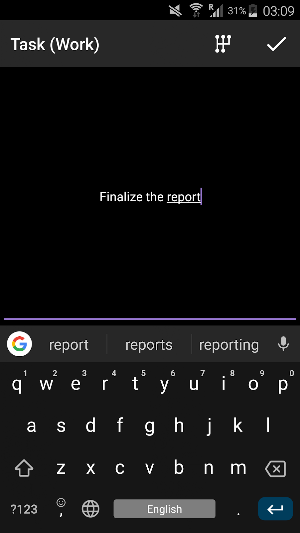
Use your stylus for the best result. Typing text is also possible.
How to use it:
1. Quickly write down all your thoughts to free up your mind
2. Review and sort out your thoughts, when you have some time
3. During procrastination, pick up the most important tasks and keep them in focus
More details:
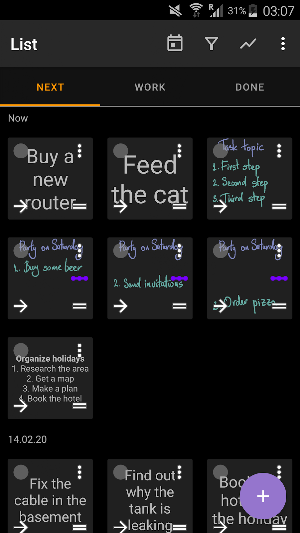
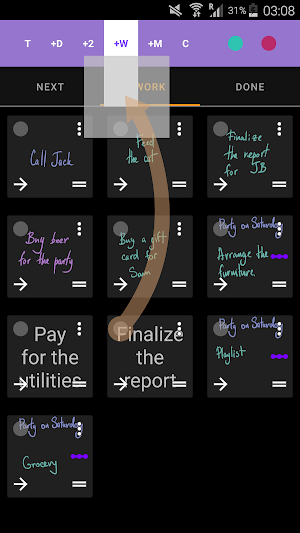
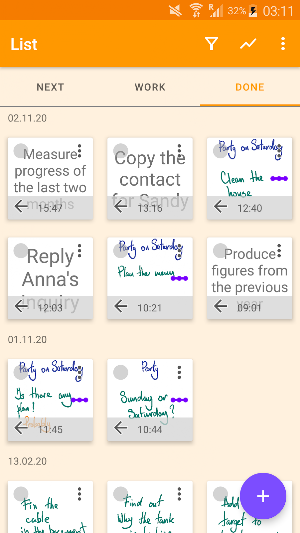
- App contains “Next”, “Work” and “Done” tabs
- “Next” is for the new and planned tasks
- “Work” is for the tasks, on which you are currently focused
- “Done” contains all the completed tasks
- All new tasks are placed to the “Next” tab
- Drag a task by the top left corner to plan them for the future
- Drag a task by the bottom right corner to change the position in the current day
- Use arrow-buttons to move tasks between categories
Upcoming features:
- Tablet version
- Subtasks
- Animations and dark theme
- Widget and various shortcuts
- Stats
- Sync between devices (under question due to complexity)
Sketch task board is not intended to be a global or project management tool. So if you have long term tasks, deadlines, milestones or tasks chains, you better write them down somewhere, chip off small parts that you can digest e.g. today and put them to Sketch task board.
Tips for using sketch part:
- Press stylus button to erase strokes
- Use selection tool to move and recolor the strokes
- The writing space is infinite, task thumb is saved from the part, displayed the last
What it is and what it is not?
It is a tool for:
- Small tasks and ideas
- Quick task recording and quick task tracking
- Personal use
- Separate and unconnected tasks
It is not a tool for:
- Project management
- Complex task information like multiple properties
- Collaboration
- Connected via relationships tasks
Sketch task board is made to make planning personal tasks simple and pleasant.
Use your stylus for the best result. Typing text is also possible.
How to use it:
1. Quickly write down all your thoughts to free up your mind
2. Review and sort out your thoughts, when you have some time
3. During procrastination, pick up the most important tasks and keep them in focus
More details:
- App contains “Next”, “Work” and “Done” tabs
- “Next” is for the new and planned tasks
- “Work” is for the tasks, on which you are currently focused
- “Done” contains all the completed tasks
- All new tasks are placed to the “Next” tab
- Drag a task by the top left corner to plan them for the future
- Drag a task by the bottom right corner to change the position in the current day
- Use arrow-buttons to move tasks between categories
Upcoming features:
- Tablet version
- Subtasks
- Animations and dark theme
- Widget and various shortcuts
- Stats
- Sync between devices (under question due to complexity)
Sketch task board is not intended to be a global or project management tool. So if you have long term tasks, deadlines, milestones or tasks chains, you better write them down somewhere, chip off small parts that you can digest e.g. today and put them to Sketch task board.
Tips for using sketch part:
- Press stylus button to erase strokes
- Use selection tool to move and recolor the strokes
- The writing space is infinite, task thumb is saved from the part, displayed the last
What it is and what it is not?
It is a tool for:
- Small tasks and ideas
- Quick task recording and quick task tracking
- Personal use
- Separate and unconnected tasks
It is not a tool for:
- Project management
- Complex task information like multiple properties
- Collaboration
- Connected via relationships tasks
What’s new
Version 1.5.1 21-01-21 · Updated January 21, 2021
- align adding a related task - arranging and updating button labels and messages - show icons in the main menu - updating default settings - rendering engine - fix crash on gearbox
User reviews


I like your apps so much! It would be great to have customizable categories with their own tabs

I love your idea

Wish it had a widget and option to schedule a task repeatedly. Overall it's easy to use with the best idea.
Alternatives to Sketch task board
Looking for apps like Sketch task board? Here are 6 similar Android apps on Google Play. The highest rated is Simple OSM Viewer (4.2/5), and all 6 are free to download.


| App | Rating | Price | Installs | Last updated | Compare |
|---|---|---|---|---|---|
| Sketch task board | – | Free | 100+ | Jan 21, 2021 | |
| Simple OSM Viewer | 4.2 / 5 | Free | 100,000+ | Oct 3, 2026 | Compare |
| Draw Mindmaps | – | Free | 10,000+ | – | Compare |
| Sketch on PDF | 3.8 / 5 | Free | 500,000+ | – | Compare |
| DigiPen | – | Free | 1,000+ | – | Compare |
| Hideface | – | Free | 10+ | – | Compare |
| SVG and SVGZ Viewer | 3.9 / 5 | Free | 10,000+ | – | Compare |
Compare Sketch task board with the top alternatives: ratings, updates, ASO score and keyword gaps →