
File Manager
Tools
Manage and organize your files with advanced tools and quick access
- Downloads
- 655+
- on Google Play
- Price
- Free
- No in-app purchases
- Updated
- Jun 10
- 2026 · v1.26_Free
Screenshots


About File Manager
File Manager 📁 is an all-in-one solution for managing all your files and documents on Android devices. With an intuitive design and advanced tools, this app lets you effortlessly organize, view, and control both internal and external storage.
Key Features:
File & Document Viewing 📄: Access all your files in one place. The app supports a wide range of formats, allowing you to open and manage documents, images, videos, audios, and more.
Custom Sorting 🔄: Organize your files based on your preferences:
By name, size, date modified, or extension.
Ascending or descending order, so you can quickly find what you need.
Change Visibility 👁️: Control the visibility of files and choose which ones to show or hide as needed.
Flexible View Modes 🔲: Switch between list or grid view to suit your visual preferences.
Hidden Files 🕵️♂️: Enable the option to show hidden files and manage everything on your device, including items that aren’t normally visible.
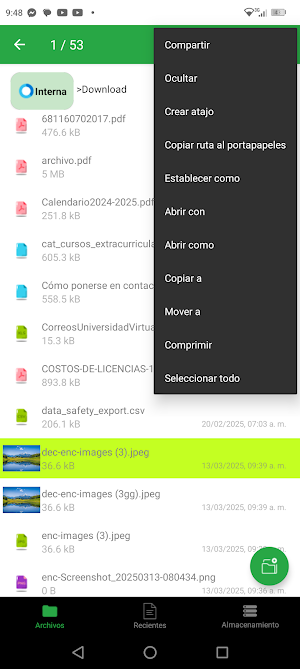
Advanced File Management ⚙️: When selecting a file or document, a variety of advanced actions are available, such as:
View properties (size, path, creation date, file type).
Easily share with other apps.
Hide or make files visible.
Delete files quickly and safely.
Create shortcuts directly on the home screen.
Set as wallpaper, ringtone, etc.
Open with a specific app or choose how you want to open it.
Copy or move to different locations on your device.
Compress files into ZIP formats.
Select All to perform actions on multiple files at once.
Create Files and Folders ➕: Easily create new files or folders directly from the app to keep your content organized.
Section Navigation:
Files 📂: Browse and manage all files stored on your device with a comprehensive, easy-to-use file viewer.
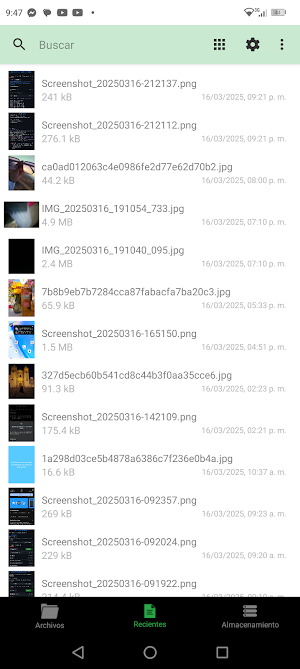
Recent Files 📅: Quickly access files you've recently opened or modified, saving time when searching for your most recent documents.
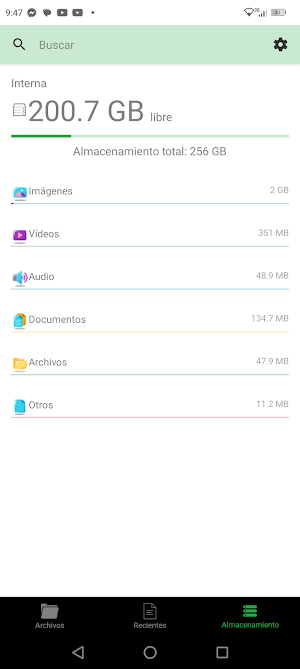
Storage 💾: View your device’s storage usage, including internal and external storage (such as SD cards). The app categorizes your storage media into:
Images 🖼️
Videos 🎥
Audios 🎶
Documents 📑
Files 📂
Others 📦
You can also access detailed statistics to see how much space each type of file is taking up, making storage management easier.
Advanced Search Engine 🔍: Fast and accurate search: Use the advanced search engine to find any file on your device by filtering by type, name, or content. Quickly find what you need with ease.
Key Features:
File & Document Viewing 📄: Access all your files in one place. The app supports a wide range of formats, allowing you to open and manage documents, images, videos, audios, and more.
Custom Sorting 🔄: Organize your files based on your preferences:
By name, size, date modified, or extension.
Ascending or descending order, so you can quickly find what you need.
Change Visibility 👁️: Control the visibility of files and choose which ones to show or hide as needed.
Flexible View Modes 🔲: Switch between list or grid view to suit your visual preferences.
Hidden Files 🕵️♂️: Enable the option to show hidden files and manage everything on your device, including items that aren’t normally visible.
Advanced File Management ⚙️: When selecting a file or document, a variety of advanced actions are available, such as:
View properties (size, path, creation date, file type).
Easily share with other apps.
Hide or make files visible.
Delete files quickly and safely.
Create shortcuts directly on the home screen.
Set as wallpaper, ringtone, etc.
Open with a specific app or choose how you want to open it.
Copy or move to different locations on your device.
Compress files into ZIP formats.
Select All to perform actions on multiple files at once.
Create Files and Folders ➕: Easily create new files or folders directly from the app to keep your content organized.
Section Navigation:
Files 📂: Browse and manage all files stored on your device with a comprehensive, easy-to-use file viewer.
Recent Files 📅: Quickly access files you've recently opened or modified, saving time when searching for your most recent documents.
Storage 💾: View your device’s storage usage, including internal and external storage (such as SD cards). The app categorizes your storage media into:
Images 🖼️
Videos 🎥
Audios 🎶
Documents 📑
Files 📂
Others 📦
You can also access detailed statistics to see how much space each type of file is taking up, making storage management easier.
Advanced Search Engine 🔍: Fast and accurate search: Use the advanced search engine to find any file on your device by filtering by type, name, or content. Quickly find what you need with ease.
What’s new
Version 1.26_Free · Updated June 10, 2026
Boosted local FTP and HTTP wireless transfer speeds. Enhanced ZIP archive compression stability and resolved minor external SD card access bugs.
User reviews

highly recommend

easy and fast to use

amazing app really useful
Alternatives to File Manager
Looking for apps like File Manager? Here are 6 similar Android apps on Google Play. 2 of the 6 are free to download.
-
Oaxaca Tourism: Tours & Travel
-
Elemental Hub: Periodic Table
-
MusicPro: Music & MP3 Player
-
Gallery: Photos & Videos
-
Gallery: Photos & Videos
-
File Manager
| App | Rating | Price | Installs | Last updated | Compare |
|---|---|---|---|---|---|
| File Manager | – | Free | 500+ | Jun 10, 2026 | |
| Oaxaca Tourism: Tours & Travel | – | Free | 100+ | Sep 23, 2026 | Compare |
| Elemental Hub: Periodic Table | – | 0.49 USD | 100+ | Apr 7, 2026 | Compare |
| MusicPro: Music & MP3 Player | – | 0.49 USD | 100+ | – | Compare |
| Gallery: Photos & Videos | – | Free | 1,000+ | Jun 10, 2026 | Compare |
| Gallery: Photos & Videos | – | 0.49 USD | 1,000+ | Jun 10, 2026 | Compare |
| File Manager | – | 0.49 USD | 100+ | Mar 18, 2025 | Compare |
Compare File Manager with the top alternatives: ratings, updates, ASO score and keyword gaps →
Similar apps on Google Play
- Oaxaca Tourism: Tours & Travel
- Elemental Hub: Periodic Table
- MusicPro: Music & MP3 Player
- File Manager
- Gallery: Photos & Videos
- Gallery: Photos & Videos
- File Manager
- Background Remover
- Fertility: Calculator
- ChatOk: Random Chat
- Functions Calculator
- Numerical Methods: Calculator
- Numerical Methods: Calculator
- MathApp: More than a Form
- Family BMI Calculator
- Gestogram: Calculator
- My Pregnancy: Month by Month
- Canvas: Create & Edit
- Notepad - Fast Notes
- Color Palett: Generator
- Color Palett: Generator
- AR Drawing: Sketch & Paint
- Pyrotechnics: fireworks
- Encrypted: Cipher & Security