
Pro Design: Designer Tools
akhilasdeveloper Tools
Overlay design grids, guidelines, and mockup images over any Android app.
- Downloads
- 15+
- on Google Play
- Price
- Free
- No in-app purchases
- Updated
- Aug 4
- 2026 · v1.0
Screenshots
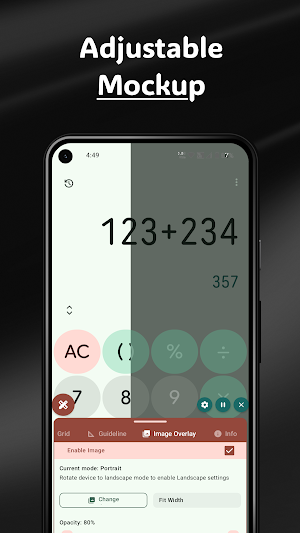

About Pro Design: Designer Tools
Designer Tools is the ultimate utility for app designers, UI/UX developers, and QA engineers who need to review, test, and verify mobile interfaces with pixel-perfect precision.
Overlay design specs, custom grid systems, screen guidelines, and image mockups directly over your live Android applications to catch layout bugs and spacing inconsistencies instantly.
Initial Release Notice
This is our official v1.0 launch! We built Designer Tools to streamline your design QA workflow. As this is a brand-new release, exciting new features, tools, and performance improvements are already on the way. Have feedback or feature requests? We’d love to hear from you to shape future updates together!
Key Features
Image Mockup Overlay
Side-by-Side Verification: Overlay your design comps (PNG/JPG) over your live app screens.
Opacity Control: Adjust transparency on the fly to spot padding, alignment, and sizing mismatches.
Portrait & Landscape Modes: Assign dedicated mockup images for both device orientations.
Fitting Options: Toggle between fit-to-width or fit-to-height for perfect scale alignment.
Custom Grid System
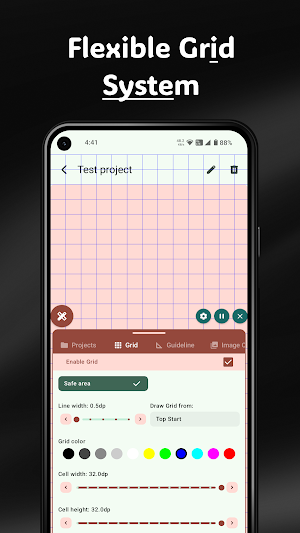
Flexible Layout Grids: Customize cell width, cell height, line thickness, and color.
Multiple Origin Points: Draw grids starting from top-left, center, or safe areas.
Responsive Units: Define grid settings directly in dp for native Android density testing.
Precision Guidelines & Specs
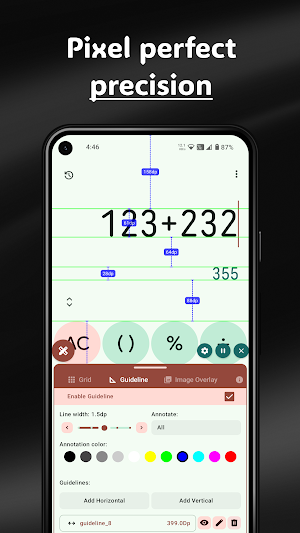
Horizontal & Vertical Lines: Add infinite custom alignment lines across any screen.
Interactive Annotations: Measure distances and mark UI element dimensions directly on target screens.
On-Screen Indicators: View real-time spacing measurements and exact offset values.
Device Screen Metrics & Info
Screen DPI & Resolution: Instantly view active screen width/height in pixels (px) and density-independent pixels (dp).
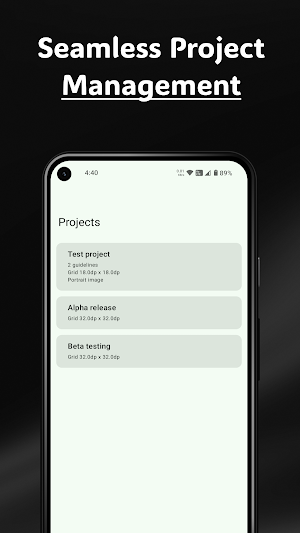
Multi-Project Management: Save custom grid configurations and guide setups for different client projects.
Who Is Designer Tools For?
UI/UX Designers: Ensure implementation matches Figma, Sketch, or Adobe XD specs down to the exact pixel.
Android Developers: Verify component margins, padding, and layout constraints faster without taking constant screenshots.
QA Engineers & Testers: Speed up design QA audits and log layout defect tickets with clear visual proof.
Privacy & Permissions
Designer Tools relies on the Display Over Other Apps (SYSTEM_ALERT_WINDOW) permission to project grid lines, guides, and mockups seamlessly over other apps.
Privacy First: Designer Tools does not collect, store, or share your personal data, app usage, or design files. All image overlays and project data remain stored locally on your device.
Download Designer Tools today to bring pixel-perfect precision to your Android workflow, and stay tuned for regular updates!
Overlay design specs, custom grid systems, screen guidelines, and image mockups directly over your live Android applications to catch layout bugs and spacing inconsistencies instantly.
Initial Release Notice
This is our official v1.0 launch! We built Designer Tools to streamline your design QA workflow. As this is a brand-new release, exciting new features, tools, and performance improvements are already on the way. Have feedback or feature requests? We’d love to hear from you to shape future updates together!
Key Features
Image Mockup Overlay
Side-by-Side Verification: Overlay your design comps (PNG/JPG) over your live app screens.
Opacity Control: Adjust transparency on the fly to spot padding, alignment, and sizing mismatches.
Portrait & Landscape Modes: Assign dedicated mockup images for both device orientations.
Fitting Options: Toggle between fit-to-width or fit-to-height for perfect scale alignment.
Custom Grid System
Flexible Layout Grids: Customize cell width, cell height, line thickness, and color.
Multiple Origin Points: Draw grids starting from top-left, center, or safe areas.
Responsive Units: Define grid settings directly in dp for native Android density testing.
Precision Guidelines & Specs
Horizontal & Vertical Lines: Add infinite custom alignment lines across any screen.
Interactive Annotations: Measure distances and mark UI element dimensions directly on target screens.
On-Screen Indicators: View real-time spacing measurements and exact offset values.
Device Screen Metrics & Info
Screen DPI & Resolution: Instantly view active screen width/height in pixels (px) and density-independent pixels (dp).
Multi-Project Management: Save custom grid configurations and guide setups for different client projects.
Who Is Designer Tools For?
UI/UX Designers: Ensure implementation matches Figma, Sketch, or Adobe XD specs down to the exact pixel.
Android Developers: Verify component margins, padding, and layout constraints faster without taking constant screenshots.
QA Engineers & Testers: Speed up design QA audits and log layout defect tickets with clear visual proof.
Privacy & Permissions
Designer Tools relies on the Display Over Other Apps (SYSTEM_ALERT_WINDOW) permission to project grid lines, guides, and mockups seamlessly over other apps.
Privacy First: Designer Tools does not collect, store, or share your personal data, app usage, or design files. All image overlays and project data remain stored locally on your device.
Download Designer Tools today to bring pixel-perfect precision to your Android workflow, and stay tuned for regular updates!
Alternatives to Pro Design: Designer Tools
Looking for apps like Pro Design: Designer Tools? Here are 6 similar Android apps on Google Play. The highest rated is Vera Icon Pack: shapeless icon (4.8/5), and 5 of the 6 are free to download.
-
DesignEvo - Logo Maker 3.0
-
Kickresume: AI Resume Builder 4.3
-
Vera Icon Pack: shapeless icon 4.8
-
Design Space: DIY with Cricut 3.9
-
Handoff Construction Estimator 4.7
-
Partify: All Things Birthday 4.4
| App | Rating | Price | Installs | Last updated | Compare |
|---|---|---|---|---|---|
| Pro Design: Designer Tools | – | Free | 10+ | Aug 4, 2026 | |
| DesignEvo - Logo Maker | 3.0 / 5 | Free | 1,000,000+ | Apr 19, 2018 | Compare |
| Kickresume: AI Resume Builder | 4.3 / 5 | Free | 100,000+ | – | Compare |
| Vera Icon Pack: shapeless icon | 4.8 / 5 | 3.49 USD | 10,000+ | Oct 22, 2026 | Compare |
| Design Space: DIY with Cricut | 3.9 / 5 | Free | 5,000,000+ | – | Compare |
| Handoff Construction Estimator | 4.7 / 5 | Free | 10,000+ | – | Compare |
| Partify: All Things Birthday | 4.4 / 5 | Free | 500+ | May 20, 2025 | Compare |
Similar apps on Google Play
- DesignEvo - Logo Maker
- Kickresume: AI Resume Builder
- Vera Icon Pack: shapeless icon
- Design Space: DIY with Cricut
- Handoff Construction Estimator
- Partify: All Things Birthday
- Logo Maker : Logo Creator
- Logo Maker Shop - AI Generator
- JobNimbus: All-In-One Roof App
- HomeByMe
- AI Logo Generator, Logo Maker
- WaiverForever - Online Waiver
- PosterMyWall: Design & Promote
- Logo maker Design Logo creator
- KYRO: Storm, Linemen & VM
- KnowHow
- Remodel AI - Home Renovation
- Thermomix Cookidoo App
- VistaCreate: AI Graphic Design
- Renovate AI : House Design
- Building Tools
- Aceable Real Estate, Insurance
- Personal Creations
- Invitation Maker & Card Design
- HerePrint
- Houzz - Home Design & Remodel
- Desygner: Graphic Design Maker
- AI Home Design: Ideal House
- MakerFlo