

CurioMate: Utility Tools
Tools
Converters, calculators, scanners, and measurement tools in one app.
- Rating
- 4.7
- 87 ratings
- Downloads
- 1K+
- on Google Play
- Price
- $1.49
- No in-app purchases
- Updated
- Jul 22
- 2026 · v1.1.1
Screenshots
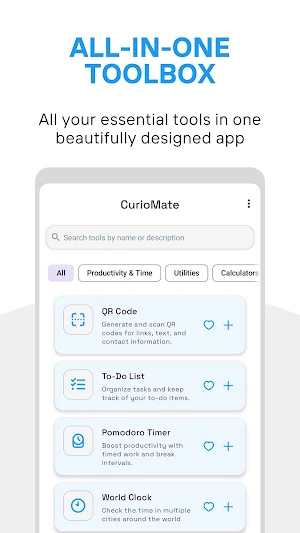
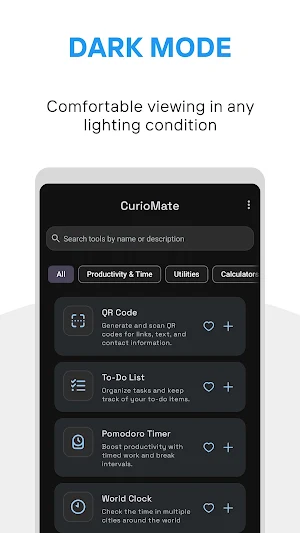
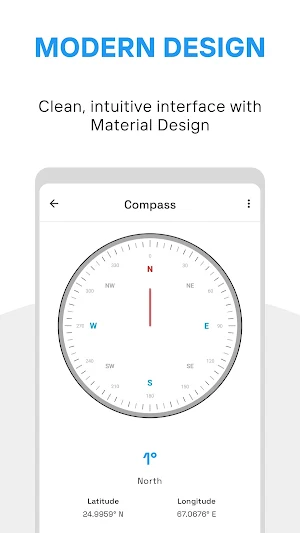



About CurioMate: Utility Tools
Available Tools:
Measurement & Conversion
• Unit Converter - Convert between common measurement units
• Digital Ruler - For basic on-screen measurements
• Level Tool - Assists with levelling objects
• Compass - Shows directional orientation
• Decibel Meter - Measures approximate sound levels
• Speedometer - Shows approximate speed via GPS
• Lux Meter - Indicates relative light levels
Calculation
• Tip Calculator - Helps calculate tips and divide bills
• Age Calculator - Calculates age between dates
• Number Base Converter - Converts between numerical formats
Document Utilities
• QR Code Scanner - Scans compatible QR codes
• QR Code Generator - Creates basic QR codes
• File Compression - Basic zip file handling
• Image Compressor - Reduces image file size
• PDF Tools - Simple PDF operations
• Basic Invoice Creator - Creates simple invoice documents
Productivity Tools
• Password Generator - Creates password suggestions
• Text Formatter - Basic text manipulation
• World Clock - Shows time in different locations
• Holiday Reference - Shows holiday information by region
• Morse Code Tool - Converts text to/from Morse code
• URL Cleaner - Removes tracking elements from URLS
• Note Keeper - Stores encrypted notes
• Flashlight - Controls device light
• Stopwatch - Basic time tracking
Miscellaneous Utilities
• Random Number Tool - Generates random numbers
• Decision Helper - Assists with simple choices
• Colour Generator - Creates colour values
• Name Suggestion Tool - Generates name ideas
• Rhyme Reference - Helps find rhyming words
• Virtual Coin - Simulates coin flips
• Reaction Timer - Measures tap response time
App Features:
• Material Design interface
• Tool bookmarking
• Home screen shortcuts for frequent tools
• Most tools function without the internet
• Dark mode option
Permission Information:
• Microphone: The Decibel Meter requires microphone access solely to detect sound levels. No audio is recorded or stored.
• Location: The Speedometer and Compass tools require location access only while using these specific features.
• Storage: Document tools require storage access only to save and load files you create.
• Camera: Required for tools like a QR scanner and a flashlight. Only accessed when using camera-dependent features.
All permissions are optional and only requested when a specific tool that requires the permission is used. No personal data is collected through these permissions.
CurioMate is regularly maintained with stability improvements and refinements to existing tools.
What’s new
Version 1.1.1 · Updated July 22, 2026
• New Home search bar • Added data import & Rate App in Settings • Secure Notes timestamps • Flashlight auto-off timer • Pomodoro session stats • Todo List search • Password Generator clipboard auto-clear • Stopwatch hours + fastest/slowest lap highlights • Tip Calculator quick tip buttons • Unit Converter long-press to copy • Improved tool launching reliability • Updated for Android 16 & latest Billing Library • Fixed crashes and various bugs
User reviews

Nice selection of tools and widgets. Very cool to have them in an all-in-one app. Quality developer that updates regularly.

great work but please improve the calculator with history, copy and share etc...

lightweight and useful as there are too many tiny tools

Edit: After using the tool for some time, I find the app to be great at what it does, and the tools are very useful at times. I would like to see some additional features added: - A feature that creates a QR code for the WiFi network that the device is connected to. This would make it easier to share the network wit...

Love it, I hope you keep adding tools and polishing the app. One thing I'd suggest, since this seems to be expanding rapidly and having a lot of tools is to organize them the way you want. Maybe custom folders or category where you can sort the tools the way you want and change the home page of the app directly to t...

What a useful application! I really appreciate it.
Alternatives to CurioMate: Utility Tools
Looking for apps like CurioMate: Utility Tools? Here are 2 similar Android apps on Google Play. The highest rated is CurioShuffle: Find Cool Sites (4.3/5), and all 2 are free to download.


| App | Rating | Price | Installs | Last updated | Compare |
|---|---|---|---|---|---|
| CurioMate: Utility Tools | 4.7 / 5 | $1.49 | 1,000+ | Jul 22, 2026 | |
| CurioShuffle: Find Cool Sites | 4.3 / 5 | Free | 5,000+ | Jul 30, 2026 | Compare |
| Linkzary - Link Organizer | – | Free | 1,000+ | Jul 29, 2026 | Compare |