

Inline Math: Auto Calculator
CareStream Productivity
Automatically calculate math formulas inside any chat text box as you type!
- Downloads
- 100+
- on Google Play
- Price
- Free
- No in-app purchases
- Updated
- Sep 14
- 2026 · v2.0
Screenshots
About Inline Math: Auto Calculator
Inline Math is an assistive background utility designed to help individuals with cognitive, learning, or motor impairments perform arithmetic and mathematics calculations easily without leaving their active application.
For individuals with cognitive disabilities such as dyscalculia, copying numbers, switching between a chat application and a calculator, or transcribing equations presents a significant cognitive barrier. Similarly, for individuals with motor or dexterity challenges, performing app-switching gestures and typing long, continuous inputs on soft keyboards is physically fatiguing.
Inline Math solves these problems by providing an automated inline math calculation macro. Once the Accessibility Service is enabled, the app monitors input fields locally and ephemerally. When a mathematical equation ending in a standard or keyboard-friendly equals sign is typed, the app automatically solves the formula and inserts the answer inline.
🚀 HOW IT WORKS
1. Open any input field (Messaging, Notes, or Search text boxes).
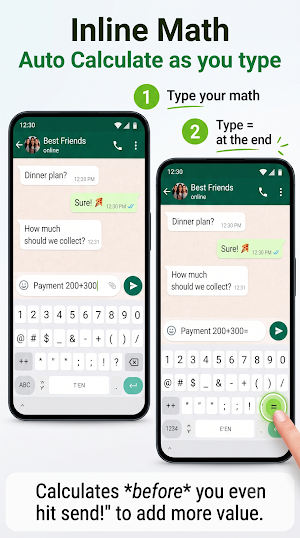
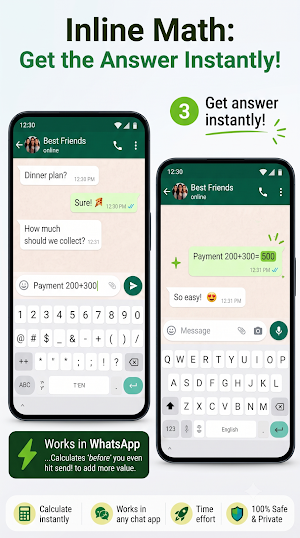
2. Enter an equation ending with an equals sign (e.g., "150+250=").
3. Inline Math automatically detects the equation, calculates the answer, and appends the result instantly (e.g., "150+250=400").
✨ ASSISTIVE FEATURES
• App-Switching Elimination: Solves math inline, preventing the physical and cognitive fatigue of switching back and forth between messaging apps and calculator utilities.
• Smart Keyboard Mappings: Supports standard mathematical operators (+, -, *, /, ^) as well as soft-keyboard specific symbols like × (multiplication), ÷ (division), Unicode minus signs (−, –, —), and percentage (%).
• Ephemeral Local Processing: All calculations are performed entirely locally and offline on your device. To protect user privacy, no text input, keystrokes, messages, or personal data are ever saved, collected, or transmitted.
• Smart Output Formatting: Dropped trailing decimals for clean whole numbers (e.g., 5.0 becomes 5) while preserving precise values up to 2 decimal places where necessary.
Permissions Notice:
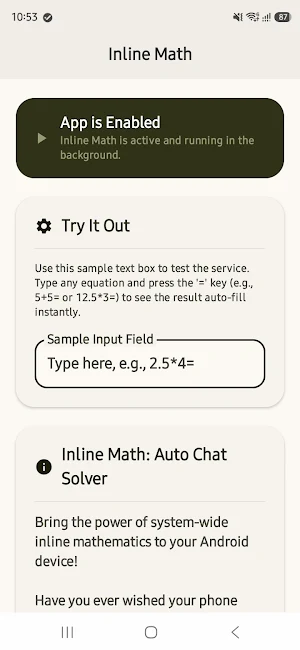
This app requires the activation of Android’s Accessibility Service permission to function. This permission is used strictly to read input text to locate the '=' equation trigger, and to write the calculated result back into the active text area.
For individuals with cognitive disabilities such as dyscalculia, copying numbers, switching between a chat application and a calculator, or transcribing equations presents a significant cognitive barrier. Similarly, for individuals with motor or dexterity challenges, performing app-switching gestures and typing long, continuous inputs on soft keyboards is physically fatiguing.
Inline Math solves these problems by providing an automated inline math calculation macro. Once the Accessibility Service is enabled, the app monitors input fields locally and ephemerally. When a mathematical equation ending in a standard or keyboard-friendly equals sign is typed, the app automatically solves the formula and inserts the answer inline.
🚀 HOW IT WORKS
1. Open any input field (Messaging, Notes, or Search text boxes).
2. Enter an equation ending with an equals sign (e.g., "150+250=").
3. Inline Math automatically detects the equation, calculates the answer, and appends the result instantly (e.g., "150+250=400").
✨ ASSISTIVE FEATURES
• App-Switching Elimination: Solves math inline, preventing the physical and cognitive fatigue of switching back and forth between messaging apps and calculator utilities.
• Smart Keyboard Mappings: Supports standard mathematical operators (+, -, *, /, ^) as well as soft-keyboard specific symbols like × (multiplication), ÷ (division), Unicode minus signs (−, –, —), and percentage (%).
• Ephemeral Local Processing: All calculations are performed entirely locally and offline on your device. To protect user privacy, no text input, keystrokes, messages, or personal data are ever saved, collected, or transmitted.
• Smart Output Formatting: Dropped trailing decimals for clean whole numbers (e.g., 5.0 becomes 5) while preserving precise values up to 2 decimal places where necessary.
Permissions Notice:
This app requires the activation of Android’s Accessibility Service permission to function. This permission is used strictly to read input text to locate the '=' equation trigger, and to write the calculated result back into the active text area.
What’s new
Version 2.0 · Updated September 14, 2026
Super Math for calculating dates, units and finance
User reviews

The app is very good and now because of the custom prefixes i cant accidentally trigger it

very easy to write math in chat now
Alternatives to Inline Math: Auto Calculator
Looking for apps like Inline Math: Auto Calculator? Here are 6 similar Android apps on Google Play. The highest rated is Cuemath: Math Learning & Games (4.6/5), and all 6 are free to download.
-
Spoken – Tap to Talk AAC 3.7
-
LingoDeer Plus: Language quiz 3.9
-
2Do - To do List & Reminders 4.1
-
iTalkuTalk: AI recognition 4.5
-
MEL Science: a science lab app 3.3
-
Cuemath: Math Learning & Games 4.6
| App | Rating | Price | Installs | Last updated | Compare |
|---|---|---|---|---|---|
| Inline Math: Auto Calculator | – | Free | 100+ | Sep 14, 2026 | |
| Spoken – Tap to Talk AAC | 3.7 / 5 | Free | 100,000+ | – | Compare |
| LingoDeer Plus: Language quiz | 3.9 / 5 | Free | 100,000+ | Aug 28, 2026 | Compare |
| 2Do - To do List & Reminders | 4.1 / 5 | Free | 100,000+ | – | Compare |
| iTalkuTalk: AI recognition | 4.5 / 5 | Free | 1,000,000+ | Oct 21, 2026 | Compare |
| MEL Science: a science lab app | 3.3 / 5 | Free | 100,000+ | Aug 28, 2026 | Compare |
| Cuemath: Math Learning & Games | 4.6 / 5 | Free | 1,000,000+ | Jul 9, 2026 | Compare |