Solar Hybrid PCU
RemoteMonitoring With Bluetooth-enabled off-grid solar inverter/solar Hybrid PCU
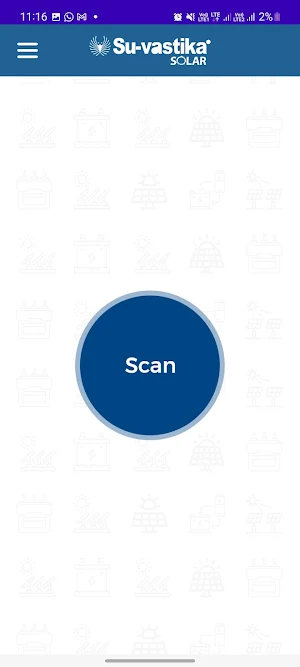
About Solar Hybrid PCU
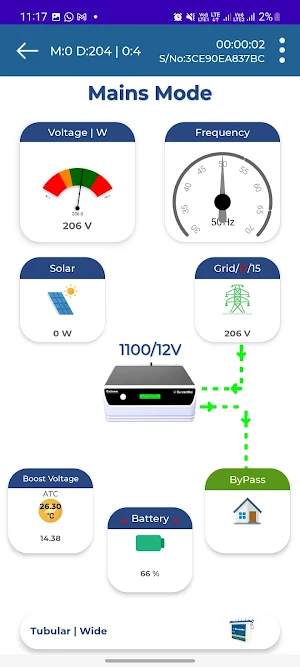
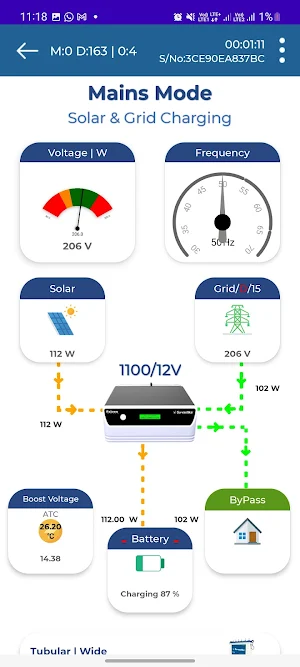
Remote Monitoring: With a Bluetooth-enabled off-grid solar inverter/solar Hybrid PCU, you can remotely monitor the performance of your solar power system. You can access real-time data on your smartphone or tablet and keep track of your system’s energy production and usage.
This app has so many settings to choose from, and the grounds are done in the Hybrid PCU via two-way communication as we do the scenes in the app; it has been taken by the solar Hybrid UPS, and change the settings inside the solar hybrid PCU so we can do settings for Mains Grid Wide mode and Narrow mode where the voltage range is changed to run specialised loads like computers and printers.
There is a setting for the selection of battery which can give you an option of selecting LeadAcid tubular, SMF and Lithium Ion battery which can be chosen through the app and solar hybrid PCU stores those settings through the app only.
The other essential settings are Grid Charging current, and these settings can be changed from 2.5Amp to 15 Amp, which helps the user to reduce the electricity bill or use a small battery in the Solar PCU.
Another setting is Grid Enable and Disable, which is very important for a user to save the electricity bill. By selecting this feature through the settings, one can change the solar Hybrid PCU to Completely shut down charging from the grid, which saves the electricity bill.
Also, there is a setting for reserve mode for the battery where you can set the DOD of the battery to increase the battery life. The same feature can be used in an emergency to get more backup time if the Hybrid UPS is stopped and there is no grid, and you want to use it for some more time by just changing the DOD in the settings.
Another critical feature in settings is to set the solar priority battery voltage setting, which can help you save the electricity bill as the grid charging will not take place till the battery voltage reaches the settable voltage.
The app has alert tones for every alert like overload, short circuit, low battery and high temperature. It has different mobile techniques, making it attractive and unique compared to anyone worldwide. You can set these tones off and on through the app.
This app has the unique feature of ATC monitoring while charging. The Automatic Temperature compensation works on the app as the ambient temperature increases or decreases. The boost voltage is changing on the screen, which shows how the ATC feature is helping the user save on electricity bills and increase the backup time in the winter.
At the solar and UPS mode, one can see the load percentage so that the user can use the load judiciously while on solar and UPS mode.
Even a user can know which loads in his home or office takes more wattage.
There are three modes which we have shown through this app Mains Mode, UPS mode and Solar Mode. We have offered different types of situations through all three modes, and users can see what is happening in these three different modes.
Another critical feature is the switch provided on the app in the case of UPS and Solar mode, by which one can switch off the load through this button and switch on the load.
The same button works as a reset button in case of Overload and Short circuits of the hybrid solar PCU.
In this app, we have shown every situation with alerts coming and telling the user what to do in case of any problem like Overload. It means the user reduces the load. In case of Overload shit down, it gives the message with an audio alert to reset the reset button or in case of low battery, it gives the warning. It tells the user to reduce the load, and in case of a low battery shutdown, it provides a message to the user to wait for the Mains power to come back.
Similar Apps
Suvastika Online UPS (3P-3P)
Suvastika's Online UPS is something different from general UPS ,is a different...

Suvastika Heavy Duty UPS 3P-3P
Su-vastika Heavy Duty UPS (3P-3P) application shows you all the details of...
Suvastika Heavy Duty ESS
Su-vastika Heavy Duty ESS IGBT (1P-1P) application makes it easy for you...
Suvastika Heavy Duty UPS
Su-vastika Heavy Duty UPS IGBT (1P-1P) application makes it easy for you...

Su-vastika ESS
Traditional inverters emit indoor air pollution, a health risk, particularly for older...

Solar Hybrid PCU
Remote Monitoring: With a Bluetooth-enabled off-grid solar inverter/solar Hybrid PCU, you can...
Frequently Asked Questions (FAQ)
