
NoFace - Blur Face with Emoji
Art & Design Contains ads
Auto-detect faces in photos and hide them with blur, circle blur or emoji
- Downloads
- 1.2K+
- on Google Play
- Price
- Free
- No in-app purchases
- Updated
- Sep 26
- 2026 · v2.2.release
Screenshots
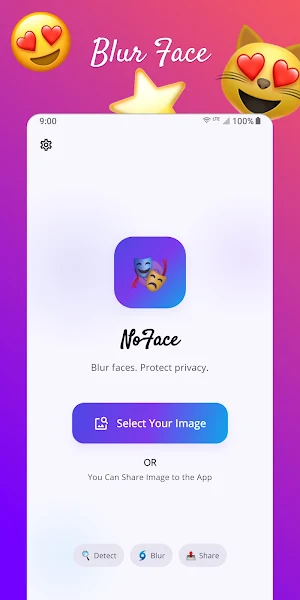


About NoFace - Blur Face with Emoji
Protect your privacy and the privacy of the people around you. NoFace
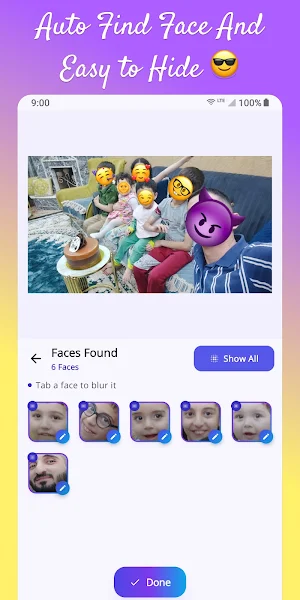
automatically finds every face in a photo from your gallery and lets you
hide each one with a single tap — using a smooth blur, a circular blur, or
a fun emoji overlay.
Everything happens on your device. Your photos are never uploaded, shared
with us, or sent to any server. We do not collect, store, or transmit your
images at any point.
KEY FEATURES
• Automatic face detection powered by on-device machine learning (Google
ML Kit). No internet connection is required to detect or edit faces.
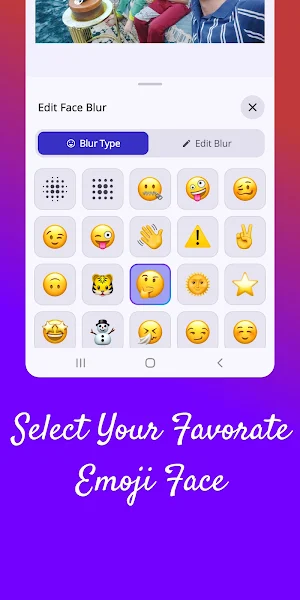
• Three hide styles for every face:
– Smooth blur
– Circular blur (clean, rounded mask)
– Emoji overlay (a wide selection of expressive emojis)
• Per-face control: tap a single face to hide it, or hide / show all at
once.
• Edit each face individually: adjust blur size, rotation and transparency,
or pick a different emoji per person.
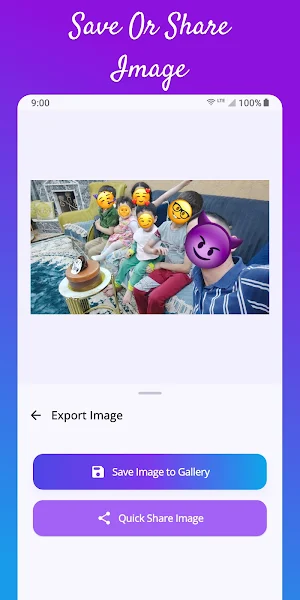
• Save the edited image to your gallery in the "NoFaceImages" folder, or
share it directly to any other app.
• Receive images shared from other apps (gallery, camera, messaging) and
start editing right away.
• Light, dark and system-matching themes.
• Optional haptic feedback.
• Available in English, Arabic, Spanish, French, Kurdish, Thai, Turkish
and Chinese.
PRIVACY FIRST
• No account or sign-up is required.
• No images, no metadata and no personal data leave your device.
• Face detection uses Google ML Kit's on-device model — nothing is sent
to the cloud.
• Only the AdMob advertising identifier is processed by Google's ads SDK
to show banner and interstitial ads. You can review and change your
consent at any time from Settings → Privacy Settings.
PERMISSIONS
• Photos / Media access — to read the image you choose and to save the
edited result back to your gallery.
• Internet — required only to display ads.
GREAT FOR
• Sharing group photos, screenshots or street photography without
exposing strangers.
• Protecting children's faces before posting on social media.
• Hiding faces in screenshots, ID-like images or documents before sending
them to support, a client or a friend.
NoFace is a free, lightweight tool focused on doing one thing well:
keeping faces in your photos private. We hope you enjoy it — and if you
do, please consider leaving a rating in the Play Store.
automatically finds every face in a photo from your gallery and lets you
hide each one with a single tap — using a smooth blur, a circular blur, or
a fun emoji overlay.
Everything happens on your device. Your photos are never uploaded, shared
with us, or sent to any server. We do not collect, store, or transmit your
images at any point.
KEY FEATURES
• Automatic face detection powered by on-device machine learning (Google
ML Kit). No internet connection is required to detect or edit faces.
• Three hide styles for every face:
– Smooth blur
– Circular blur (clean, rounded mask)
– Emoji overlay (a wide selection of expressive emojis)
• Per-face control: tap a single face to hide it, or hide / show all at
once.
• Edit each face individually: adjust blur size, rotation and transparency,
or pick a different emoji per person.
• Save the edited image to your gallery in the "NoFaceImages" folder, or
share it directly to any other app.
• Receive images shared from other apps (gallery, camera, messaging) and
start editing right away.
• Light, dark and system-matching themes.
• Optional haptic feedback.
• Available in English, Arabic, Spanish, French, Kurdish, Thai, Turkish
and Chinese.
PRIVACY FIRST
• No account or sign-up is required.
• No images, no metadata and no personal data leave your device.
• Face detection uses Google ML Kit's on-device model — nothing is sent
to the cloud.
• Only the AdMob advertising identifier is processed by Google's ads SDK
to show banner and interstitial ads. You can review and change your
consent at any time from Settings → Privacy Settings.
PERMISSIONS
• Photos / Media access — to read the image you choose and to save the
edited result back to your gallery.
• Internet — required only to display ads.
GREAT FOR
• Sharing group photos, screenshots or street photography without
exposing strangers.
• Protecting children's faces before posting on social media.
• Hiding faces in screenshots, ID-like images or documents before sending
them to support, a client or a friend.
NoFace is a free, lightweight tool focused on doing one thing well:
keeping faces in your photos private. We hope you enjoy it — and if you
do, please consider leaving a rating in the Play Store.
What’s new
Version 2.2.release · Updated September 26, 2026
- improve performance - now can add emoji from user - fix bugs
User reviews

nice
Alternatives to NoFace - Blur Face with Emoji
Looking for apps like NoFace - Blur Face with Emoji? Here are 6 similar Android apps on Google Play. The highest rated is Card PIN-Code Scanner (5.0/5), and all 6 are free to download.
-
VIN Code Scanner 4.2
-
Card Reader (Pin Code Scan) 4.3
-
Calculator Volt/Amp/Watt/Ohm 4.5
-
Card PIN-Code Scanner 5.0
-
SmartWork Kit - Employee Tools
-
QrSnap QR & Barcode Scanner
| App | Rating | Price | Installs | Last updated | Compare |
|---|---|---|---|---|---|
| NoFace - Blur Face with Emoji | – | Free | 1,000+ | Sep 26, 2026 | |
| VIN Code Scanner | 4.2 / 5 | Free | 10,000+ | Aug 4, 2026 | Compare |
| Card Reader (Pin Code Scan) | 4.3 / 5 | Free | 100,000+ | Aug 2, 2026 | Compare |
| Calculator Volt/Amp/Watt/Ohm | 4.5 / 5 | Free | 100,000+ | Aug 17, 2026 | Compare |
| Card PIN-Code Scanner | 5.0 / 5 | Free | 10,000+ | Aug 3, 2026 | Compare |
| SmartWork Kit - Employee Tools | – | Free | 10+ | Aug 15, 2026 | Compare |
| QrSnap QR & Barcode Scanner | – | Free | 100+ | Jul 29, 2026 | Compare |