
EZ Outliner
Productivity In-app purchases Contains ads
Create powerful and easy to read outline documents!
- Rating
- 4.1
- 59 ratings
- Downloads
- 3.1K+
- on Google Play
- Price
- Free
- In-app purchases
- Updated
- Aug 6
- 2026 · v2.3.1
Screenshots


About EZ Outliner
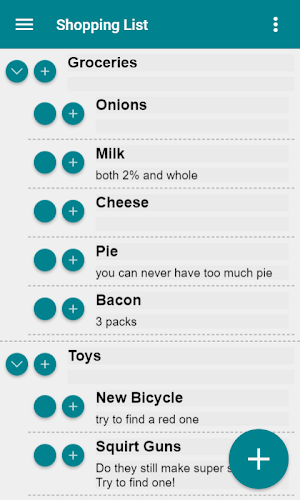
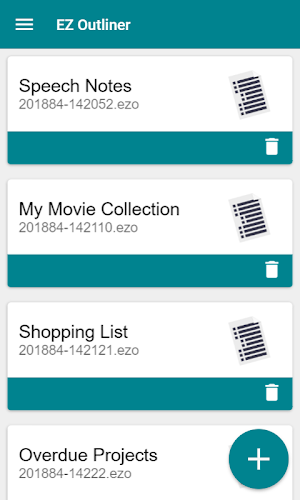
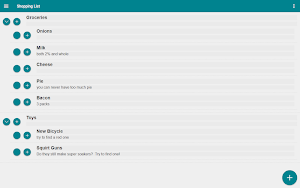
EZ Outliner aims to be a simple yet easy to use outliner application, allowing you to create powerful and easy to read outline documents from any device, anywhere. Use EZ Outliner to create shopping and grocery lists, plans, schedules, outline speeches and presentations, to do lists, or anything else which takes the format of an outline.
EZ Outliner currently contains everything you need to create basic outlines, but I will expand and add more based on user requests and feedback. Here is just a list of some of the things EZ Outliner can already do.
- Create a virtually unlimited number of outlines for every use case and occasion!
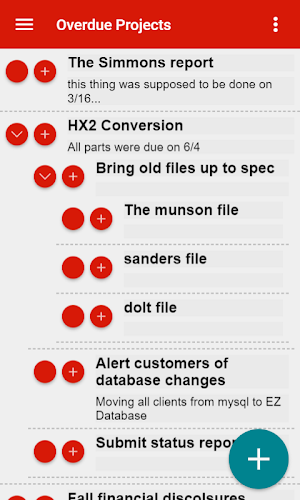
- Color code your outlines for better organization.
- Print your outlines, from any device! Properly formatted outline printing is supported on all devices, as long as a printer is available.
- Sync your outlines between devices. If you sign in with an Ape Apps account, you can sync your outline files across all of your devices. Work on a grocery list or presentation at home, then pull them up on your phone when you need them!
The goal of EZ Outliner is to be quick and easy to use. If there are features you would like to see added, or if you can think of changes that will improve the app, e-mail me or let me know in the comments. This app is for you guys, so help me make it the best it can be!
EZ Outliner currently contains everything you need to create basic outlines, but I will expand and add more based on user requests and feedback. Here is just a list of some of the things EZ Outliner can already do.
- Create a virtually unlimited number of outlines for every use case and occasion!
- Color code your outlines for better organization.
- Print your outlines, from any device! Properly formatted outline printing is supported on all devices, as long as a printer is available.
- Sync your outlines between devices. If you sign in with an Ape Apps account, you can sync your outline files across all of your devices. Work on a grocery list or presentation at home, then pull them up on your phone when you need them!
The goal of EZ Outliner is to be quick and easy to use. If there are features you would like to see added, or if you can think of changes that will improve the app, e-mail me or let me know in the comments. This app is for you guys, so help me make it the best it can be!
What’s new
Version 2.3.1 · Updated August 6, 2026
bug fixes
User reviews

Very clean, very professional, very well done.

Can't be better for my study!!

Beautiful and useful app

Good app 👍 needs some improvement in flexibility but over all great 👍 app
Frequently asked questions
What is EZ Outliner?
EZ Outliner is an easy to use outliner application that allows you to create powerful and easy to read outline documents from any device, anywhere.
What can I use EZ Outliner for?
You can use EZ Outliner to create shopping and grocery lists, plans, schedules, outline speeches and presentations, to-do lists, or anything else which takes the format of an outline.
What features does EZ Outliner have?
EZ Outliner allows you to create a virtually unlimited number of outlines, color code your outlines for better organization, print your outlines from any device with a printer available, and sync your outlines between devices if you sign in with an Ape Apps account.
How can I sync my outlines between devices?
To sync your outlines between devices, simply sign in with an Ape Apps account and your outline files will be accessible across all of your devices.
Can I provide feedback or request new features for EZ Outliner?
Yes, you can email the developer or leave your suggestions and feedback in the comments. The goal of EZ Outliner is to improve and cater to the users' needs, so your input is valuable.
Alternatives to EZ Outliner
Looking for apps like EZ Outliner? Here are 6 similar Android apps on Google Play. The highest rated is EZ Calendar Maker (4.3/5), and all 6 are free to download.
-
EZ Calendar Maker 4.3
-
EZ Register 4.0
-
EZ Genealogy 3.4
-
EZ Composer 2.9
-
EZ Database 3.8
-
EZ Letter Maker 4.0
| App | Rating | Price | Installs | Last updated | Compare |
|---|---|---|---|---|---|
| EZ Outliner | 4.1 / 5 | Free | 1,000+ | Aug 6, 2026 | |
| EZ Calendar Maker | 4.3 / 5 | Free | 50,000+ | Oct 6, 2026 | Compare |
| EZ Register | 4.0 / 5 | Free | 10,000+ | Aug 11, 2026 | Compare |
| EZ Genealogy | 3.4 / 5 | Free | 10,000+ | May 21, 2025 | Compare |
| EZ Composer | 2.9 / 5 | Free | 10,000+ | Jul 11, 2025 | Compare |
| EZ Database | 3.8 / 5 | Free | 10,000+ | – | Compare |
| EZ Letter Maker | 4.0 / 5 | Free | 10,000+ | – | Compare |
Compare EZ Outliner with the top alternatives: ratings, updates, ASO score and keyword gaps →