
DailyRecord
Mart Studio Productivity Contains ads
Capture your daily moments with photos & text. Your personal digital diary.
- Downloads
- 26+
- on Google Play
- Price
- Free
- No in-app purchases
- Updated
- May 31
- 2026 · v1.9
Screenshots
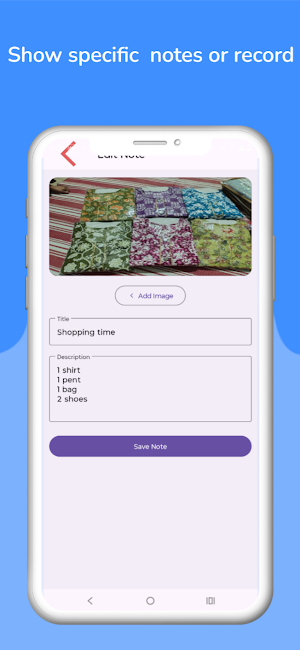

About DailyRecord
Description:
Do you want to keep track of important events, special moments, or your everyday tasks? Daily Record is the perfect companion for you. It’s more than just a notepad; it’s your personal digital diary where you can save text along with photos.
Key Features:
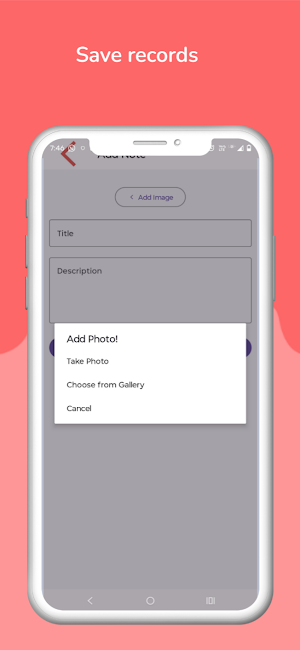
Record with Photos: Make your daily entries more special. You can capture a new photo directly from the Camera or choose an existing one from the Gallery to attach to your note. You also have the option to save text entries without any photo.
Auto Date Generation: The date is saved automatically with every entry, so you don't have to enter it manually. This makes it incredibly easy to track your records and find older entries.
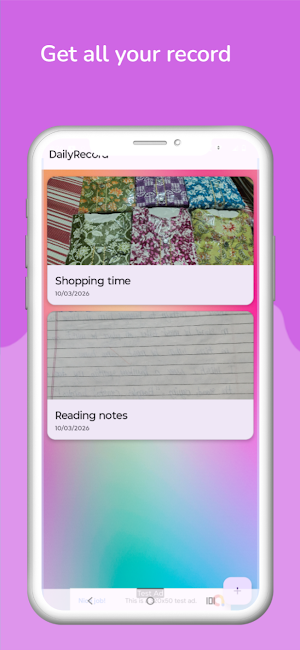
Organized in RecyclerView: All your records are displayed in a clean, organized list (RecyclerView). To view any past record, simply click on it.
Detailed View: Clicking on any entry opens it in a new screen showing your full text, photo, and date, making it very convenient to read and review.
Simple and Intuitive Interface: The app is designed to be extremely simple so that any user can use it without any hassle.
How to Use:
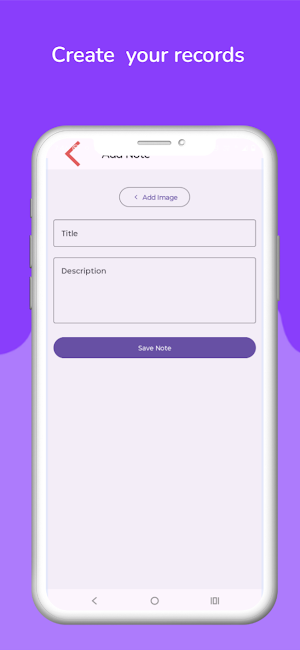
Add a new record using the button on the home screen.
Write your text.
If you wish, click the camera icon to take a new photo or the gallery icon to choose an existing one.
Press the "Save" button. Your entry will be saved with the automatically generated date.
To view an old record, just click on it in the main list.
Who is this app for?
Students: To note down their studies or daily activities.
Professionals: For creating meeting notes or daily task lists.
General Users: As a personal diary or photo diary.
Note: This app uses Google Ads to help keep it free for all users.
Download Daily Record today and start digitizing your daily diary!
Do you want to keep track of important events, special moments, or your everyday tasks? Daily Record is the perfect companion for you. It’s more than just a notepad; it’s your personal digital diary where you can save text along with photos.
Key Features:
Record with Photos: Make your daily entries more special. You can capture a new photo directly from the Camera or choose an existing one from the Gallery to attach to your note. You also have the option to save text entries without any photo.
Auto Date Generation: The date is saved automatically with every entry, so you don't have to enter it manually. This makes it incredibly easy to track your records and find older entries.
Organized in RecyclerView: All your records are displayed in a clean, organized list (RecyclerView). To view any past record, simply click on it.
Detailed View: Clicking on any entry opens it in a new screen showing your full text, photo, and date, making it very convenient to read and review.
Simple and Intuitive Interface: The app is designed to be extremely simple so that any user can use it without any hassle.
How to Use:
Add a new record using the button on the home screen.
Write your text.
If you wish, click the camera icon to take a new photo or the gallery icon to choose an existing one.
Press the "Save" button. Your entry will be saved with the automatically generated date.
To view an old record, just click on it in the main list.
Who is this app for?
Students: To note down their studies or daily activities.
Professionals: For creating meeting notes or daily task lists.
General Users: As a personal diary or photo diary.
Note: This app uses Google Ads to help keep it free for all users.
Download Daily Record today and start digitizing your daily diary!
What’s new
Version 1.9 · Updated May 31, 2026
Fix deprecated Api
User reviews

This app is very useful for my personal record
Alternatives to DailyRecord
Looking for apps like DailyRecord? Here are 4 similar Android apps on Google Play. The highest rated is OtterAI Transcribe Voice Notes (4.8/5), and all 4 are free to download.



| App | Rating | Price | Installs | Last updated | Compare |
|---|---|---|---|---|---|
| DailyRecord | – | Free | 10+ | May 31, 2026 | |
| HiNotes by HiDock | 3.8 / 5 | Free | 10,000+ | Sep 24, 2026 | Compare |
| Plankpad | 3.3 / 5 | Free | 100,000+ | Sep 7, 2026 | Compare |
| OtterAI Transcribe Voice Notes | 4.8 / 5 | Free | 5,000,000+ | Sep 25, 2026 | Compare |
| Spoken – Tap to Talk AAC | 3.7 / 5 | Free | 100,000+ | Sep 24, 2026 | Compare |
Compare DailyRecord with the top alternatives: ratings, updates, ASO score and keyword gaps →