
OCR Pro Scanner Ảnh lấy text
Tools Contains ads
OCR Pro Scanner – Scan text, documents quickly, copy text easily!
- Downloads
- 6+
- on Google Play
- Price
- Free
- No in-app purchases
- Updated
- Nov 25
- 2025 · v1.0.0
Screenshots
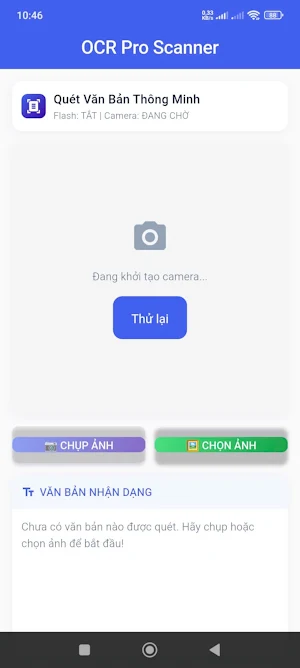


About OCR Pro Scanner Ảnh lấy text
OCR Pro Scanner – Smart and fast text scanning application!
You can scan all types of documents, bills, books, papers, or photos containing text and convert them into text easily. The application uses AI Text Recognition technology (Google MLKit) to recognize text accurately and quickly.
Outstanding features:
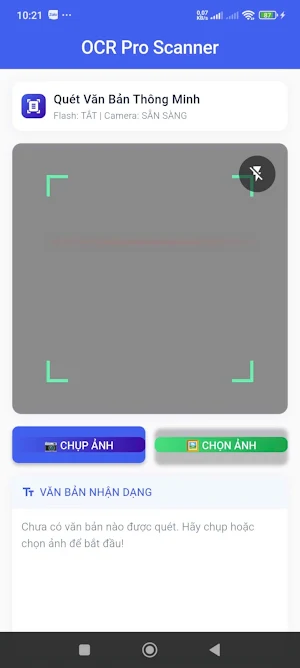
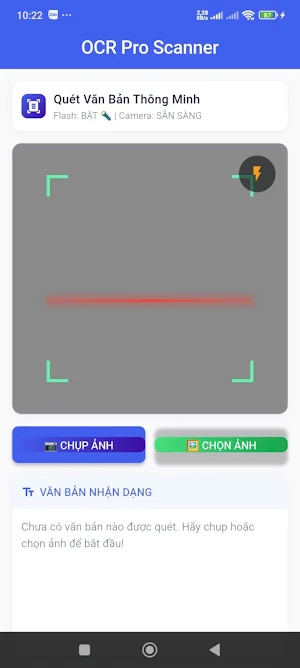
Scan text directly with Camera: Beautiful scan frame, soft rounded corners, flashing scan line effect.
Flash support: Turn on/off the light when scanning in low light environments.
Select photos from the library: Scan text from old photos or take photos from the camera.
AI OCR processing: Fast text recognition, support for Vietnamese standardization.
Quick copy: Copy text to the clipboard with just 1 operation.
Text preview: Display clear results, word count, easy to edit or save.
Modern interface: Soft rounded corners, professional mask + blur effects, "Pro Scanner" feeling.
Works offline: No internet required for basic text scanning.
OCR Pro Scanner is suitable for:
Students: Scan books, lessons, notes.
Office workers: Scan invoices, contracts, papers.
Businesses: Store electronic documents, save time on data entry.
Download OCR Pro Scanner now to turn your phone into a professional text scanner, save time and increase productivity!
OCR Pro Scanner – Smart and fast document scanning app!
Scan any document, invoice, book, or photo containing text and convert it into editable text instantly. Powered by AI Text Recognition (Google MLKit) for accurate, fast results.
Key Features:
Real-time Camera Scan: Beautiful scan frame with rounded corners and blinking scan line animation.
Flash Support: Toggle flashlight for low-light scanning.
Select from Gallery: Scan text from existing photos.
AI OCR Processing: Fast and accurate text recognition, supports Vietnamese text correction.
Quick Copy: Copy recognized text to clipboard with one tap.
Preview Text: Clear display, word count, easy to edit or save.
Modern UI: Rounded corners, mask + blur effects, professional scanner feel.
Offline Functionality: Works without internet for basic scanning.
OCR Pro Scanner is ideal for:
Students: Scan books, lessons, and notes.
Office workers: Scan invoices, contracts, documents.
Businesses: Digitize and archive documents, save time on data entry.
Download OCR Pro Scanner now and turn your phone into a professional text scanner, save time, and boost productivity!
You can scan all types of documents, bills, books, papers, or photos containing text and convert them into text easily. The application uses AI Text Recognition technology (Google MLKit) to recognize text accurately and quickly.
Outstanding features:
Scan text directly with Camera: Beautiful scan frame, soft rounded corners, flashing scan line effect.
Flash support: Turn on/off the light when scanning in low light environments.
Select photos from the library: Scan text from old photos or take photos from the camera.
AI OCR processing: Fast text recognition, support for Vietnamese standardization.
Quick copy: Copy text to the clipboard with just 1 operation.
Text preview: Display clear results, word count, easy to edit or save.
Modern interface: Soft rounded corners, professional mask + blur effects, "Pro Scanner" feeling.
Works offline: No internet required for basic text scanning.
OCR Pro Scanner is suitable for:
Students: Scan books, lessons, notes.
Office workers: Scan invoices, contracts, papers.
Businesses: Store electronic documents, save time on data entry.
Download OCR Pro Scanner now to turn your phone into a professional text scanner, save time and increase productivity!
OCR Pro Scanner – Smart and fast document scanning app!
Scan any document, invoice, book, or photo containing text and convert it into editable text instantly. Powered by AI Text Recognition (Google MLKit) for accurate, fast results.
Key Features:
Real-time Camera Scan: Beautiful scan frame with rounded corners and blinking scan line animation.
Flash Support: Toggle flashlight for low-light scanning.
Select from Gallery: Scan text from existing photos.
AI OCR Processing: Fast and accurate text recognition, supports Vietnamese text correction.
Quick Copy: Copy recognized text to clipboard with one tap.
Preview Text: Clear display, word count, easy to edit or save.
Modern UI: Rounded corners, mask + blur effects, professional scanner feel.
Offline Functionality: Works without internet for basic scanning.
OCR Pro Scanner is ideal for:
Students: Scan books, lessons, and notes.
Office workers: Scan invoices, contracts, documents.
Businesses: Digitize and archive documents, save time on data entry.
Download OCR Pro Scanner now and turn your phone into a professional text scanner, save time, and boost productivity!
What’s new
Version 1.0.0 · Updated November 25, 2025
✨ Phiên bản mới đã sẵn sàng! • Cải thiện tốc độ quét văn bản từ camera và hình ảnh • Nâng cấp giao diện khung quét mượt mà, dễ nhìn hơn • Bổ sung hiệu ứng quét giúp nhận diện trực quan hơn • Sửa lỗi hiển thị camera trên một số thiết bị • Tăng độ chính xác nhận dạng văn bản tiếng Việt • Cải thiện độ ổn định và hiệu năng ứng dụng Cảm ơn bạn đã sử dụng ứng dụng! ❤️
Alternatives to OCR Pro Scanner Ảnh lấy text
Looking for apps like OCR Pro Scanner Ảnh lấy text? Here are 6 similar Android apps on Google Play. All of them are free to download.
-
Color Mixer: Hue,Ratio,Opacity
-
LED Banner – Scrolling Text
-
LineArt Studio
-
Todo List - Danh sách việc
-
Drowsy Alert – Stay Awake
-
Photo to PDF- Ảnh sang PDF
| App | Rating | Price | Installs | Last updated | Compare |
|---|---|---|---|---|---|
| OCR Pro Scanner Ảnh lấy text | – | Free | 5+ | Nov 25, 2025 | |
| Color Mixer: Hue,Ratio,Opacity | – | Free | 500+ | Jan 23, 2026 | Compare |
| LED Banner – Scrolling Text | – | Free | 100+ | Dec 29, 2025 | Compare |
| LineArt Studio | – | Free | 50+ | – | Compare |
| Todo List - Danh sách việc | – | Free | 0+ | Dec 22, 2025 | Compare |
| Drowsy Alert – Stay Awake | – | Free | 100+ | Dec 30, 2025 | Compare |
| Photo to PDF- Ảnh sang PDF | – | Free | 1+ | Dec 30, 2025 | Compare |