
Wallshow - Wallpaper Slideshow. Wallpaper changer.
Personalization In-app purchases Contains ads
Auto Slideshow by folder, pictures. Set lockscreen wallpaper. Wallpaper changer.
- Rating
- 4.3
- 6.8K ratings
- Downloads
- 385K+
- on Google Play
- Price
- Free
- In-app purchases
- Updated
- Jan 8
- 2026 · v26.1.8
Screenshots



About Wallshow - Wallpaper Slideshow. Wallpaper changer.
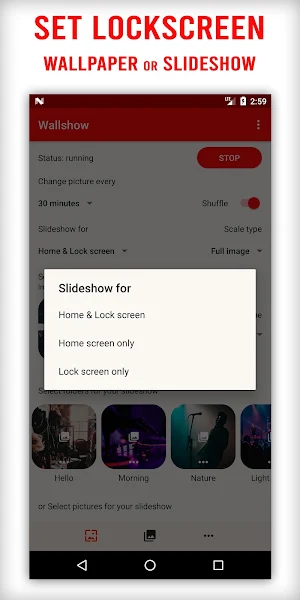
Wallshow allow you to set auto change slideshow or wallpaper for Lockscreen and/or Home screen with a super easy step.
Just set your phone wallpaper slideshow by folders and/or picture collection and done.
Or set lock screen wallpaper with just 1 click.
(Lock screen feature is only supported for Android 7 or higher)
Slideshow intervals: 5s, 10s, 30s, 1min, 2mins, 3mins, ... 15mins, ..., everyday
Change picture when screen is turned on or unlocked as your desired.
Support SDcard and Night mode
WALLPAPER WIDGET
If you want to next wallpaper, don't worry the Wallshow wallpaper widget will help you with that. Just add it to your screen, click on it to go to next wallpaper.
EASY MANAGER
Add or remove photo or folder is super easy. Everything will then play automatically for you. If you want to temporarily disable a photo, do it just one click with our Wallpaper Playlist, the photo will be exclude from the playlist for you.
SHUFFLE WALLPAPER
Shuffle you wallpaper playlist. Auto change wallpaper by 5s, 10s, ..., 15 minutes, 30 minutes, 1 hour or everyday,... whatever you desire.
MATERIAL SLEEK DESIGN
Wallshow is designed for easily managing your screen wallpaper. Easy to select your folders or any photos you want to show on your screen.
Let's beautify our device screen with Wallshow wallpaper slideshow.
Give us 5 stars if you like the app. Don't hesitate to leave it a review ;).
Just set your phone wallpaper slideshow by folders and/or picture collection and done.
Or set lock screen wallpaper with just 1 click.
(Lock screen feature is only supported for Android 7 or higher)
Slideshow intervals: 5s, 10s, 30s, 1min, 2mins, 3mins, ... 15mins, ..., everyday
Change picture when screen is turned on or unlocked as your desired.
Support SDcard and Night mode
WALLPAPER WIDGET
If you want to next wallpaper, don't worry the Wallshow wallpaper widget will help you with that. Just add it to your screen, click on it to go to next wallpaper.
EASY MANAGER
Add or remove photo or folder is super easy. Everything will then play automatically for you. If you want to temporarily disable a photo, do it just one click with our Wallpaper Playlist, the photo will be exclude from the playlist for you.
SHUFFLE WALLPAPER
Shuffle you wallpaper playlist. Auto change wallpaper by 5s, 10s, ..., 15 minutes, 30 minutes, 1 hour or everyday,... whatever you desire.
MATERIAL SLEEK DESIGN
Wallshow is designed for easily managing your screen wallpaper. Easy to select your folders or any photos you want to show on your screen.
Let's beautify our device screen with Wallshow wallpaper slideshow.
Give us 5 stars if you like the app. Don't hesitate to leave it a review ;).
What’s new
Version 26.1.8 · Updated January 8, 2026
Rate us 5 stars to support our development. - Bug fix and improvement
User reviews

Great app, i used this as a way to make a slideshow of my gf as my wallpaper and it has worked amazingly Sumtimes the app will freeze my phone when i unlock my phone and sometimes the app will stop displaying the wallpaper but other than that its is a amazing app Highly recommended

Op just op

It's amazing guys, please add a border lighting for this app also allow it to display over other apps that would be perfect for your app allow the light around the border of your wallpaper
It works gret

Works great and easy to use

Love this app
Frequently asked questions
What is Wallshow?
Wallshow is an app that allows you to set auto-change wallpaper slideshow or static wallpapers for your Lockscreen and/or Home screen on your device.
How do I set a wallpaper slideshow?
You can set your phone's wallpaper slideshow by selecting folders and/or picture collections. Simply choose the desired images, and the slideshow will play automatically.
Can I set a lock screen wallpaper with Wallshow?
Yes, you can easily set a lock screen wallpaper with just one click using Wallshow. Note that this feature is only supported for Android 7 or higher.
What intervals are available for the slideshow?
The slideshow intervals available range from 5 seconds to 15 minutes or even everyday, depending on your preference.
Can the pictures change when the screen is turned on or unlocked?
Yes, Wallshow allows you to change the pictures automatically when the screen is turned on or unlocked, according to your desired settings.
Does Wallshow support SD card and Night mode?
Yes, Wallshow supports SD card storage and also offers a Night mode feature.
Is there a wallpaper widget available?
Yes, Wallshow provides a wallpaper widget that helps you switch to the next wallpaper with just a click. Simply add it to your screen and click on it to go to the next wallpaper.
How easy is it to manage photos or folders with Wallshow?
Managing photos and folders with Wallshow is super easy. You can easily add or remove photos or folders, and everything will play automatically for you. There is also a Wallpaper Playlist feature that allows you to temporarily disable a photo with just one click.
Can I shuffle my wallpaper playlist?
Yes, Wallshow allows you to shuffle your wallpaper playlist to auto-change wallpapers according to your desired time intervals, such as every 5 seconds, 30 minutes, 1 hour, or daily.
What is the design of Wallshow like?
Wallshow has a material sleek design that is specifically designed to make managing your screen wallpaper easy. You can easily select folders or photos to display on your screen.
How can I support Wallshow?
If you like the app, you can give Wallshow a 5-star rating and leave a review. Your support is greatly appreciated.
Alternatives to Wallshow - Wallpaper Slideshow. Wallpaper changer.
Looking for apps like Wallshow - Wallpaper Slideshow. Wallpaper changer.? Here are 6 similar Android apps on Google Play. The highest rated is Downloader for Pinterest 2023 (4.7/5), and all 6 are free to download.
-
VodTwit: Downloader for Twitch 4.6
-
Smart MP3 Tag Editor 4.5
-
Downloader for Pinterest 2023 4.7
-
VidTumb: Downloader for Tumblr 4.3
-
Lyrics Editor: Make Lyrics 4.6
-
Flowie Music Player 4.6
| App | Rating | Price | Installs | Last updated | Compare |
|---|---|---|---|---|---|
| Wallshow - Wallpaper Slideshow. Wallpaper changer. | 4.3 / 5 | Free | 100,000+ | Jan 8, 2026 | |
| VodTwit: Downloader for Twitch | 4.6 / 5 | Free | 500,000+ | – | Compare |
| Smart MP3 Tag Editor | 4.5 / 5 | Free | 100,000+ | – | Compare |
| Downloader for Pinterest 2023 | 4.7 / 5 | Free | 1,000,000+ | Jul 15, 2026 | Compare |
| VidTumb: Downloader for Tumblr | 4.3 / 5 | Free | 10,000+ | Jan 6, 2026 | Compare |
| Lyrics Editor: Make Lyrics | 4.6 / 5 | Free | 100,000+ | Aug 10, 2026 | Compare |
| Flowie Music Player | 4.6 / 5 | Free | 100,000+ | Jul 3, 2024 | Compare |
Similar apps on Google Play
- Wallshow: Wallpaper Changer
- VodTwit: Downloader for Twitch
- Smart MP3 Tag Editor
- Downloader for Pinterest 2023
- VidTumb: Downloader for Tumblr
- Lyrics Editor: Make Lyrics
- Flowie Music Player
- Lock Screen Music Player
- Instas: Download for Instagram
- AirExchange: Send files to TV
- File Downloader
- Ommer: Downloader for Omlet
- Screen lock and off - Sensors
- Liwa: Christmas Live Wallpaper
- Halloween Live Wallpaper 2022
- All Social Video Downloader
- Nimmer: Downloader for Nimo TV
- Tikker: Download Short Video
- Photo Gallery: Manage photos