
Custom Hourly Chime Wear
Personalization In-app purchases Contains ads
Create customizable hourly chimes for your mobile device and Wear OS watch.
- Rating
- 4.2
- 216 ratings
- Downloads
- 8.8K+
- on Google Play
- Price
- Free
- In-app purchases
- Updated
- Jan 11
- 2026 · v1.3.1
Screenshots


About Custom Hourly Chime Wear
Custom Hourly Chime Wear is a simple yet powerful app that helps you stay aware of time throughout the day.
Perfect for boosting productivity, time management, or just staying mindful of the passing hours! ⏰
✨With this app, you can:
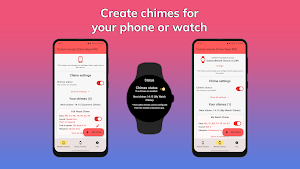
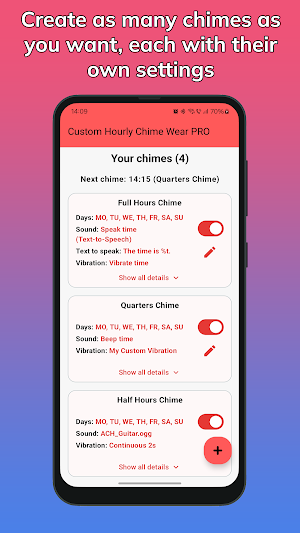
● Create multiple chimes for your mobile device.
● Create multiple chimes for any Wear OS watch you have.
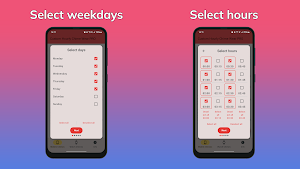
● Choose specific days and hours for each chime, split into 15-minute intervals (:00, :15, :30, :45).
● Set custom sounds and vibrations for each chime.
● Use your own audio files as the sound for the chimes.
● Create your own vibration patterns.
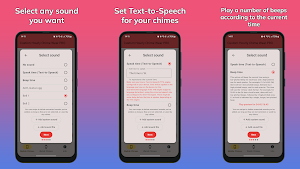
● Set Text-to-Speech as the sound for your chimes, to read out loud the current time. You can also configure the text that is spoken.
● Create chimes that "beep the time" or "vibrate the time", meaning that they play a number of beeps or vibrations corresponding to the current hour, followed by shorter beeps or vibrations corresponding to the number of quarters that passed in the current hour. Useful for staying aware of the time without looking at your device!
● Get notifications about the next chime that will play.
The chimes you create can be for your mobile device or for any connected Wear OS watch. Each device can have its own independent chimes!
When using the app for your watch, kindly note that the app is intended only for Wear OS smartwatches and you also need to install the watch version of the app. The watch version will play the chimes you configure for your watch in the mobile app, and allows you to turn on or off the chimes.
Some of the app's features, such as Text-to-Speech, or watch chimes, are available only in the PRO Version of the app. However, you can test the watch chimes feature for free, for a few hours after installation.
Please contact us if you have any questions or difficulties with the app. We respond as soon as possible.
Perfect for boosting productivity, time management, or just staying mindful of the passing hours! ⏰
✨With this app, you can:
● Create multiple chimes for your mobile device.
● Create multiple chimes for any Wear OS watch you have.
● Choose specific days and hours for each chime, split into 15-minute intervals (:00, :15, :30, :45).
● Set custom sounds and vibrations for each chime.
● Use your own audio files as the sound for the chimes.
● Create your own vibration patterns.
● Set Text-to-Speech as the sound for your chimes, to read out loud the current time. You can also configure the text that is spoken.
● Create chimes that "beep the time" or "vibrate the time", meaning that they play a number of beeps or vibrations corresponding to the current hour, followed by shorter beeps or vibrations corresponding to the number of quarters that passed in the current hour. Useful for staying aware of the time without looking at your device!
● Get notifications about the next chime that will play.
The chimes you create can be for your mobile device or for any connected Wear OS watch. Each device can have its own independent chimes!
When using the app for your watch, kindly note that the app is intended only for Wear OS smartwatches and you also need to install the watch version of the app. The watch version will play the chimes you configure for your watch in the mobile app, and allows you to turn on or off the chimes.
Some of the app's features, such as Text-to-Speech, or watch chimes, are available only in the PRO Version of the app. However, you can test the watch chimes feature for free, for a few hours after installation.
Please contact us if you have any questions or difficulties with the app. We respond as soon as possible.
What’s new
Version 1.3.1 · Updated January 11, 2026
1. Added a switch for disabling the appearance of chimes as alarms, on certain devices. 2. Added a switch for playing a phone chime only if the watch is disconnected, or a watch chime only if the phone is disconnected. 3. You can now reorder your chimes by long-pressing and dragging them to a new position. 4. Minor UI improvements.
User reviews

works like a charm ! thank you
Alternatives to Custom Hourly Chime Wear
Looking for apps like Custom Hourly Chime Wear? Here are 2 similar Android apps on Google Play. The highest rated is Custom Wear Notifications (3.5/5), and all 2 are free to download.


| App | Rating | Price | Installs | Last updated | Compare |
|---|---|---|---|---|---|
| Custom Hourly Chime Wear | 4.2 / 5 | Free | 5,000+ | Jan 11, 2026 | |
| Custom Wear Notifications | 3.5 / 5 | Free | 10,000+ | Jan 14, 2026 | Compare |
| Ticking Sound Wear | – | Free | 1,000+ | Feb 1, 2026 | Compare |