
Action Dot: Assistive Touch
Tools In-app purchases Contains ads
Floating assistive touch button for quick apps, shortcuts, flashlight, and more.
- Rating
- 4.6
- 1.1K ratings
- Downloads
- 110K+
- on Google Play
- Price
- Free
- In-app purchases
- Updated
- Sep 10
- 2026 · v1.1.9
Screenshots
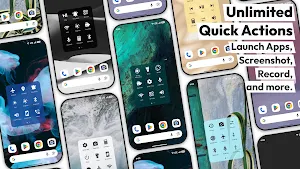
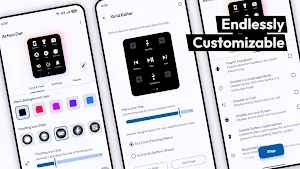
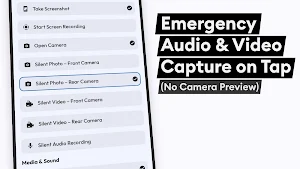
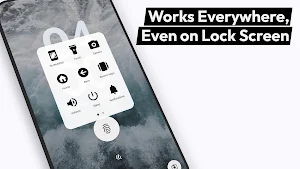


About Action Dot: Assistive Touch
With Action Dot: Assistive Touch, you get a floating button / quick ball that gives you shortcuts and controls on any screen. Tap, double tap or long press the dot to run actions in seconds – no more hunting through menus or pressing physical buttons again and again.
Simplify your daily interactions, protect your hardware buttons and boost multitasking with this floating assistive touch app.
Key Features of Action Dot: Assistive Touch
• 🎥 Screen Recording: Start or stop screen recording from the floating dot.
• 📸 Screenshot Capture: Take screenshots in one tap, reducing wear on power + volume keys.
• 📷 Camera Shortcuts: Open camera or jump straight to front / back capture with no camera preview.
• 🎙️ Audio Recording: Record voice notes, meetings or ideas instantly.
• 🔦 Flashlight: Turn torch on or off from the assistive touch menu.
• 🔒 Screen Off: Lock the screen without pressing the power button.
Smart Navigation & System Controls
• ⏹️ Home & Back Button: Use the assistive dot as soft Home / Back keys.
• 🧩 Recent Apps: Open recent apps and switch tasks quickly.
• 🔝 Scroll to Top / Bottom: Jump in long chats, feeds and webpages with a tap.
• 📲 Notification & Quick Settings: Expand notification shade or quick settings.
• ↔️ Screen Rotation: Toggle auto-rotate for videos, games and reading.
• 📴 Power Menu: Open the power / global actions menu in one touch.
Apps, Shortcuts & Tools
• 📱 Favorite Apps: Pin most used apps – chats, games, camera, calculator, UPI & payment apps.
• ⭐ Recent / Most Used: Let Action Dot show your recent or frequently used apps.
• 🔢 Calculator: Launch calculator from any screen.
• 📞 Speed Dial: Call favorite or emergency contacts with a single tap.
• 🔎 QR & Barcode Scanner: Scan QR codes and barcodes from the floating menu.
Quick Toggles & Controls
• 📶 Wi-Fi & 📡 Bluetooth: Turn Wi-Fi or Bluetooth on/off without opening settings.
• ✈️ Airplane Mode: Jump to airplane mode settings (Android dependent).
• 📍 Location: Quickly access location / GPS settings.
• 🌞 Brightness: Adjust brightness or switch preset levels.
• 🔔 Sound / Vibrate / Silent: Toggle ringer modes or Do Not Disturb.
• 🎵 Music Controls: Play, pause, next and previous track.
Why You’ll Love Action Dot
• 🖐️ One-handed control: Place the floating dot anywhere for easy reach.
• 🛡️ Protect buttons: Reduce usage of power, volume and home keys.
• ⚡ Faster multitasking: Open apps, toggles and tools without leaving your screen.
• 🎨 Customizable menu: Change size, position and actions of the assistive touch dot.
• 🧼 Clean UI: Floating menu with powerful shortcuts.
• 🔋 Battery friendly: Optimized to run in the background.
Accessibility Service API Disclosure
Action Dot: Assistive Touch uses the Android Accessibility Service API to:
• Display an assistive touch floating overlay (dot / quick ball) above other apps.
• Perform shortcuts like Home, Back, recent apps and opening panels on your behalf.
• Help users with one-handed navigation and easier access to system controls.
The Accessibility Service is only used to provide assistive touch and floating shortcut features. No keystrokes, passwords, messages or personal data are read or stored.
Accessibility privileges are required solely to enable the overlay and execute your chosen actions safely.
Simplify your daily interactions, protect your hardware buttons and boost multitasking with this floating assistive touch app.
Key Features of Action Dot: Assistive Touch
• 🎥 Screen Recording: Start or stop screen recording from the floating dot.
• 📸 Screenshot Capture: Take screenshots in one tap, reducing wear on power + volume keys.
• 📷 Camera Shortcuts: Open camera or jump straight to front / back capture with no camera preview.
• 🎙️ Audio Recording: Record voice notes, meetings or ideas instantly.
• 🔦 Flashlight: Turn torch on or off from the assistive touch menu.
• 🔒 Screen Off: Lock the screen without pressing the power button.
Smart Navigation & System Controls
• ⏹️ Home & Back Button: Use the assistive dot as soft Home / Back keys.
• 🧩 Recent Apps: Open recent apps and switch tasks quickly.
• 🔝 Scroll to Top / Bottom: Jump in long chats, feeds and webpages with a tap.
• 📲 Notification & Quick Settings: Expand notification shade or quick settings.
• ↔️ Screen Rotation: Toggle auto-rotate for videos, games and reading.
• 📴 Power Menu: Open the power / global actions menu in one touch.
Apps, Shortcuts & Tools
• 📱 Favorite Apps: Pin most used apps – chats, games, camera, calculator, UPI & payment apps.
• ⭐ Recent / Most Used: Let Action Dot show your recent or frequently used apps.
• 🔢 Calculator: Launch calculator from any screen.
• 📞 Speed Dial: Call favorite or emergency contacts with a single tap.
• 🔎 QR & Barcode Scanner: Scan QR codes and barcodes from the floating menu.
Quick Toggles & Controls
• 📶 Wi-Fi & 📡 Bluetooth: Turn Wi-Fi or Bluetooth on/off without opening settings.
• ✈️ Airplane Mode: Jump to airplane mode settings (Android dependent).
• 📍 Location: Quickly access location / GPS settings.
• 🌞 Brightness: Adjust brightness or switch preset levels.
• 🔔 Sound / Vibrate / Silent: Toggle ringer modes or Do Not Disturb.
• 🎵 Music Controls: Play, pause, next and previous track.
Why You’ll Love Action Dot
• 🖐️ One-handed control: Place the floating dot anywhere for easy reach.
• 🛡️ Protect buttons: Reduce usage of power, volume and home keys.
• ⚡ Faster multitasking: Open apps, toggles and tools without leaving your screen.
• 🎨 Customizable menu: Change size, position and actions of the assistive touch dot.
• 🧼 Clean UI: Floating menu with powerful shortcuts.
• 🔋 Battery friendly: Optimized to run in the background.
Accessibility Service API Disclosure
Action Dot: Assistive Touch uses the Android Accessibility Service API to:
• Display an assistive touch floating overlay (dot / quick ball) above other apps.
• Perform shortcuts like Home, Back, recent apps and opening panels on your behalf.
• Help users with one-handed navigation and easier access to system controls.
The Accessibility Service is only used to provide assistive touch and floating shortcut features. No keystrokes, passwords, messages or personal data are read or stored.
Accessibility privileges are required solely to enable the overlay and execute your chosen actions safely.
What’s new
Version 1.1.9 · Updated September 10, 2026
We’re always making changes and improvements to Action Dot. Keep your updates turned on to ensure you don’t miss a thing.
User reviews

it's a very good app there is no ads idk how I love how the dot is u can press the dot and press what u want I rate it 1000 tysm for the creator and ty for the likes

i like this

wow

how can we record?

my favourite app 🥳
It's amazing. I like how easy it's to use this app.
Alternatives to Action Dot: Assistive Touch
Looking for apps like Action Dot: Assistive Touch? Here are 6 similar Android apps on Google Play. The highest rated is Action Notch: Touch The Notch (4.7/5), and all 6 are free to download.
-
AmpereFlow: Battery Speed, AOD 4.5
-
Playback: background play 4.3
-
Night Screen: Ultra Dim Mode 4.1
-
Flow Equalizer: Bass Booster 4.7
-
Action Notch: Touch The Notch 4.7
-
AOD Flow: Always On Display 4.5
| App | Rating | Price | Installs | Last updated | Compare |
|---|---|---|---|---|---|
| Action Dot: Assistive Touch | 4.6 / 5 | Free | 100,000+ | Sep 10, 2026 | |
| AmpereFlow: Battery Speed, AOD | 4.5 / 5 | Free | 5,000,000+ | Sep 21, 2026 | Compare |
| Playback: background play | 4.3 / 5 | Free | 1,000,000+ | Sep 22, 2026 | Compare |
| Night Screen: Ultra Dim Mode | 4.1 / 5 | Free | 500,000+ | – | Compare |
| Flow Equalizer: Bass Booster | 4.7 / 5 | Free | 1,000,000+ | Aug 30, 2026 | Compare |
| Action Notch: Touch The Notch | 4.7 / 5 | Free | 1,000,000+ | Sep 16, 2026 | Compare |
| AOD Flow: Always On Display | 4.5 / 5 | Free | 1,000,000+ | Sep 15, 2026 | Compare |