

nfcGuard - NFC Focus Lock
Productivity
Block distracting apps. Unlock them only by tapping a physical NFC tag.
- Downloads
- 1K+
- on Google Play
- Price
- Free
- No in-app purchases
- Updated
- Sep 20
- 2026 · v1.2.3
Screenshots


About nfcGuard - NFC Focus Lock
NFCGUARD — DIGITAL WELLBEING WITH PHYSICAL FRICTION
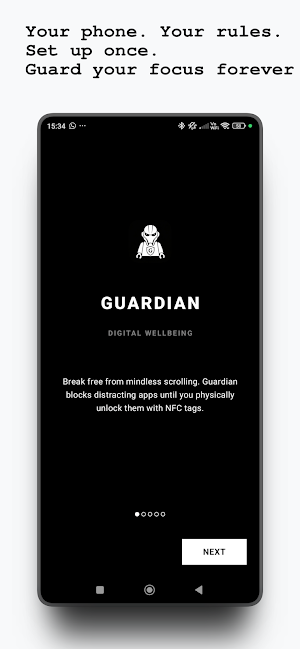
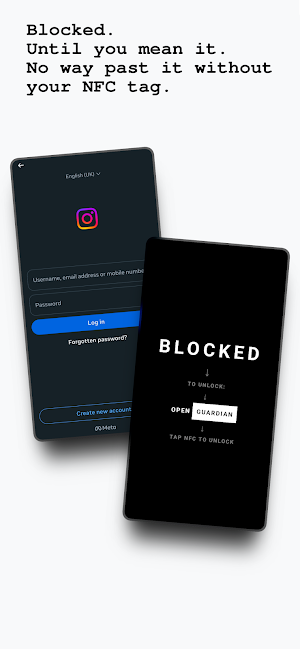
Break the cycle of mindless scrolling. nfcGuard blocks access to distracting
apps and requires you to physically tap an NFC tag to unlock them — making
you pause and think before picking up your phone.
━━━ HOW IT WORKS ━━━
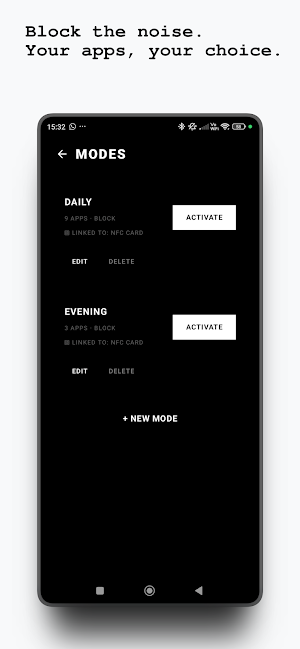
1. Create a blocking mode and select apps to block (or apps to allow)
2. Optionally link a physical NFC tag as the unlock key
3. Optionally set a schedule to auto-activate at specific times
4. Tap your NFC tag — placed somewhere inconvenient — to regain access
The physical act of walking to your NFC tag is the whole point.
Place it in your kitchen, gym bag, or a friend's house. You'll think
twice before mindlessly opening Instagram or TikTok.
━━━ FEATURES ━━━
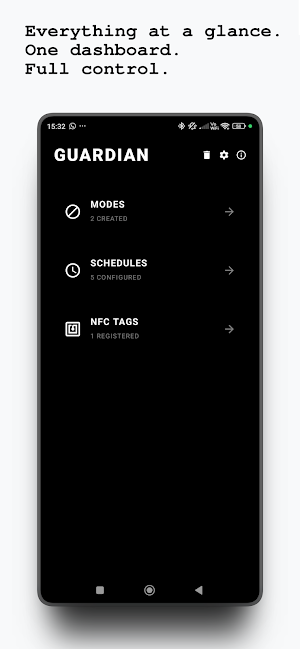
▸ BLOCK MODE — Block specific distracting apps while everything else works
▸ ALLOW MODE — Block everything except a whitelist of essential apps
▸ NFC LOCKS — Require a specific NFC tag to deactivate a mode
▸ SCHEDULES — Auto-activate modes on specific days and time ranges
▸ PERSISTENT — Survives reboots, app restarts, and battery optimization
▸ EXPORT / IMPORT — Back up your configuration in JSON or YAML
▸ EMERGENCY RESET — Lost your NFC tag? A timed safety flow removes it
▸ NO INTERNET — Works fully offline. No accounts, no tracking, no ads
━━━ ACCESSIBILITY SERVICE DISCLOSURE ━━━
nfcGuard uses the Android AccessibilityService API solely to detect which
app is currently in the foreground. This is necessary because the standard
UsageStatsManager API does not reliably report foreground app transitions
on certain devices, including Pixel and Samsung phones. The Accessibility
Service only monitors window-change events to identify the current app.
It does NOT read screen content, text fields, user input, passwords, or
any personal data. No data is collected, transmitted, or shared. This
service is used exclusively to support the core app-blocking functionality.
━━━ PRIVACY ━━━
nfcGuard collects zero data. No analytics, no servers, no network requests.
Everything stays on your device. Full privacy policy on our website.
━━━ OPEN SOURCE ━━━
nfcGuard is free and open source. Contributions are welcome on GitHub.
━━━ REQUIREMENTS ━━━
▸ Android 8.0 or higher
▸ NFC hardware (required for NFC unlock features)
▸ Usage Access, Accessibility Service, Display Over Apps, and Battery Optimization permissions
Break the cycle of mindless scrolling. nfcGuard blocks access to distracting
apps and requires you to physically tap an NFC tag to unlock them — making
you pause and think before picking up your phone.
━━━ HOW IT WORKS ━━━
1. Create a blocking mode and select apps to block (or apps to allow)
2. Optionally link a physical NFC tag as the unlock key
3. Optionally set a schedule to auto-activate at specific times
4. Tap your NFC tag — placed somewhere inconvenient — to regain access
The physical act of walking to your NFC tag is the whole point.
Place it in your kitchen, gym bag, or a friend's house. You'll think
twice before mindlessly opening Instagram or TikTok.
━━━ FEATURES ━━━
▸ BLOCK MODE — Block specific distracting apps while everything else works
▸ ALLOW MODE — Block everything except a whitelist of essential apps
▸ NFC LOCKS — Require a specific NFC tag to deactivate a mode
▸ SCHEDULES — Auto-activate modes on specific days and time ranges
▸ PERSISTENT — Survives reboots, app restarts, and battery optimization
▸ EXPORT / IMPORT — Back up your configuration in JSON or YAML
▸ EMERGENCY RESET — Lost your NFC tag? A timed safety flow removes it
▸ NO INTERNET — Works fully offline. No accounts, no tracking, no ads
━━━ ACCESSIBILITY SERVICE DISCLOSURE ━━━
nfcGuard uses the Android AccessibilityService API solely to detect which
app is currently in the foreground. This is necessary because the standard
UsageStatsManager API does not reliably report foreground app transitions
on certain devices, including Pixel and Samsung phones. The Accessibility
Service only monitors window-change events to identify the current app.
It does NOT read screen content, text fields, user input, passwords, or
any personal data. No data is collected, transmitted, or shared. This
service is used exclusively to support the core app-blocking functionality.
━━━ PRIVACY ━━━
nfcGuard collects zero data. No analytics, no servers, no network requests.
Everything stays on your device. Full privacy policy on our website.
━━━ OPEN SOURCE ━━━
nfcGuard is free and open source. Contributions are welcome on GitHub.
━━━ REQUIREMENTS ━━━
▸ Android 8.0 or higher
▸ NFC hardware (required for NFC unlock features)
▸ Usage Access, Accessibility Service, Display Over Apps, and Battery Optimization permissions
What’s new
Version 1.2.3 · Updated September 20, 2026
New app Icon -FRESH.
User reviews

Works really well in stopping unintentional app usage.

So good

I never post on apps, but this is the best and most powerful one I've found, and it's totally free! Thank you very much! Guardian Galaxy keeps my phone safe from distractions, haha!

great app, works great, but I think that it could be a bit confusing to set up with the two modes etc. but works great overall, i use it with an nfc chip, which I put in another room, to deny myself the access to social media

simple and clear and just works. no data collected.
Alternatives to nfcGuard - NFC Focus Lock
Looking for apps like nfcGuard - NFC Focus Lock? Here is 1 similar Android app on Google Play.

| App | Rating | Price | Installs | Last updated | Compare |
|---|---|---|---|---|---|
| nfcGuard - NFC Focus Lock | – | Free | 1,000+ | Sep 20, 2026 | |
| Awareen - ScreenTime Awareness | – | Free | 100+ | Oct 7, 2026 | Compare |