
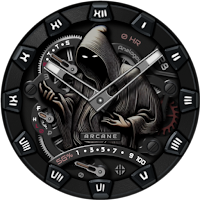
Arcane : Classic Watch Face
Personalization
Ultra Realistic classic watch face with customizable classic skeleton design.
- Downloads
- 157+
- on Google Play
- Price
- $1.49
- No in-app purchases
- Updated
- Oct 17
- 2025
Screenshots
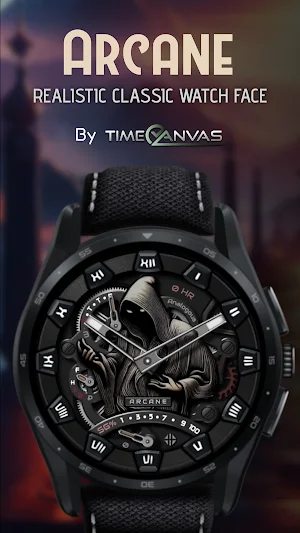
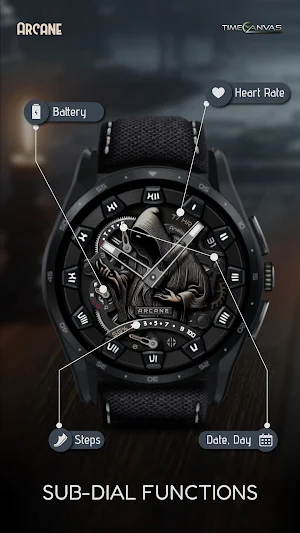
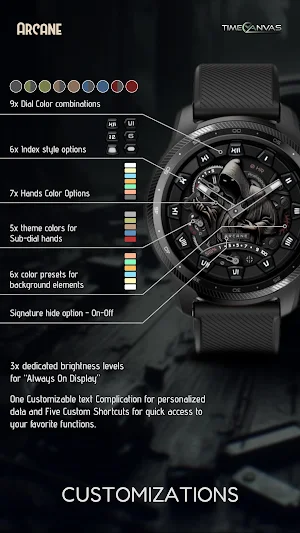
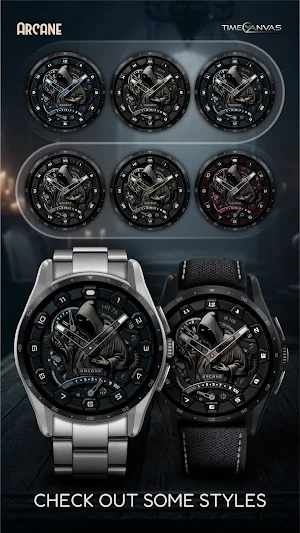


About Arcane : Classic Watch Face
Unveil the Dark Side of Luxury with The Arcane – a realistic classic watch face. A perfect fusion of eerie aesthetics and refined craftsmanship, featuring a lifelike skeleton design. Step into the realm of dark elegance and elevate your style with every glance.
Features
Analog Daily Step Goal Counter
Digital Heart Rate Counter
Analog Battery Level Indicator
Low Battery Alert
Day of the Week and Date Display
Always-On Display: 3 Brightness Levels
Customizable Options
6 Index Styles
9 Dial Color Styles
7 Hand Color Options
1 Custom Complication
5 Custom Shortcuts
How to Customize:
To customize your watch face, touch and hold the screen, then tap Customize (or the settings/edit icon specific to your watch brand). Swipe left and right to browse customization options, and swipe up and down to select styles from the available custom options.
How to Set Custom Complications and Shortcuts:
To set custom complications and shortcuts, touch and hold the screen, then tap Customize (or the settings/edit icon specific to your watch brand). Swipe left until you reach "Complications," then tap on the highlighted area for the complication or shortcut you want to set up.
Compatibility:
This watch face is designed for Wear OS devices running on Wear OS API 30 or higher, including the Samsung Galaxy Watch 4, 5, 6, and 7, as well as other supported Samsung Wear OS watches, TicWatch, Pixel Watches, and other Wear OS-compatible models from various brands.
If you encounter any issues during installation, even with a compatible smartwatch, please refer to the detailed instructions in the companion app. For further assistance, feel free to reach out to us at [email protected] or [email protected].
Note: The phone app serves as a companion to assist you in installing and locating the watch face on your Wear OS watch. You can choose your watch device from the installation drop-down menu and install the watch face directly on your watch. The companion app also offers details about the watch face features and installation instructions. If you no longer need it, you can uninstall the companion app from your phone at any time.
If you like our designs, don’t forget to check out our other watch faces, with more coming soon to Wear OS! For quick help, feel free to email us. Your feedback on the Google Play Store means a lot to us—let us know what you love, what we can improve, or any suggestions you have. We’re always excited to hear your design ideas!
Features
Analog Daily Step Goal Counter
Digital Heart Rate Counter
Analog Battery Level Indicator
Low Battery Alert
Day of the Week and Date Display
Always-On Display: 3 Brightness Levels
Customizable Options
6 Index Styles
9 Dial Color Styles
7 Hand Color Options
1 Custom Complication
5 Custom Shortcuts
How to Customize:
To customize your watch face, touch and hold the screen, then tap Customize (or the settings/edit icon specific to your watch brand). Swipe left and right to browse customization options, and swipe up and down to select styles from the available custom options.
How to Set Custom Complications and Shortcuts:
To set custom complications and shortcuts, touch and hold the screen, then tap Customize (or the settings/edit icon specific to your watch brand). Swipe left until you reach "Complications," then tap on the highlighted area for the complication or shortcut you want to set up.
Compatibility:
This watch face is designed for Wear OS devices running on Wear OS API 30 or higher, including the Samsung Galaxy Watch 4, 5, 6, and 7, as well as other supported Samsung Wear OS watches, TicWatch, Pixel Watches, and other Wear OS-compatible models from various brands.
If you encounter any issues during installation, even with a compatible smartwatch, please refer to the detailed instructions in the companion app. For further assistance, feel free to reach out to us at [email protected] or [email protected].
Note: The phone app serves as a companion to assist you in installing and locating the watch face on your Wear OS watch. You can choose your watch device from the installation drop-down menu and install the watch face directly on your watch. The companion app also offers details about the watch face features and installation instructions. If you no longer need it, you can uninstall the companion app from your phone at any time.
If you like our designs, don’t forget to check out our other watch faces, with more coming soon to Wear OS! For quick help, feel free to email us. Your feedback on the Google Play Store means a lot to us—let us know what you love, what we can improve, or any suggestions you have. We’re always excited to hear your design ideas!
What’s new
Updated October 17, 2025
General performance and stability enhancements for companion app.
Alternatives to Arcane : Classic Watch Face
Looking for apps like Arcane : Classic Watch Face? Here are 6 similar Android apps on Google Play. 3 of the 6 are free to download.
-
Ebon Basic - Hybrid Watch Face
-
Vortex : Hybrid Watch Face
-
Minimal Ebon Hybrid Watch Face
-
Cryo - Classic Watch Face
-
FiberChron : Hybrid Watch Face
-
ElariaChron: Luxury Watch Face
| App | Rating | Price | Installs | Last updated | Compare |
|---|---|---|---|---|---|
| Arcane : Classic Watch Face | – | $1.49 | 100+ | Oct 17, 2025 | |
| Ebon Basic - Hybrid Watch Face | – | Free | 1,000+ | Jul 31, 2024 | Compare |
| Vortex : Hybrid Watch Face | – | Free | 100+ | May 11, 2025 | Compare |
| Minimal Ebon Hybrid Watch Face | – | Free | 10,000+ | Oct 27, 2025 | Compare |
| Cryo - Classic Watch Face | – | 1.49 USD | 50+ | – | Compare |
| FiberChron : Hybrid Watch Face | – | 1.49 USD | 500+ | Oct 5, 2026 | Compare |
| ElariaChron: Luxury Watch Face | – | 1.49 USD | 100+ | Oct 19, 2025 | Compare |
Similar apps on Google Play
- Ebon Basic - Hybrid Watch Face
- Vortex : Hybrid Watch Face
- Minimal Ebon Hybrid Watch Face
- Cryo - Classic Watch Face
- FiberChron : Hybrid Watch Face
- ElariaChron: Luxury Watch Face
- Elaria : Luxury Watch Face
- Auris - Hybrid Watch Face
- Time Canvas Watch Faces
- Venture - Digital Watch Face
- Arcane H - Luxury Watch Face
- AquaTimer - Diver Watch Face
- AQVOS: Modern Diver Watch Face
- Viron - Hybrid Watch Face
- TC013-DD - Digital Watch Face
- TC012-DD - Digital Watch Face
- Explorer World Time Watch Face
- Fusion - Hybrid Watch Face
- Accutime - Hybrid Watch Face
- Heritage - Classic Watch Face
- Solis Luxury Watch Face
- Arcane : Classic Watch Face
- Classic Luxury Moon Watch Face