
Multi Picture Wallpaper
Personalization
Wallon can use multiple picture to set different wallpapers for each screen
- Rating
- 4.0
- 32 ratings
- Downloads
- 1K+
- on Google Play
- Price
- Free
- No in-app purchases
- Updated
- May 17
- 2025 · v2.0.15
Screenshots
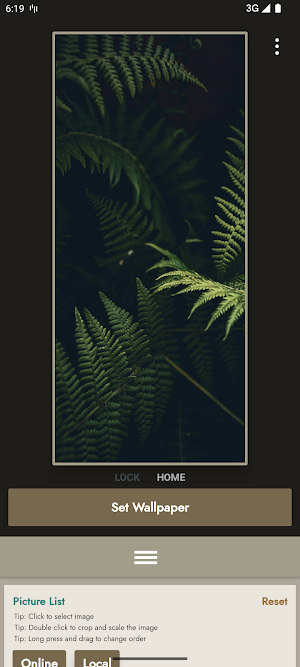
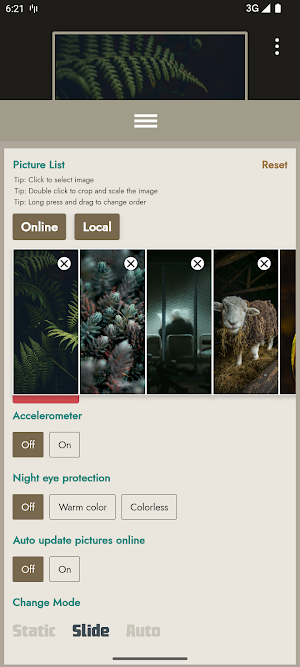
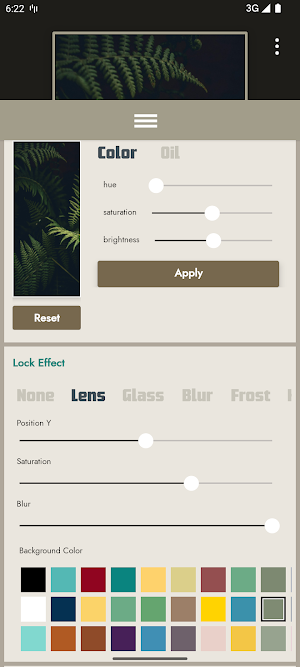
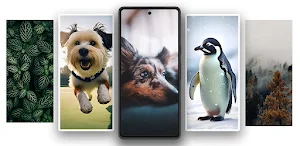
About Multi Picture Wallpaper
Wallon not only allows you to set different wallpapers for each screen with multiple photos, but also provides various image switching effects.
Features:
1. Set different wallpapers for each screen and switch wallpapers by sliding.
2. Offers various wallpaper transition effects and post-processing effects.
3. Choose your favorite wallpapers from your phone's storage.
4. Provides lock screen and home screen wallpaper transition animations.
5. More effects and settings (coming in the next version).
How to Set Up:
1. Set Wallpaper: Click the "Set Wallpaper" button to enter the wallpaper preview and set it as your wallpaper.
2. Apply Wallpaper: When you modify transition effects or wallpaper content, click the "Apply" button to apply the changes.
3. Stop Wallpaper: If you want to stop Wallon Multiple Wallpaper, click the "Stop" button to disable the wallpaper.
Device Compatibility:
These phones may not be able to detect screen positions via home screen sliding, which may prevent setting specific wallpapers for each page: Galaxy, HUAWEI
These phones can detect screen positions and support fixed wallpapers per screen: Pixel, Xperia, Xiaomi, OPPO
Other: If you enjoy this app, please consider leaving a positive review. For any suggestions or feature requests, feel free to contact us via email: [email protected].
Stay tuned for more exciting features!
Features:
1. Set different wallpapers for each screen and switch wallpapers by sliding.
2. Offers various wallpaper transition effects and post-processing effects.
3. Choose your favorite wallpapers from your phone's storage.
4. Provides lock screen and home screen wallpaper transition animations.
5. More effects and settings (coming in the next version).
How to Set Up:
1. Set Wallpaper: Click the "Set Wallpaper" button to enter the wallpaper preview and set it as your wallpaper.
2. Apply Wallpaper: When you modify transition effects or wallpaper content, click the "Apply" button to apply the changes.
3. Stop Wallpaper: If you want to stop Wallon Multiple Wallpaper, click the "Stop" button to disable the wallpaper.
Device Compatibility:
These phones may not be able to detect screen positions via home screen sliding, which may prevent setting specific wallpapers for each page: Galaxy, HUAWEI
These phones can detect screen positions and support fixed wallpapers per screen: Pixel, Xperia, Xiaomi, OPPO
Other: If you enjoy this app, please consider leaving a positive review. For any suggestions or feature requests, feel free to contact us via email: [email protected].
Stay tuned for more exciting features!
What’s new
Version 2.0.15 · Updated May 17, 2025
Fix: Crash
User reviews
this great app ,but some time force close when add image to slide

Really cool, better than other apk multiple wallpaper i am really excited to get a new update, edit: its works for hyperOS/POCO, thank you so much for the hard work

Does what it describes works great with my Google pixel pro 9 XL.
Alternatives to Multi Picture Wallpaper
Looking for apps like Multi Picture Wallpaper? Here are 2 similar Android apps on Google Play. The highest rated is DockWalls - Generate Dock Bar (4.6/5), and all 2 are free to download.

| App | Rating | Price | Installs | Last updated | Compare |
|---|---|---|---|---|---|
| Multi Picture Wallpaper | 4.0 / 5 | Free | 1,000+ | May 17, 2025 | |
| DockWalls - Generate Dock Bar | 4.6 / 5 | Free | 1,000,000+ | Oct 17, 2026 | Compare |
| Lim Grass:Live Wallpaper | – | Free | 1,000+ | Oct 6, 2024 | Compare |