
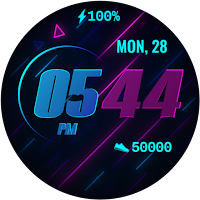
Pixel Beam - watch face
Personalization
Pixel Beam: neon energy with sharp stats
- Downloads
- 418+
- on Google Play
- Price
- $1.99
- No in-app purchases
- Updated
- Oct 20
- 2026
Screenshots


About Pixel Beam - watch face
IMPORTANT:
The watch face may take some time to appear, sometimes more than 15 minutes, depending on your watch's connectivity. If it doesn’t show up immediately, it is recommended to search for the watch face directly in the Play Store on your watch.
Pixel Beam brings a bold neon aesthetic to your wrist. With glowing gradients, crisp digital time, and dynamic background elements, this face combines retro-futuristic style with functional stats.
Stay on track with visible battery percentage, daily step count, and date info—plus a customizable widget slot (empty by default) for added flexibility. Designed for easy readability and optimized for Wear OS with Always-On Display support.
Whether you're powering through the day or winding down, Pixel Beam keeps your essentials glowing.
Key Features:
⏱ Digital Time – Bold hour and minute split in contrasting neon
🔋 Battery % – Charge level displayed at the top
🚶 Steps – Daily step count with sneaker icon
📆 Date & Day – Clean weekday and date display
🔧 Custom Widget – One editable slot (empty by default)
🎇 Animated Neon Style – Futuristic background with glowing details
✨ Always-On Display – Minimal AOD for quick time checks
✅ Wear OS Optimized – Responsive, efficient performance
The watch face may take some time to appear, sometimes more than 15 minutes, depending on your watch's connectivity. If it doesn’t show up immediately, it is recommended to search for the watch face directly in the Play Store on your watch.
Pixel Beam brings a bold neon aesthetic to your wrist. With glowing gradients, crisp digital time, and dynamic background elements, this face combines retro-futuristic style with functional stats.
Stay on track with visible battery percentage, daily step count, and date info—plus a customizable widget slot (empty by default) for added flexibility. Designed for easy readability and optimized for Wear OS with Always-On Display support.
Whether you're powering through the day or winding down, Pixel Beam keeps your essentials glowing.
Key Features:
⏱ Digital Time – Bold hour and minute split in contrasting neon
🔋 Battery % – Charge level displayed at the top
🚶 Steps – Daily step count with sneaker icon
📆 Date & Day – Clean weekday and date display
🔧 Custom Widget – One editable slot (empty by default)
🎇 Animated Neon Style – Futuristic background with glowing details
✨ Always-On Display – Minimal AOD for quick time checks
✅ Wear OS Optimized – Responsive, efficient performance
Alternatives to Pixel Beam - watch face
Looking for apps like Pixel Beam - watch face? Here are 6 similar Android apps on Google Play. The highest rated is Orbit Time (4.6/5), and 2 of the 6 are free to download.
-
Watch Face Manager 4.6
-
Color Ribbon - watch face
-
Color Flow - watch face
-
Moonlight Classic
-
Electronic Time - watch face
-
Orbit Time 4.6
| App | Rating | Price | Installs | Last updated | Compare |
|---|---|---|---|---|---|
| Pixel Beam - watch face | – | $1.99 | 100+ | Oct 20, 2026 | |
| Watch Face Manager | 4.6 / 5 | Free | 100,000+ | Oct 26, 2026 | Compare |
| Color Ribbon - watch face | – | 0.99 USD | 500+ | Dec 4, 2025 | Compare |
| Color Flow - watch face | – | 0.99 USD | 1,000+ | Oct 21, 2026 | Compare |
| Moonlight Classic | – | 0.99 USD | 5,000+ | Oct 23, 2026 | Compare |
| Electronic Time - watch face | – | 0.99 USD | 500+ | Oct 17, 2026 | Compare |
| Orbit Time | 4.6 / 5 | Free | 50,000+ | – | Compare |