
GroqBoard
Alex Goldberg Productivity In-app purchases
Groq AI voice keyboard for phone & Wear OS - Speak naturally, get instant text.
- Downloads
- 1.7K+
- on Google Play
- Price
- Free
- In-app purchases
- Updated
- Sep 10
- 2026
Screenshots
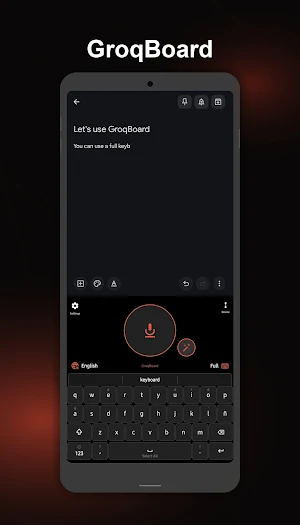


About GroqBoard
Speak, type, or swipe. GroqBoard combines blazing-fast voice dictation, a full QWERTY keyboard, a floating mic bubble, and smart AI predictions into one keyboard, all powered by Groq, the world's fastest AI inference.
Try it free for 7 days. Unlock forever for a one-time payment.
PHONE FEATURES
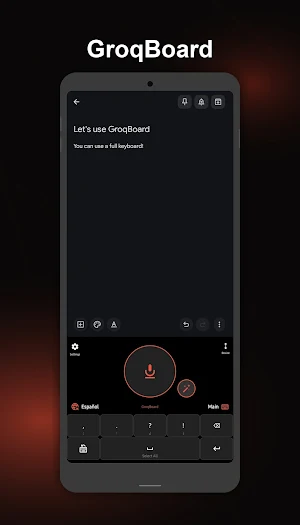
🎙️ Voice Typing - Instant & Accurate: Tap the big mic button and speak. Your words appear instantly using Groq's Whisper Large V3, the most accurate speech-to-text model available. Works in any app, any text field.
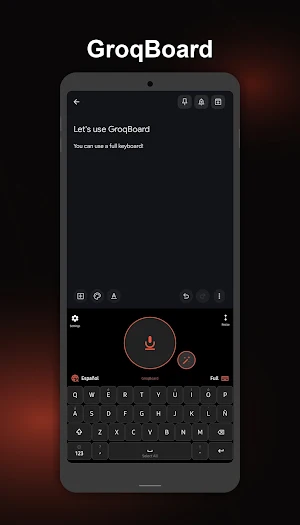
⌨️ Full QWERTY + Swipe Typing: One tap to switch between voice and keyboard mode. Swipe to type with spatial path matching that finds the right word even through gaps. Emoji keyboard included.
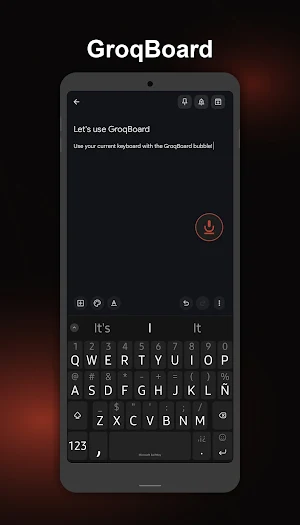
🫧 Floating Bubble - Dictate Anywhere.
A floating mic bubble appears whenever you focus on a text field. Dictate without switching keyboards. Drag it anywhere, tap to record, and tap again to stop. Shake your phone to restore if dismissed. Long-press for AI voice editing.
✨ AI Voice Editing - Edit with Your Voice. Press the magic wand and speak your edit: "Make this more formal," or "Fix the grammar". GroqBoard rewrites the text instantly using Groq's LLM. Works in the keyboard and the bubble.
🧠 Smart Predictions: Next-word suggestions powered by your local history + Groq's LLM. Auto-correct, accent correction, and swipe scoring all work together. The more you type, the smarter it gets.
↕️ Resizable Keyboard: Drag the resize handle to scale the keyboard to your desired height.
🌐 8 Languages: English, Spanish, Portuguese, French, German, Italian, Dutch, and bilingual auto-detection. Set two favorites on the keyboard for instant one-tap switching.
📝 Custom Vocabulary: Add names, technical terms, or slang via Custom Instructions. GroqBoard adapts transcription to your vocabulary automatically.
📊 Train Predictions: Import a .txt file (e.g., WhatsApp chat export) to build a personalized word model. Only your messages are used; everything stays on the device.
WEAR OS FEATURES
⌚ Dictate from your wrist in any app.
🔄 Settings sync automatically from your phone.
🌐 All 8 languages supported.
WHY DOES GROQBOARD USE THE ACCESSIBILITY SERVICE?
GroqBoard uses Android's Accessibility Service exclusively to power the Floating Bubble feature.
• Shows the bubble when you tap a text field; the service detects when a text input is focused, so the bubble appears automatically and hides when you leave it.
• Inserts your dictated text after transcription; it injects your words directly into the focused text field in any app (WhatsApp, Gmail, Notes, etc.).
• Automation support. It responds to commands from apps like MacroDroid to start/stop recording hands-free.
The Accessibility Service does NOT record calls, capture audio in the background, track your activity, or access any personal data. It only reads which text field is currently focused to insert your transcription.
You can disable the Accessibility Service at any time from Android Settings → Accessibility → GroqBoard. The app works without it; the floating bubble will remain visible regardless of which field is focused.
PRIVACY
🔒 Audio is NEVER stored or sent anywhere except Groq's API.
🔒 Recordings are processed instantly and deleted.
🔒 Your API key stays on your device only, never on our servers.
🔒 No ads, no tracking, no data collection.
🔒 Predictions and vocabulary stay 100% on-device.
FREE TRIAL & PRICING
✅ 7-day free trial - no credit card required.
💳 One-time payment to unlock forever - no subscription, ever.
👑 If you purchased GroqBoard before v5.0, you are unlocked forever automatically.
REQUIREMENTS
• Android 5.0+ • Microphone.
• Free Groq API key (get it at console.groq.com; no credit card needed).
• Internet connection for voice transcription and AI features.
• Wear OS 3+ for watch features (optional).
Version 5.0 - Created by Alex Goldberg
Support: [email protected]
https://groqboard.com
What’s new
Updated September 10, 2026
• Fixed: long dictations could vanish with no text and no error. The filter that strips silence artefacts was throwing away real sentences. • Dictation now tells you when nothing was heard, instead of going quiet. • Fixed: the full stop went missing in Gmail and Telegram, and the docked button now applies spoken punctuation and saves to history.
User reviews

Fantastic app! Set up couldn't be easier, that was nice. Got a chance to stress test it for a straight hour and it performed beautifully, exactly what I needed and I love the interface. Dev is great too, I sent off a question and got a nice reply back, gotta love someone who really cares about the app and users! Hig...

It's just what I was looking for to have high quality dictation anywhere without another janky keyboard.
It's great to see Integrated qwerty keyboard. Great app. Are you considering to add more language like Chinese? Thanks!

This keyboard saves your time.
Alternatives to GroqBoard
Looking for apps like GroqBoard? Here are 6 similar Android apps on Google Play. All of them are free to download.




| App | Rating | Price | Installs | Last updated | Compare |
|---|---|---|---|---|---|
| GroqBoard | – | Free | 1,000+ | Sep 10, 2026 | |
| Simple Deadline Tracker | – | Free | 50+ | Oct 5, 2026 | Compare |
| Bee-RP | – | Free | 100+ | Jan 20, 2026 | Compare |
| Yarn Stasher | – | Free | 500+ | Jun 20, 2026 | Compare |
| Refinery at LACS | – | Free | 0+ | Sep 24, 2026 | Compare |
| İGEM | – | Free | 1,000+ | Oct 7, 2026 | Compare |
| Chants d'Esperance & Bible | – | Free | 100+ | Mar 31, 2026 | Compare |
Compare GroqBoard with the top alternatives: ratings, updates, ASO score and keyword gaps →
Similar apps on Google Play
- Simple Deadline Tracker
- Bee-RP
- Yarn Stasher
- Refinery at LACS
- İGEM
- Chants d'Esperance & Bible
- GenScreen Capture
- FieldBrain AI
- Ultra Doc Scanner
- AI Side Panel: Smart Workspace
- Profit Calendar and shifts
- Orbis Monitoring
- Oreate: AI Tutor Research Hint
- FaRe SelfRegistration
- DigiClippy
- Foodboss Rider App
- Ofisu PDF Scan Merge Convert
- 4safe
- Simple FRAT
- Parola Manager
- Tiroler Jagd
- Colaborador CGC
- TeraTeams
- Say hi Translate
- PopMaker – Creator AI Tool