
OpenAny: PDF & Document Reader
Productivity
Read PDF, Word, Excel, PPT & photos offline. No storage permission, no ads.
- Downloads
- 1.1K+
- on Google Play
- Price
- Free
- No in-app purchases
- Updated
- Sep 26
- 2026 · v2.4
Screenshots


About OpenAny: PDF & Document Reader
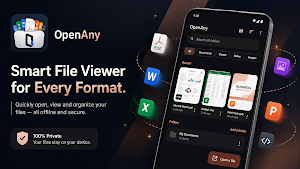
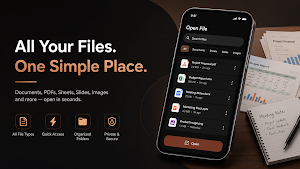
OpenAny is a lightweight, private, and fully offline file viewer for Android. View PDFs, Word documents, Excel spreadsheets, PowerPoint presentations, photos, videos, audio files, archives, EPUB books, Markdown files, text, and source code — all from one simple app.
With a tiny app size of around 4 MB, OpenAny is designed to be fast, simple, and privacy-focused. Your files stay on your device, with no account, advertisements, trackers, analytics, cloud uploads, or internet access required.
WHAT OPENANY CAN VIEW
📄 Documents
• PDF with pinch-to-zoom, text selection, and in-document search
• Word documents (.docx)
• Excel spreadsheets (.xlsx, .xls, .csv, .ods)
• Multi-sheet Excel workbooks with easy sheet navigation
• PowerPoint presentations (.pptx)
• EPUB books with chapter navigation
• Markdown files
• Plain text files
• Source code files
🖼️ Images
• JPG / JPEG
• PNG
• WebP
• HEIC
• GIF
• SVG
• And more
Enjoy deep zoom for high-resolution images, automatic EXIF rotation, and optimized tiled decoding for large photos.
🎬 Video
Play popular video formats including MP4, MKV, WebM, MOV, and more.
Includes picture-in-picture mode, playback speed controls, and resume playback.
🎵 Audio
Play MP3, M4A, FLAC, WAV, OGG, Opus, and more.
Background playback lets your audio continue even when you leave the app.
📦 Archives
Browse ZIP, TAR, and TAR.GZ archives directly inside the app.
Navigate archived files like folders without manually extracting everything first.
🔒 PRIVATE BY DESIGN
Your files are yours.
OpenAny is built with privacy at its core:
• No account or sign-up required
• No advertisements
• No trackers
• No analytics
• No cloud uploads
• No file synchronization
• No internet access required
• No unnecessary storage permission
Files are opened through Android's system file picker or your device's "Open with" functionality.
Your documents remain on your device and are processed locally.
OpenAny does not upload your files to a server or require an online account to view them.
Only the permissions required for media playback may be requested, such as notifications and foreground playback functionality. These permissions do not provide OpenAny with access to your personal files.
⚡ FEATURES
• Recent and starred files with thumbnail previews
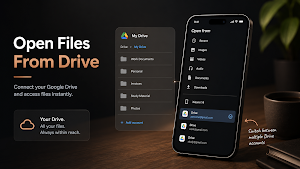
• Browse folders you have granted access to
• Search across accessible folders
• Filter files by type
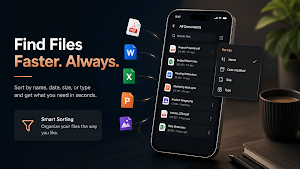
• Sort by name, date, size, or type
• Switch between list and grid views
• Search inside supported documents
• Navigate between search matches
• Resume documents from where you last stopped
• Resume audio and video playback
• Deep zoom for high-resolution images
• Memory-efficient tiled image decoding
• Automatic EXIF image rotation
• Background audio playback
• Picture-in-picture video playback
• Playback speed controls
• Share opened files with other apps
• Quickly open a file's location in your file manager
• Launcher shortcuts for recently opened files
• Two-pane interface for tablets and foldables
• ChromeOS support
• Material 3 interface
• Dynamic colour support
• Dark mode
• Edge-to-edge design
• Android 8.0 and newer support
OpenAny is designed to give you one simple place to view and play your files without unnecessary accounts, cloud services, advertising, or data collection.
Simple. Fast. Private. Offline.
Everything you need to view your files, right on your phone.
What’s new
Version 2.4 · Updated September 26, 2026
What's new in OpenAny 2.5 • Updates now arrive inside the app • Opens more files: OpenDocument (.odt, .odp), .apk, .jar, .cbz, .gz, subtitles and more code files • Font preview, plus a hex view for files that aren't documents • Faster start, smoother scrolling and quicker PDFs • Double-tap to skip 10 seconds in videos, and better picture-in-picture We now collect anonymous usage stats to see which formats to improve next. File names, paths, searches and contents are never sent. No ads.
User reviews

Amazing APP. There are some manufacturers that don't provide such generic preview APP so you have to download a whole bunch of tools to open them. This APP just works for every format I wanted.
Alternatives to OpenAny: PDF & Document Reader
Looking for apps like OpenAny: PDF & Document Reader? Here are 6 similar Android apps on Google Play. All of them are free to download.
-
OneCalc: All-in-One Calculator
-
Inkroad: Draw Physics Puzzle
-
QRino: QR Code Scanner & Maker
-
Loop The Loop: Logic Puzzle
-
PalabraManía – Spanish Game
-
AdLens: AdMob Revenue Tracker
| App | Rating | Price | Installs | Last updated | Compare |
|---|---|---|---|---|---|
| OpenAny: PDF & Document Reader | – | Free | 1,000+ | Sep 26, 2026 | |
| OneCalc: All-in-One Calculator | – | Free | 1+ | Sep 8, 2026 | Compare |
| Inkroad: Draw Physics Puzzle | – | Free | 5+ | – | Compare |
| QRino: QR Code Scanner & Maker | – | Free | 100+ | Sep 7, 2026 | Compare |
| Loop The Loop: Logic Puzzle | – | Free | 10+ | Aug 1, 2026 | Compare |
| PalabraManía – Spanish Game | – | Free | 5+ | Jul 25, 2026 | Compare |
| AdLens: AdMob Revenue Tracker | – | Free | 5+ | Jul 16, 2026 | Compare |