
Volume Control Styles SynEdge
Personalization In-app purchases
Custom animated volume overlay — Skins, themes & zero ads
- Rating
- 4.6
- 831 ratings
- Downloads
- 387K+
- on Google Play
- Price
- Free
- In-app purchases
- Updated
- Oct 15
- 2026 · v1.75
Screenshots

About Volume Control Styles SynEdge
SynEdge replaces Android's default volume panel with a stunning, fully animated overlay. Now featuring Apple-inspired Liquid Glass skins, SynEdge brings next-generation UI design right to your fingertips.
Whether you want a translucent glass aesthetic, a minimal interface, a retro terminal, or a futuristic cyberpunk HUD, SynEdge puts total UI customization in your hands. It is free to install with permanently unlocked core styles—upgrade anytime to access our full premium library!
🌟 WHY CHOOSE SYNEDGE?
Android's built-in volume control is plain, obstructive, and identical on every device. SynEdge is the ultimate volume styles app—a floating sound manager that looks exactly how you want it. It works seamlessly over any app: games, YouTube, Spotify, video calls, and more.
💧LIQUID GLASS — THE FUTURE OF VOLUME UI
SynEdge is one of the first Android apps to bring Apple's iconic Liquid Glass design language to your volume controls. This isn't just a basic blur effect; it's a full multi-layer glass material system featuring:
• Frosted Glass Track: Real backdrop blur (Android 12+) with a soft, clean fallback for older devices.
• Dynamic Specular Sheen: Beautiful highlights that shift as your volume changes.
• Liquid Glass Thumb: Layered highlights, inner glow, and a crisp rim light.
• Fluid Fill Animation: Smooth animations that flow like water inside the track.
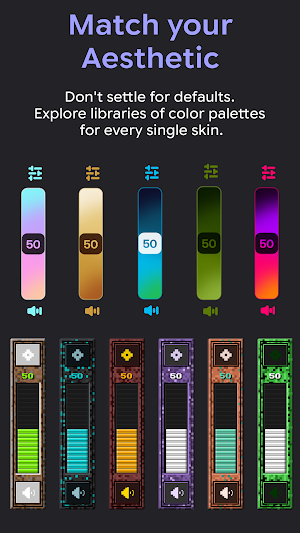
• Custom Themes: Multiple Liquid Glass palettes including Frost, Obsidian, Prism, Aurora, and more.
*(If you've seen the NoVolume-style floating sliders and wanted something more refined and premium—this is it.)*
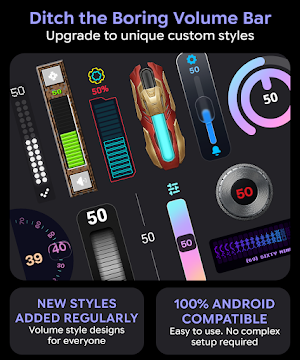
🎨 20+ UNIQUE VOLUME STYLES
Several beautifully crafted skins are permanently free from day one. Upgrade to Pro or Founder to unlock the full library:
• 💧 Liquid Glass (NEW): Apple-inspired multi-layer glass slider with fluid dynamics
• 🌌 Nebula: Aurora mesh-gradient slider with 20 vibrant color palettes
• 🔴 Nothing OS: Minimalist dot-style volume panel
• 📺 Vertical Slider: Clean pill-style volume bar
• 💻 Retro OS: Classic command-line terminal aesthetic
• ⚙️ Mechanical Knob: Rotating metallic dial with realistic inertia
• 🔢 ASCII: Retro text-mode volume display
• 🎮 Pixel Art: Discrete block-fill volume bar
• 🔮 Prisoner Rune: Occult-style runic indicator
• ✍️ Floating Typography: Giant animated volume numbers
• 🌊 Neumorphic: Soft-shadow modern UI
*(New skins added regularly. Each skin features 15–24 themes for endless customization.)*
⚙️ ULTIMATE UI CUSTOMIZATION
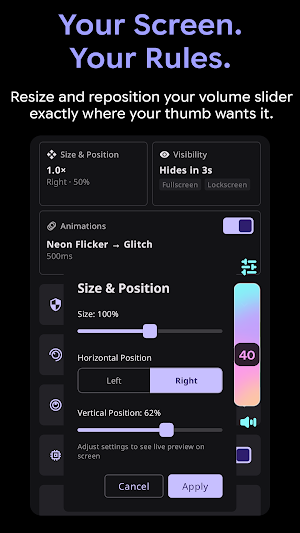
• Scale & Resize: Adjust the overlay from 80% to 120%
• Custom Positioning: Drag, drop, and pin anywhere on your screen
• Animation Controls: Choose snappy instant feedback or smooth fluid motion
• Smart Memory: Each skin perfectly remembers your last applied theme
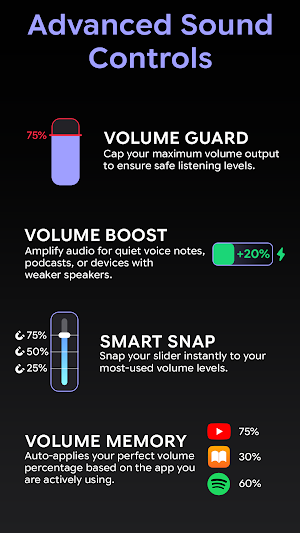
🎛️ SMART SOUND CONTROLS
• Gesture Scrubbing: Tap and drag on the overlay for fast adjustments
• Magnetic Snap Points: Lock media volume at 25%, 50%, 75%, or custom levels
• Auto-Hide Timeout: Set custom durations for the panel to disappear
• Universal Support: Works in any orientation, seamlessly over any app
🚫 SMART APP EXCLUSIONS
Add specific apps to your exclusion list, and SynEdge will automatically suppress the custom overlay when those apps are open—perfect for uninterrupted gaming and full-screen streaming.
🔒 PRIVACY FIRST: ZERO DATA COLLECTED
SynEdge requires NO internet permission, No analytics, No ads or tracking
All of your preferences are stored strictly and locally on your device.
📱 REQUIRED PERMISSIONS EXPLAINED
• Accessibility Service: Used strictly to detect your physical volume button presses. SynEdge does NOT read your screen content or monitor other apps.
• Display Over Other Apps: Required to draw the custom volume panel on your screen.
• Battery Optimization: Keeps the background service responsive so your overlay appears instantly.
Whether you want a translucent glass aesthetic, a minimal interface, a retro terminal, or a futuristic cyberpunk HUD, SynEdge puts total UI customization in your hands. It is free to install with permanently unlocked core styles—upgrade anytime to access our full premium library!
🌟 WHY CHOOSE SYNEDGE?
Android's built-in volume control is plain, obstructive, and identical on every device. SynEdge is the ultimate volume styles app—a floating sound manager that looks exactly how you want it. It works seamlessly over any app: games, YouTube, Spotify, video calls, and more.
💧LIQUID GLASS — THE FUTURE OF VOLUME UI
SynEdge is one of the first Android apps to bring Apple's iconic Liquid Glass design language to your volume controls. This isn't just a basic blur effect; it's a full multi-layer glass material system featuring:
• Frosted Glass Track: Real backdrop blur (Android 12+) with a soft, clean fallback for older devices.
• Dynamic Specular Sheen: Beautiful highlights that shift as your volume changes.
• Liquid Glass Thumb: Layered highlights, inner glow, and a crisp rim light.
• Fluid Fill Animation: Smooth animations that flow like water inside the track.
• Custom Themes: Multiple Liquid Glass palettes including Frost, Obsidian, Prism, Aurora, and more.
*(If you've seen the NoVolume-style floating sliders and wanted something more refined and premium—this is it.)*
🎨 20+ UNIQUE VOLUME STYLES
Several beautifully crafted skins are permanently free from day one. Upgrade to Pro or Founder to unlock the full library:
• 💧 Liquid Glass (NEW): Apple-inspired multi-layer glass slider with fluid dynamics
• 🌌 Nebula: Aurora mesh-gradient slider with 20 vibrant color palettes
• 🔴 Nothing OS: Minimalist dot-style volume panel
• 📺 Vertical Slider: Clean pill-style volume bar
• 💻 Retro OS: Classic command-line terminal aesthetic
• ⚙️ Mechanical Knob: Rotating metallic dial with realistic inertia
• 🔢 ASCII: Retro text-mode volume display
• 🎮 Pixel Art: Discrete block-fill volume bar
• 🔮 Prisoner Rune: Occult-style runic indicator
• ✍️ Floating Typography: Giant animated volume numbers
• 🌊 Neumorphic: Soft-shadow modern UI
*(New skins added regularly. Each skin features 15–24 themes for endless customization.)*
⚙️ ULTIMATE UI CUSTOMIZATION
• Scale & Resize: Adjust the overlay from 80% to 120%
• Custom Positioning: Drag, drop, and pin anywhere on your screen
• Animation Controls: Choose snappy instant feedback or smooth fluid motion
• Smart Memory: Each skin perfectly remembers your last applied theme
🎛️ SMART SOUND CONTROLS
• Gesture Scrubbing: Tap and drag on the overlay for fast adjustments
• Magnetic Snap Points: Lock media volume at 25%, 50%, 75%, or custom levels
• Auto-Hide Timeout: Set custom durations for the panel to disappear
• Universal Support: Works in any orientation, seamlessly over any app
🚫 SMART APP EXCLUSIONS
Add specific apps to your exclusion list, and SynEdge will automatically suppress the custom overlay when those apps are open—perfect for uninterrupted gaming and full-screen streaming.
🔒 PRIVACY FIRST: ZERO DATA COLLECTED
SynEdge requires NO internet permission, No analytics, No ads or tracking
All of your preferences are stored strictly and locally on your device.
📱 REQUIRED PERMISSIONS EXPLAINED
• Accessibility Service: Used strictly to detect your physical volume button presses. SynEdge does NOT read your screen content or monitor other apps.
• Display Over Other Apps: Required to draw the custom volume panel on your screen.
• Battery Optimization: Keeps the background service responsive so your overlay appears instantly.
What’s new
Version 1.75 · Updated October 15, 2026
Sale of the Year is here! All products are 50% off for a limited time. New skin: KeyCap.
User reviews

THE GREATEST CUSTOMIZATION APP EVERRR, Ive tried other apps, none of them work, all just buggy, but this, this is an masterpiece, huge w to the devs. only disadvantage is that the free version is very limited (with less options) ):

great options for customizing! highly recommend.

one of the best

best custom volume control I've seen on here, lots of options and skins!

This app has exceeded my expectations! i have not seen such designs in any other app. I strongly recommend this one, don't think, just go for it.

awesome app, no data collected, no internet connection or ads! SICK
Alternatives to Volume Control Styles SynEdge
Looking for apps like Volume Control Styles SynEdge? Here are 6 similar Android apps on Google Play. 1 of the 6 are free to download.
-
Neon Flow Live Wallpaper & TV
-
Contura Live Wallpaper & TV
-
Cirxle Black Icon Pack
-
Cirxle White Icon Pack
-
Material You Adaptive IconPack
-
Onyx Black Icon Pack
| App | Rating | Price | Installs | Last updated | Compare |
|---|---|---|---|---|---|
| Volume Control Styles SynEdge | 4.6 / 5 | Free | 100,000+ | Oct 15, 2026 | |
| Neon Flow Live Wallpaper & TV | – | Free | 1,000+ | Sep 24, 2026 | Compare |
| Contura Live Wallpaper & TV | – | 0.49 USD | 100+ | Oct 1, 2026 | Compare |
| Cirxle Black Icon Pack | – | 0.49 USD | 10+ | – | Compare |
| Cirxle White Icon Pack | – | 0.49 USD | 50+ | Nov 16, 2025 | Compare |
| Material You Adaptive IconPack | – | 0.49 USD | 50+ | Feb 19, 2026 | Compare |
| Onyx Black Icon Pack | – | 0.49 USD | 10+ | – | Compare |