

NavEdge Smart Assistive Touch
Tools In-app purchases
Supercharge navigation with a customizable floating button, gestures, and themes
- Rating
- 4.9
- 140 ratings
- Downloads
- 5.8K+
- on Google Play
- Price
- Free
- In-app purchases
- Updated
- Oct 29
- 2026 · vv1.28
Screenshots

About NavEdge Smart Assistive Touch
NavEdge is a customizable floating action button and overlay controller that brings system navigation, quick settings, and media playback controls directly to your fingertips. Inspired by assistive touch widgets and navigation bar utilities, NavEdge sits subtly on your screen edge, allowing you to control your Android device with simple swipes, taps, and gestures.
Whether you want to navigate your phone with one hand, control your music without leaving your current app, or quickly toggle system settings like brightness and DND, NavEdge provides a smooth, customizable experience tailored to your workflow.
Key Features
One Hand Gesture Navigation
Navigate your device effortlessly using a floating shortcut button that replaces traditional navigation bars.
Perform standard system actions like Back, Home, and Recents.
Trigger gestures such as double taps, long presses, or edge swipes to open custom menus.
Pull down the notification panel or quick settings drawer instantly.
Media Player and Music Controller
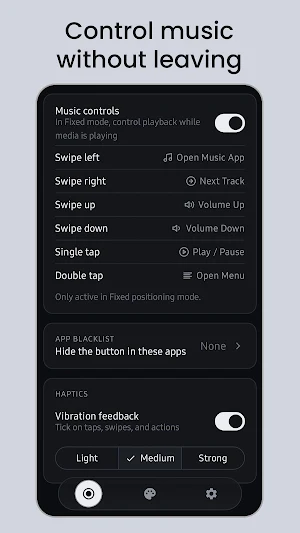
Control your background music and media apps through a floating audio widget.
Access state-dependent Play, Pause, Next, and Previous controls.
Adjust volume levels with a smooth, responsive slider.
View track details and open your active music player with a single tap.
Quick Settings Toggles and Utilities
Access essential hardware settings and tools directly from the overlay menu.
Toggle flashlight, screen rotation lock, and Do Not Disturb (DND) modes.
Adjust screen brightness and system volume with interactive sliders.
Launch helper tools like the calculator, system camera, and screenshot capture.
Open the system power menu safely without physical buttons.
Premium Theme Customization
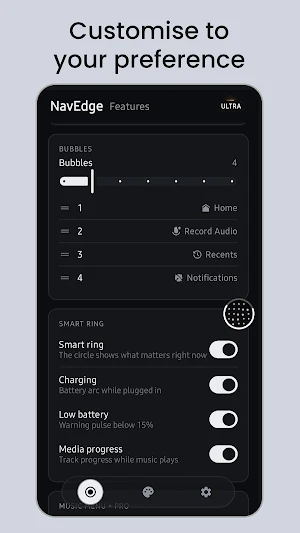
Make NavEdge match your phone setup with an advanced visual style engine.
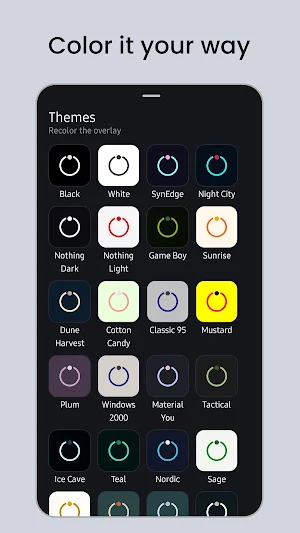
Select from 48 calibrated color themes, including Nothing Dark, Nothing Light, Night City, Sunrise, Dune Harvest, and Cotton Candy.
Enable dynamic Material You integration to automatically match your Android wallpaper colors.
Create and preview your own palettes with an interactive hex color theme editor.
Unique Interface Styles
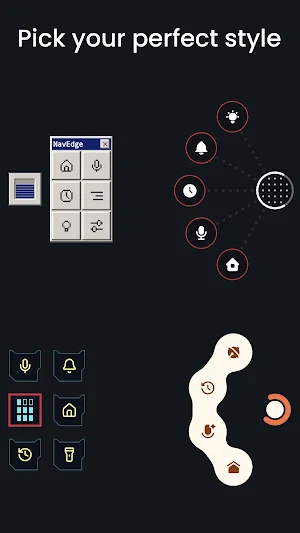
Choose a unique personality and shape layout for your floating button.
Nothing Style: Minimalist dots and monochrome aesthetics.
Cyberpunk HUD: Vibrant neon colors and futuristic geometries.
RetroOS: A classic Windows 95 inspired desktop theme.
Liquid Style and Tonal Style: Organic shapes and smooth color gradients.
Custom Icon Packs
Swap icon designs to fit your aesthetic. Choose from preloaded packs including Lucid, Trace, Box, Tabler, Pixel, Feather, Remix, and a custom Minecraft pixel-art set.
Why Choose NavEdge?
NavEdge is designed for users who want to streamline their multitasking, protect physical volume and power buttons, or navigate large screens with one hand. It runs efficiently in the background, respects device performance, and does not require complex root access to unlock its features.
Simplify your Android experience. Download NavEdge today and customize your floating navigation deck.
Whether you want to navigate your phone with one hand, control your music without leaving your current app, or quickly toggle system settings like brightness and DND, NavEdge provides a smooth, customizable experience tailored to your workflow.
Key Features
One Hand Gesture Navigation
Navigate your device effortlessly using a floating shortcut button that replaces traditional navigation bars.
Perform standard system actions like Back, Home, and Recents.
Trigger gestures such as double taps, long presses, or edge swipes to open custom menus.
Pull down the notification panel or quick settings drawer instantly.
Media Player and Music Controller
Control your background music and media apps through a floating audio widget.
Access state-dependent Play, Pause, Next, and Previous controls.
Adjust volume levels with a smooth, responsive slider.
View track details and open your active music player with a single tap.
Quick Settings Toggles and Utilities
Access essential hardware settings and tools directly from the overlay menu.
Toggle flashlight, screen rotation lock, and Do Not Disturb (DND) modes.
Adjust screen brightness and system volume with interactive sliders.
Launch helper tools like the calculator, system camera, and screenshot capture.
Open the system power menu safely without physical buttons.
Premium Theme Customization
Make NavEdge match your phone setup with an advanced visual style engine.
Select from 48 calibrated color themes, including Nothing Dark, Nothing Light, Night City, Sunrise, Dune Harvest, and Cotton Candy.
Enable dynamic Material You integration to automatically match your Android wallpaper colors.
Create and preview your own palettes with an interactive hex color theme editor.
Unique Interface Styles
Choose a unique personality and shape layout for your floating button.
Nothing Style: Minimalist dots and monochrome aesthetics.
Cyberpunk HUD: Vibrant neon colors and futuristic geometries.
RetroOS: A classic Windows 95 inspired desktop theme.
Liquid Style and Tonal Style: Organic shapes and smooth color gradients.
Custom Icon Packs
Swap icon designs to fit your aesthetic. Choose from preloaded packs including Lucid, Trace, Box, Tabler, Pixel, Feather, Remix, and a custom Minecraft pixel-art set.
Why Choose NavEdge?
NavEdge is designed for users who want to streamline their multitasking, protect physical volume and power buttons, or navigate large screens with one hand. It runs efficiently in the background, respects device performance, and does not require complex root access to unlock its features.
Simplify your Android experience. Download NavEdge today and customize your floating navigation deck.
What’s new
Version v1.28 · Updated October 29, 2026
New style: Sunburst. Performance improvements
User reviews

just what I was looking for. thank you

Love NavEdge! It's been incredibly useful, and fun to set up.
really great app

apps great

good so far

Finally found the Assistive Touch app I've been looking for! Huge thanks to HowToMen for recommending it in one of his YouTube videos 'August 2026'. I bought a license I hope more paid feature updates and themes to the Pro version in the future. Thanks, Bro! Edit: Bought Ultra
Alternatives to NavEdge Smart Assistive Touch
Looking for apps like NavEdge Smart Assistive Touch? Here are 6 similar Android apps on Google Play. The highest rated is Farm Girls Fancy Frills (4.9/5), and all 6 are free to download.
-
Vagustim: Vagus Activation 3.4
-
Napoly Menswear 4.7
-
Farm Girls Fancy Frills 5.0
-
Syd
-
Snug Safety: Daily Check-In 3.9
-
Happiness Project 4.8
| App | Rating | Price | Installs | Last updated | Compare |
|---|---|---|---|---|---|
| NavEdge Smart Assistive Touch | 4.9 / 5 | Free | 5,000+ | Oct 29, 2026 | |
| Vagustim: Vagus Activation | 3.4 / 5 | Free | 1,000+ | Oct 28, 2026 | Compare |
| Napoly Menswear | 4.7 / 5 | Free | 1,000+ | Jun 23, 2026 | Compare |
| Farm Girls Fancy Frills | 4.9 / 5 | Free | 1,000+ | Oct 13, 2026 | Compare |
| Syd | – | Free | 1,000+ | – | Compare |
| Snug Safety: Daily Check-In | 3.9 / 5 | Free | 10,000+ | Oct 8, 2026 | Compare |
| Happiness Project | 4.8 / 5 | Free | 10,000+ | Oct 27, 2026 | Compare |