

NexFlow
Tools
Build no-code automations: triggers, actions, conditions. Android, automated.
- Downloads
- 31+
- on Google Play
- Price
- Free
- No in-app purchases
- Updated
- Sep 3
- 2026
Screenshots


About NexFlow
HOW IT WORKS
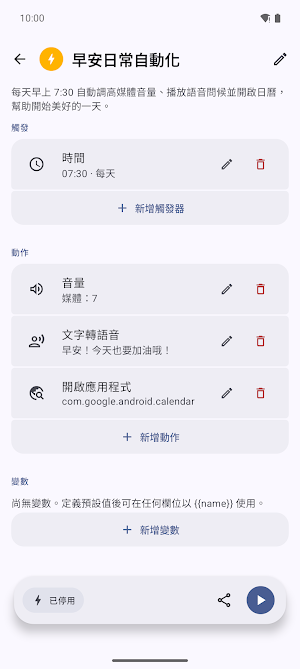
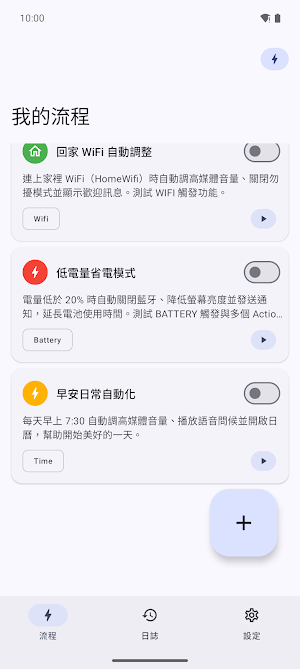
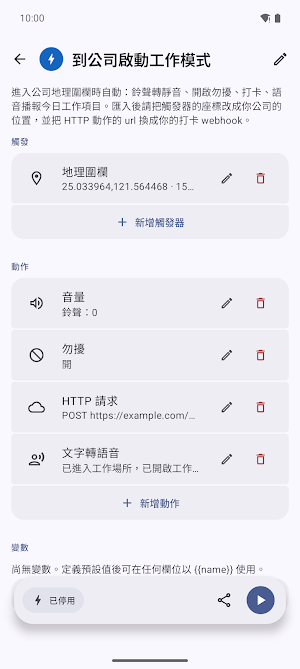
Create a flow, choose a trigger, and chain together the actions you want. Add if/else conditions, repeat loops, delays, and interactive menus to build automations that adapt to the moment.
TRIGGERS — start a flow when…
• Time or schedule
• Battery level / charging state
• Bluetooth connected or disconnected
• Wi-Fi connected or disconnected
• Screen turns on or off
• An app is launched
• Incoming phone call
• SMS received
• Notification received
• Device finishes booting
• Headset plugged or unplugged
• An NFC tag is scanned
• You enter or leave a location (geofence)
• You shake your phone
• Ambient light changes
• Manually (run button or home-screen shortcut)
ACTIONS — what a flow can do…
• Open an app or launch a shortcut
• Send an SMS or place a phone call
• Toggle Wi-Fi, Bluetooth, Do Not Disturb, or Airplane mode
• Adjust media volume or screen brightness
• Post a notification or a quick toast
• Make an HTTP request to a web service
• Copy to clipboard, open a URL, or share content
• Play/pause media, toggle speakerphone
• Speak text aloud (text-to-speech)
• Take a screenshot
• Simulate a tap at coordinates you choose
• Set the wallpaper or write a file
• Set variables, add delays, and show on-screen menus
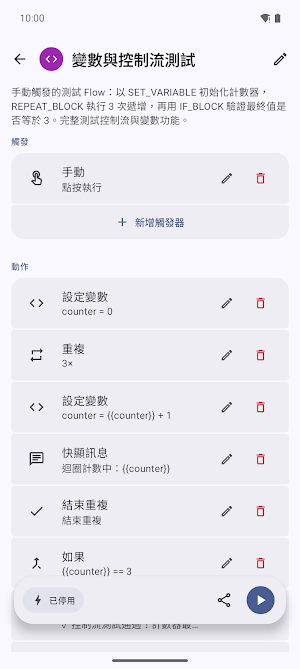
CONTROL FLOW
If/else conditions, repeat loops, variables, and interactive menus let you build automations that respond to real context—not just fixed steps.
IMPORT & EXPORT
Save your flows and move them between devices using a simple JSON format.
ACCESSIBILITY SERVICE DISCLOSURE
NexFlow is an automation tool. To provide its core automation features, it uses Android's AccessibilityService for the following purposes:
• Detecting which app is brought to the foreground (reading only the package name) so your "App Launched" triggers can fire.
• Capturing a screenshot when a flow runs a "Screenshot" action, saving it to your gallery.
• Performing a tap gesture at coordinates you specify when a flow runs a "Simulated Tap" action.
The service runs only after you manually enable it. It does not read on-screen text, account names, or passwords, and it does not send any data to a server. You can disable it at any time in your device's Accessibility settings.
PRIVACY
NexFlow runs on your device. Your flows and data stay on your phone; we do not sell your personal data. Some actions (like Send SMS, Location/geofence, or Accessibility features) need permissions you grant yourself and can revoke anytime.
What’s new
Updated September 3, 2026
DUPLICATE A FLOW Detail screen, ⋮ → Duplicate flow. The copy starts switched off. THE WIDGET FITS ITS SIZE Columns, rows and cards follow the widget's size — no half-cut rows — and it holds 12 flows, not 4. BATTERY: TRIGGER VS CONDITION The trigger fires once, as the level crosses. The condition is checked before every run. FIXED • Light theme: the running action is readable • Flows stay put when you flick the switch • Toasts keep up with the flow • AI chat: bubbles overlapped after Retry
Alternatives to NexFlow
Looking for apps like NexFlow? Here are 4 similar Android apps on Google Play. The highest rated is 2Do - To do List & Reminders (4.1/5), and all 4 are free to download.


| App | Rating | Price | Installs | Last updated | Compare |
|---|---|---|---|---|---|
| NexFlow | – | Free | 10+ | Sep 3, 2026 | |
| 2Do - To do List & Reminders | 4.1 / 5 | Free | 100,000+ | – | Compare |
| HiNotes by HiDock | 3.8 / 5 | Free | 10,000+ | Sep 24, 2026 | Compare |
| OPERI | – | Free | 5,000+ | Aug 31, 2026 | Compare |
| Sportvibez | – | Free | 1,000+ | Aug 29, 2026 | Compare |
Compare NexFlow with the top alternatives: ratings, updates, ASO score and keyword gaps →