

Acticheck Companion App
Acticheck Health & Fitness
Connect your Acticheck wristband to your smartphone so you can stay connected
- Downloads
- 1.4K+
- on Google Play
- Price
- Free
- No in-app purchases
- Updated
- Aug 24
- 2026 · v30.01
Screenshots
About Acticheck Companion App
Connects your Acticheck wristband to your smartphone using Bluetooth Low Energy.
Once the wristband has been paired with your phone and you have confirmed your telephone number, the App remains active and will connect with your wristband when you leave home. When you raise an alert the App will record your current location and confirm the alert by calling your mobile. If you do not answer the call the alert will be passed to your responders. The first responder to accept will be given your mobile number and your location.
Prerequisites:
- An Acticheck band already registered and linked to an Acticheck base
- An Android smartphone running Android 8 or higher
- A mobile data contract
Setup:
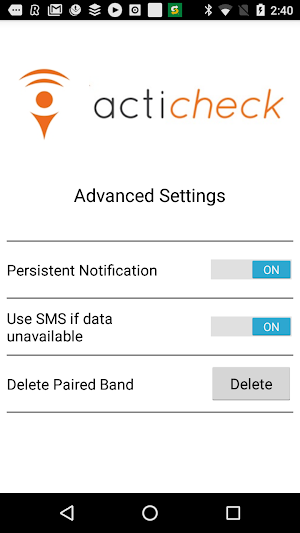
- Go to Advanced -> Pair Band
- Enter the number of the mobile phone. The App will send an SMS back to your phone to confirm the number is correct and active
- Now select Pair band and press a single button on your band for about 10 seconds.
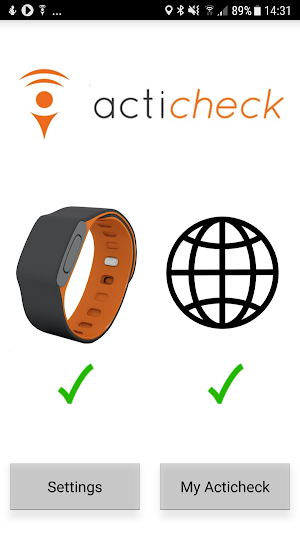
- A picture of a band should appear with the ID of the band. Select the band then go back to the main screen
- To activate the band you may need to press a single button again for 10 seconds. You should then see two green ticks
Once the wristband has been paired with your phone and you have confirmed your telephone number, the App remains active and will connect with your wristband when you leave home. When you raise an alert the App will record your current location and confirm the alert by calling your mobile. If you do not answer the call the alert will be passed to your responders. The first responder to accept will be given your mobile number and your location.
Prerequisites:
- An Acticheck band already registered and linked to an Acticheck base
- An Android smartphone running Android 8 or higher
- A mobile data contract
Setup:
- Go to Advanced -> Pair Band
- Enter the number of the mobile phone. The App will send an SMS back to your phone to confirm the number is correct and active
- Now select Pair band and press a single button on your band for about 10 seconds.
- A picture of a band should appear with the ID of the band. Select the band then go back to the main screen
- To activate the band you may need to press a single button again for 10 seconds. You should then see two green ticks
User reviews

This app worked really well, and the Acticheck display showed my current location via my mobile when away from the base. Unfortunately after the latest Android software update the App won't open at all. I've tried uninstalling and reinstalling the app, restarting the phone and checking the settings. Maybe it's just ...

Does the job.
Alternatives to Acticheck Companion App
Looking for apps like Acticheck Companion App? Here are 6 similar Android apps on Google Play. All of them are free to download.





| App | Rating | Price | Installs | Last updated | Compare |
|---|---|---|---|---|---|
| Acticheck Companion App | – | Free | 1,000+ | Aug 24, 2026 | |
| Patient Advocate | – | Free | 10+ | Jun 29, 2026 | Compare |
| ShapePilot AI | – | Free | 50+ | Jul 23, 2026 | Compare |
| BetterApp | – | Free | 50+ | Jul 26, 2026 | Compare |
| Team She Strong App | – | Free | 10+ | Dec 4, 2025 | Compare |
| Apex Pro | – | Free | 100+ | – | Compare |
| Oracle MI | – | Free | 100+ | Dec 15, 2024 | Compare |
Similar apps on Google Play
- Patient Advocate
- ShapePilot AI
- BetterApp
- Team She Strong App
- Apex Pro
- Oracle MI
- Calculadora de IMC
- Singular Medic
- Vaznim - kaloriya sanagich
- Udite Udite
- HerBody - Home Workout
- 睡眠時間 記録帳
- OneImpact CAR
- LIV Fitness
- Tae Kyum
- Mylurah
- לירון ווינר
- Veyda Coach
- FitNutri AI
- Alcohol Lock aid
- Psyfy: Self-care Companion
- Foundry
- Dosie - GLP-1 Tracker Mounjaro
- eFizjo
- Walk Wallet