
SpecialEffect's Checkers
SpecialEffect Board
Clear your opponent’s pieces to win! Supports multiple accessible input methods.
- Downloads
- 42+
- on Google Play
- Price
- Free
- No in-app purchases
- Updated
- Nov 4
- 2025 · v2.5
Screenshots
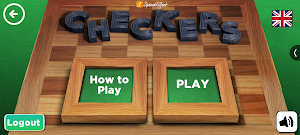
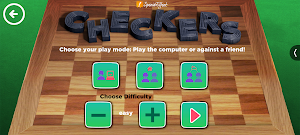
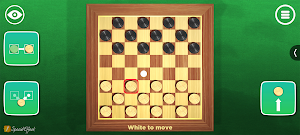


About SpecialEffect's Checkers
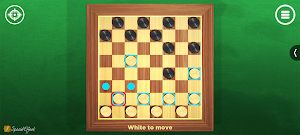
In SpecialEffect’s Checkers, you use either our ‘Classic’ or ‘Precise’ controls to move diagonally up the board, keeping to the black squares. The objective of the game is to take all your opponent's pieces or play until they can’t make another move.
You take an opponent's piece by hopping over it if it. The game will show you where you can move each piece once it is selected.
Created to enable players to use their preferred controls on Android, the game is designed to be played with one of the following input methods: touch, a mouse cursor, Switch Access, a game controller or a keyboard.
CLASSIC AND PRECISE CONTROLS:
With our ‘Classic’ controls option, you select from 3 onscreen buttons. One to select a piece, another to choose where to move it to and a third to place it.
Using our ‘Precise’ controls option, you can directly select the piece on the board you want to move and then directly select an empty black square to move it to.
You can switch between the two control modes using the onscreen button in the top left of the screen.
SUPPORTED CONTROL INPUTS:
TOUCH - A single tap on the onscreen targets activates them. No swipes or holds are required.
MOUSE CURSOR - Using a single left click on the onscreen targets activates them. No drags or holds are required. The Auto-Click option in Android is also compatible with the game.
SWITCH ACCESS - To scan through the onscreen targets using a switch, the use of the Google Switch Access app and a compatible switch interface or device is required.
KEYBOARD - Arrow keys navigate and highlight the onscreen targets and the Enter key is used to select one, when highlighted.
GAME CONTROLLER - The Left Stick, Right Stick or D-pad is used to navigate the onscreen targets. Any of the face buttons or triggers on your compatible controller can be used to select an onscreen target, when highlighted.
SpecialEffect is a registered UK charity (1121004) that helps physically disabled players to access video games. Please visit https://www.specialeffect.org.uk/ for more information.
You take an opponent's piece by hopping over it if it. The game will show you where you can move each piece once it is selected.
Created to enable players to use their preferred controls on Android, the game is designed to be played with one of the following input methods: touch, a mouse cursor, Switch Access, a game controller or a keyboard.
CLASSIC AND PRECISE CONTROLS:
With our ‘Classic’ controls option, you select from 3 onscreen buttons. One to select a piece, another to choose where to move it to and a third to place it.
Using our ‘Precise’ controls option, you can directly select the piece on the board you want to move and then directly select an empty black square to move it to.
You can switch between the two control modes using the onscreen button in the top left of the screen.
SUPPORTED CONTROL INPUTS:
TOUCH - A single tap on the onscreen targets activates them. No swipes or holds are required.
MOUSE CURSOR - Using a single left click on the onscreen targets activates them. No drags or holds are required. The Auto-Click option in Android is also compatible with the game.
SWITCH ACCESS - To scan through the onscreen targets using a switch, the use of the Google Switch Access app and a compatible switch interface or device is required.
KEYBOARD - Arrow keys navigate and highlight the onscreen targets and the Enter key is used to select one, when highlighted.
GAME CONTROLLER - The Left Stick, Right Stick or D-pad is used to navigate the onscreen targets. Any of the face buttons or triggers on your compatible controller can be used to select an onscreen target, when highlighted.
SpecialEffect is a registered UK charity (1121004) that helps physically disabled players to access video games. Please visit https://www.specialeffect.org.uk/ for more information.
What’s new
Version 2.5 · Updated November 4, 2025
unity update
Play today's Inkspill puzzle
Spread your ink until the whole board is one color, within the move limit. A free daily puzzle from Fiplay, same board for everyone. It plays right here, no download.
Alternatives to SpecialEffect's Checkers
Looking for apps like SpecialEffect's Checkers? Here are 6 similar Android apps on Google Play. All of them are free to download.
-
Open Drive
-
Solitaire Gem Quest
-
Sudoku Monsters
-
Badger Badger
-
SpecialEffect's Sudoku
-
SpecialEffect's 4 in a Row
| App | Rating | Price | Installs | Last updated | Compare |
|---|---|---|---|---|---|
| SpecialEffect's Checkers | – | Free | 10+ | Nov 4, 2025 | |
| Open Drive | – | Free | 100+ | Dec 4, 2025 | Compare |
| Solitaire Gem Quest | – | Free | 100+ | – | Compare |
| Sudoku Monsters | – | Free | 100+ | Nov 6, 2025 | Compare |
| Badger Badger | – | Free | 100+ | Nov 3, 2025 | Compare |
| SpecialEffect's Sudoku | – | Free | 50+ | Nov 6, 2025 | Compare |
| SpecialEffect's 4 in a Row | – | Free | 10+ | – | Compare |