

Pyware 3D Mobile Editor
Pygraphics, Inc. Productivity
Edit your Pyware Drill files on the field.
- Downloads
- 100+
- on Google Play
- Price
- Free
- No in-app purchases
- Updated
- Nov 17
- 2022 · v1.0.0
Screenshots
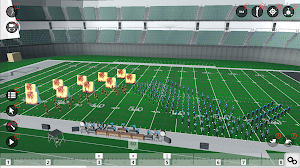
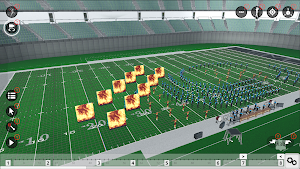
About Pyware 3D Mobile Editor
Meet your new favorite sidekick, the Pyware Mobile Editor! Make changes, clean your sets, and push directly to the UDB App and your drill writing computer. All on the fly and on the field!
FEATURES
Open Pyware 3D® drill packages (.3dz)
Files can be accessed from the Pyware Portal
Pinch zoom, rotate, tilt and shift to view the drill from any angle
Animation shows true pathways for all performers
Fluid or step-time animation
Play with audio file
Repeat and Play All animation controls
Count Track that allows you to stop and view any count of drill
View entire Production Sheet
Editing tools
Morph Tool
Push Tool
Adjuster tool
Selection Tools
Spotlight Tool (Single or multiple performers)
Pointer Tool
Box Selection Tool
Lasso Selection Tool
Sync with Pyware Portal account.
Upload Directly to UDBapp
FEATURES
Open Pyware 3D® drill packages (.3dz)
Files can be accessed from the Pyware Portal
Pinch zoom, rotate, tilt and shift to view the drill from any angle
Animation shows true pathways for all performers
Fluid or step-time animation
Play with audio file
Repeat and Play All animation controls
Count Track that allows you to stop and view any count of drill
View entire Production Sheet
Editing tools
Morph Tool
Push Tool
Adjuster tool
Selection Tools
Spotlight Tool (Single or multiple performers)
Pointer Tool
Box Selection Tool
Lasso Selection Tool
Sync with Pyware Portal account.
Upload Directly to UDBapp
Alternatives to Pyware 3D Mobile Editor
Looking for apps like Pyware 3D Mobile Editor? Here are 3 similar Android apps on Google Play. The highest rated is Pyware 3D Viewer (3.7/5), and 2 of the 3 are free to download.



| App | Rating | Price | Installs | Last updated | Compare |
|---|---|---|---|---|---|
| Pyware 3D Mobile Editor | – | Free | 100+ | Nov 17, 2022 | |
| Kjos IPS | 3.0 / 5 | Free | 50,000+ | Jun 16, 2026 | Compare |
| Pyware Junior | – | Free | 50+ | Apr 21, 2023 | Compare |
| Pyware 3D Viewer | 3.7 / 5 | 2.99 USD | 5,000+ | – | Compare |