
Pillow Chase Home App
Hadiz Studio Personalization Contains ads
Download Pillow Chase: Home App now and turn every run into an adventure!
- Rating
- 4.4
- 96.6K ratings
- Downloads
- 23.8M+
- on Google Play
- Price
- Free
- No in-app purchases
- Updated
- Jun 3
- 2026 · v2.1
Screenshots

About Pillow Chase Home App
Welcome to Pillow Chase Home App!
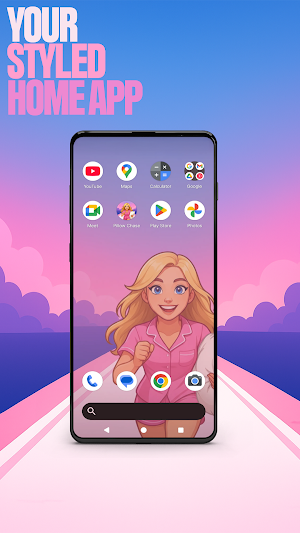
This launcher app lets you create a home screen that feels completely your own for a personal touch. You can fully customize the home screen layout, create folders, and choose colors. With a fresh style, it’s a launcher that keeps things exciting from the moment you start using it.
You can pick this app as the default choice via the "Default home app" setting to use this as your day-to-day launcher. You can switch back to your previous launcher anytime you choose.
⚡ Jump into the Pillow Chase Game! ⚡
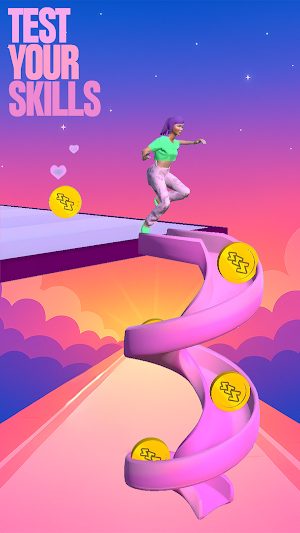
Run, dodge, and race your way to sweet dreams in Pillow Chase! Collect pillows, leap over alarm clocks, and avoid coffee cups that slow you down. It’s fast, funny, and full of surprises, the perfect game for quick breaks and endless fun.
Open via the game icon on your home screen.
🌙 Pillow Chase Home App Features: 🌙
The features listed below are available via your home screen. Long-press an empty area on your home screen to open the pop-up menu.
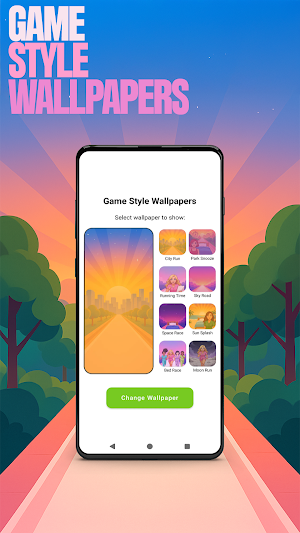
✅ Game Style Wallpapers – Add unique wallpapers inspired by the Pillow Chase game.
Long-press on home screen -> click "Game Style Wallpapers".
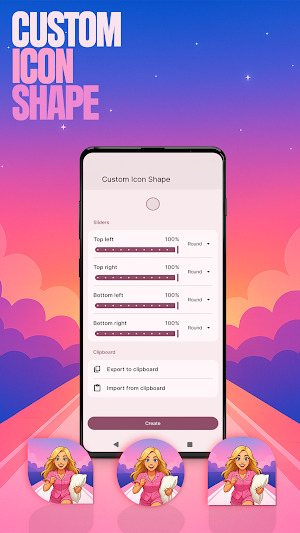
✅ Custom Icon Shape – Personalize your device with fun icon shapes and custom icon looks.
Long-press on home screen -> click "Custom Icon Shape".
✅ Custom Gestures – Swipe or tap to quickly open an app, settings or app drawer.
Long-press on home screen -> click "Home settings" -> Gestures.
✅ Hide Apps – Keep your private apps invisible while staying fully in control.
Long-press on home screen -> click "Home settings" -> "App drawer" -> "Hidden apps".
✅ Accent Color – Customize your home app colors. Use presets or create your own device style.
Long-press on home screen -> click "Home settings" -> General -> "Accent color".
Note: When using this home app, your home screen’s layout may be changed. You can customize the layout as you wish. Your previous home’s layout is not affected once you switch back.
This launcher app lets you create a home screen that feels completely your own for a personal touch. You can fully customize the home screen layout, create folders, and choose colors. With a fresh style, it’s a launcher that keeps things exciting from the moment you start using it.
You can pick this app as the default choice via the "Default home app" setting to use this as your day-to-day launcher. You can switch back to your previous launcher anytime you choose.
⚡ Jump into the Pillow Chase Game! ⚡
Run, dodge, and race your way to sweet dreams in Pillow Chase! Collect pillows, leap over alarm clocks, and avoid coffee cups that slow you down. It’s fast, funny, and full of surprises, the perfect game for quick breaks and endless fun.
Open via the game icon on your home screen.
🌙 Pillow Chase Home App Features: 🌙
The features listed below are available via your home screen. Long-press an empty area on your home screen to open the pop-up menu.
✅ Game Style Wallpapers – Add unique wallpapers inspired by the Pillow Chase game.
Long-press on home screen -> click "Game Style Wallpapers".
✅ Custom Icon Shape – Personalize your device with fun icon shapes and custom icon looks.
Long-press on home screen -> click "Custom Icon Shape".
✅ Custom Gestures – Swipe or tap to quickly open an app, settings or app drawer.
Long-press on home screen -> click "Home settings" -> Gestures.
✅ Hide Apps – Keep your private apps invisible while staying fully in control.
Long-press on home screen -> click "Home settings" -> "App drawer" -> "Hidden apps".
✅ Accent Color – Customize your home app colors. Use presets or create your own device style.
Long-press on home screen -> click "Home settings" -> General -> "Accent color".
Note: When using this home app, your home screen’s layout may be changed. You can customize the layout as you wish. Your previous home’s layout is not affected once you switch back.
What’s new
Version 2.1 · Updated June 3, 2026
> Version 2.1 > Small bugfix for better optimization
Alternatives to Pillow Chase Home App
Looking for apps like Pillow Chase Home App? Here are 6 similar Android apps on Google Play. 4 of the 6 are free to download.
-
Anime Live Wallpaper HD 4K
-
CumulusAI: Healthy Screen Time
-
Boop - colorful hybrid watch
-
Key to Love Theme +HOME
-
Galaxy A06 Wallpapers
-
SamWatch Simple Analog 4 2025
| App | Rating | Price | Installs | Last updated | Compare |
|---|---|---|---|---|---|
| Pillow Chase Home App | 4.4 / 5 | Free | 10,000,000+ | Jun 3, 2026 | |
| Anime Live Wallpaper HD 4K | – | Free | 10,000+ | Sep 10, 2025 | Compare |
| CumulusAI: Healthy Screen Time | – | Free | 500+ | Jun 8, 2026 | Compare |
| Boop - colorful hybrid watch | – | 1.49 USD | 100+ | Aug 5, 2026 | Compare |
| Key to Love Theme +HOME | – | Free | 500+ | Jul 8, 2026 | Compare |
| Galaxy A06 Wallpapers | – | Free | 10,000+ | Sep 13, 2026 | Compare |
| SamWatch Simple Analog 4 2025 | – | 2.5 USD | 1,000+ | – | Compare |
Similar apps on Google Play
- Anime Live Wallpaper HD 4K
- CumulusAI: Healthy Screen Time
- Boop - colorful hybrid watch
- Key to Love Theme +HOME
- Galaxy A06 Wallpapers
- SamWatch Simple Analog 4 2025
- Analog Seven GDC-631 Diabetes
- Anime Girl Wallpaper Offline
- Dandys Cute World Wallpaper HD
- Dazzling Sea Theme +HOME
- Pillow Chase Home App
- Infinity Wallpaper - 4K HD
- Neon Artwork Wallpaper
- Fox Den - hybrid watch face
- PureWall - Live & 4K Wallpaper
- PERSONAL PPDS
- ML2U 299 Watch Face
- Megaflix
- Blue Pink Elegant Watch Face
- Pastel Bloom WatchFace
- American Flag Wallpaper 2025
- Fonts Forge - Stylish Text
- CELEST5585 Sport Watch
- Daisy Bloom WatchFace
- Eclipse [Substratum]