

Foodie Scanner
Food & Drink
Scan ingredient lists & detect food additives (E-numbers) instantly.
- Downloads
- 22+
- on Google Play
- Price
- $4.99
- No in-app purchases
- Updated
- Sep 21
- 2026 · v1.1.9
Screenshots
About Foodie Scanner
Understand what’s really inside your food.
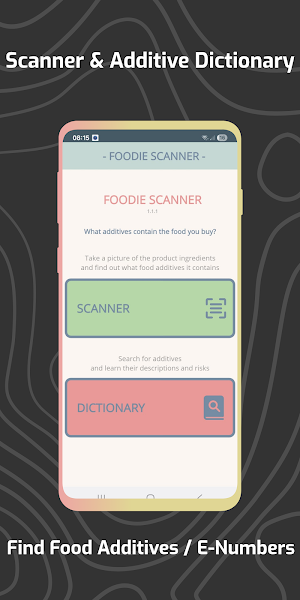
Foodie Scanner lets you take a picture of any ingredient list written in English, and instantly detects food additives (E-numbers) along with their safety information.
Perfect for anyone who wants to make healthier, informed choices.
⭐ Why Foodie Scanner?
One-time purchase - no ads, no subscriptions.
Unlimited scans - check as many products as you want.
Works offline - scan ingredient lists anytime after download.
Fast recognition - highlights all additives found in the ingredient list.
📸 How to Use the Scanner
Press the Scanner button.
Take a clear photo of the ingredient list (English only).
Tap OK.
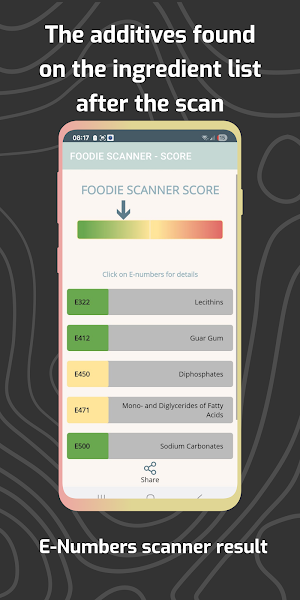
Foodie Scanner identifies the additives (E-numbers) in the product.
Important:
Do not scan the barcode.
Only scan the ingredients area and make sure the text is readable.
🔍 Color-Coded Safety System
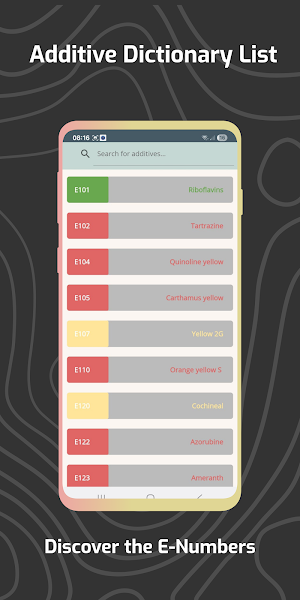
Every detected additive is marked in one of three colors:
🟢 Green — Generally considered safe
🟡 Yellow — Limited research; caution advised
🔴 Red — May pose health concerns
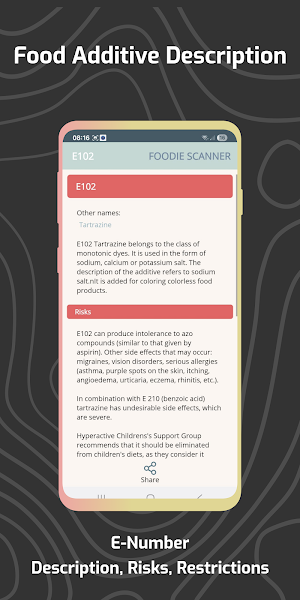
Tap any additive to see:
• Other names
• Description
• Possible risks
• Recommended daily intake
• Restrictions (if any)
🌱 Our Mission:
We created Foodie Scanner as parents who wanted clarity on what we feed our family.
Now we share this tool with anyone who wants to understand food labels quickly and easily.
Eat smarter. Scan your food. Take control of what you buy.
Download Foodie Scanner today.
Foodie Scanner lets you take a picture of any ingredient list written in English, and instantly detects food additives (E-numbers) along with their safety information.
Perfect for anyone who wants to make healthier, informed choices.
⭐ Why Foodie Scanner?
One-time purchase - no ads, no subscriptions.
Unlimited scans - check as many products as you want.
Works offline - scan ingredient lists anytime after download.
Fast recognition - highlights all additives found in the ingredient list.
📸 How to Use the Scanner
Press the Scanner button.
Take a clear photo of the ingredient list (English only).
Tap OK.
Foodie Scanner identifies the additives (E-numbers) in the product.
Important:
Do not scan the barcode.
Only scan the ingredients area and make sure the text is readable.
🔍 Color-Coded Safety System
Every detected additive is marked in one of three colors:
🟢 Green — Generally considered safe
🟡 Yellow — Limited research; caution advised
🔴 Red — May pose health concerns
Tap any additive to see:
• Other names
• Description
• Possible risks
• Recommended daily intake
• Restrictions (if any)
🌱 Our Mission:
We created Foodie Scanner as parents who wanted clarity on what we feed our family.
Now we share this tool with anyone who wants to understand food labels quickly and easily.
Eat smarter. Scan your food. Take control of what you buy.
Download Foodie Scanner today.
What’s new
Version 1.1.9 · Updated September 21, 2026
Scanner improvements for reading food labels
Alternatives to Foodie Scanner
Looking for apps like Foodie Scanner? Here is 1 similar Android app on Google Play.

| App | Rating | Price | Installs | Last updated | Compare |
|---|---|---|---|---|---|
| Foodie Scanner | – | $4.99 | 10+ | Sep 21, 2026 | |
| Peloponnese Guide | – | 9.49 USD | 100+ | Sep 9, 2026 | Compare |
Compare Foodie Scanner with the top alternatives: ratings, updates, ASO score and keyword gaps →