
DualScreen Recorder Ultimate
Friends AppStation Photography Contains ads
Ultimate screen recorder with dual camera, PIP & full video editor
- Downloads
- 10+
- on Google Play
- Price
- Free
- No in-app purchases
- Updated
- Sep 3
- 2026 · v2
Screenshots
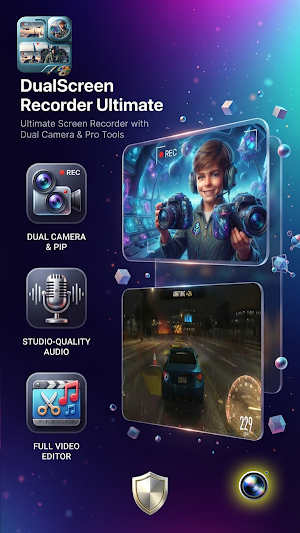
About DualScreen Recorder Ultimate
📸 DualScreen Recorder Ultimate
Welcome to the ultimate screen recording and video creation experience! Whether you are a content creator, gamer, educator, or professional, DualScreen Recorder Ultimate gives you all the powerful tools you need to capture, edit, and share high-quality videos directly from your mobile device.
Say goodbye to complicated setups. With our intuitive interface and advanced recording capabilities, you can record your screen, your reactions, and your audio seamlessly in one single app. 📱✨
🔥 Key Features & Highlights:
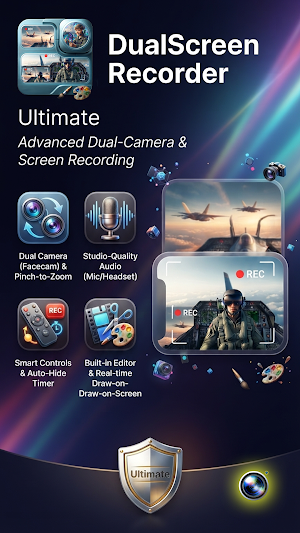
• Dual Camera & PIP Mode: Record your mobile screen and your face (via front or back camera) simultaneously using Picture-in-Picture technology. Perfect for reaction videos, tutorials, and gaming walkthroughs! 👥🎥
• Crystal Clear Audio: Capture internal system audio, external microphone sound, or both simultaneously with studio-grade clarity. 🎙️🔊
• Full Built-In Video Editor: No need for third-party apps. Trim, cut, merge, add background music, apply filters, and adjust speed right after you finish recording. 🎬✂️
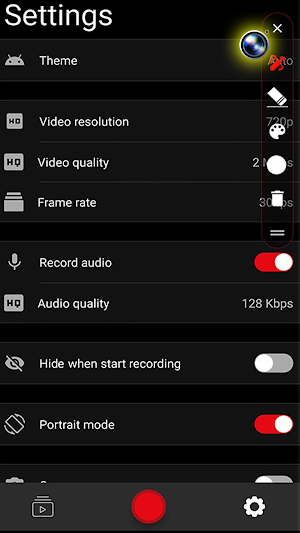
• Customizable Recording Settings: Total control over your video resolution (up to 4K), frame rate (FPS), and bit rate to balance file size and quality perfectly. ⚙️🎛️
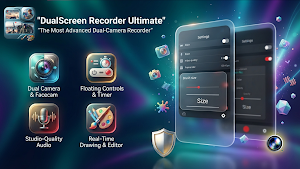
• Handy Floating Controls & Magic Button: Quickly start, pause, stop, or take screenshots using a discreet floating widget or simple gesture controls. 🖱️🛑
• Draw on Screen & Brush Tools: Highlight important areas, draw shapes, or annotate directly on your screen while recording live tutorials or presentations. 🖌️✍️
• Countdown Timer & Flexible Storage: Set a custom countdown to get ready before recording starts, and save your projects easily to internal storage or SD card. ⏳💾
• No Watermark & No Root Required: Enjoy clean, professional recordings without annoying watermarks and without needing to root your device. ✔️🚫
🚀 Why Choose DualScreen Recorder Ultimate?
Designed for performance and reliability, this app ensures smooth frame rates with minimal battery drain and CPU usage. Whether you are creating YouTube tutorials, recording online meetings, saving live streams, or capturing epic gaming moments, DualScreen Recorder Ultimate is your all-in-one production studio.
📥 Download now and take your content creation to the next level!
Welcome to the ultimate screen recording and video creation experience! Whether you are a content creator, gamer, educator, or professional, DualScreen Recorder Ultimate gives you all the powerful tools you need to capture, edit, and share high-quality videos directly from your mobile device.
Say goodbye to complicated setups. With our intuitive interface and advanced recording capabilities, you can record your screen, your reactions, and your audio seamlessly in one single app. 📱✨
🔥 Key Features & Highlights:
• Dual Camera & PIP Mode: Record your mobile screen and your face (via front or back camera) simultaneously using Picture-in-Picture technology. Perfect for reaction videos, tutorials, and gaming walkthroughs! 👥🎥
• Crystal Clear Audio: Capture internal system audio, external microphone sound, or both simultaneously with studio-grade clarity. 🎙️🔊
• Full Built-In Video Editor: No need for third-party apps. Trim, cut, merge, add background music, apply filters, and adjust speed right after you finish recording. 🎬✂️
• Customizable Recording Settings: Total control over your video resolution (up to 4K), frame rate (FPS), and bit rate to balance file size and quality perfectly. ⚙️🎛️
• Handy Floating Controls & Magic Button: Quickly start, pause, stop, or take screenshots using a discreet floating widget or simple gesture controls. 🖱️🛑
• Draw on Screen & Brush Tools: Highlight important areas, draw shapes, or annotate directly on your screen while recording live tutorials or presentations. 🖌️✍️
• Countdown Timer & Flexible Storage: Set a custom countdown to get ready before recording starts, and save your projects easily to internal storage or SD card. ⏳💾
• No Watermark & No Root Required: Enjoy clean, professional recordings without annoying watermarks and without needing to root your device. ✔️🚫
🚀 Why Choose DualScreen Recorder Ultimate?
Designed for performance and reliability, this app ensures smooth frame rates with minimal battery drain and CPU usage. Whether you are creating YouTube tutorials, recording online meetings, saving live streams, or capturing epic gaming moments, DualScreen Recorder Ultimate is your all-in-one production studio.
📥 Download now and take your content creation to the next level!
What’s new
Version 2 · Updated September 3, 2026
Enjoy with our app :}
Alternatives to DualScreen Recorder Ultimate
Looking for apps like DualScreen Recorder Ultimate? Here are 6 similar Android apps on Google Play. All of them are free to download.
-
Speed Glass HUD for Car
-
RaceStick - Off-Road Physics
-
Physics Precision Parking 3D
-
AnyShot AI: Dual Smart Camera
-
Jet Master - Canyon Avoid
-
VibeStory: Smart Media Editor
| App | Rating | Price | Installs | Last updated | Compare |
|---|---|---|---|---|---|
| DualScreen Recorder Ultimate | – | Free | 10+ | Sep 3, 2026 | |
| Speed Glass HUD for Car | – | Free | 50+ | – | Compare |
| RaceStick - Off-Road Physics | – | Free | 100+ | Jul 25, 2026 | Compare |
| Physics Precision Parking 3D | – | Free | 10+ | Sep 3, 2026 | Compare |
| AnyShot AI: Dual Smart Camera | – | Free | 10+ | Sep 3, 2026 | Compare |
| Jet Master - Canyon Avoid | – | Free | 10+ | – | Compare |
| VibeStory: Smart Media Editor | – | Free | 10+ | Aug 10, 2026 | Compare |
Similar apps on Google Play
- Speed Glass HUD for Car
- RaceStick - Off-Road Physics
- Physics Precision Parking 3D
- AnyShot AI: Dual Smart Camera
- Jet Master - Canyon Avoid
- VibeStory: Smart Media Editor
- AirLook Global Forecast
- Astro Dash 3D
- בינה יהודית - סיפרייה וחידונים
- Theory Rocket 26 - License
- Cat Bombs
- iMelamed
- Shiduchin - Jewish Social
- Friends Reels - Social