

Shopping list — Lister
Lister Studios Shopping In-app purchases Contains ads
Create shopping lists quickly and stay organized while shopping
- Rating
- 4.0
- 25.7K ratings
- Downloads
- 1M+
- on Google Play
- Price
- Free
- In-app purchases
- Updated
- Aug 11
- 2026
Screenshots


About Shopping list — Lister
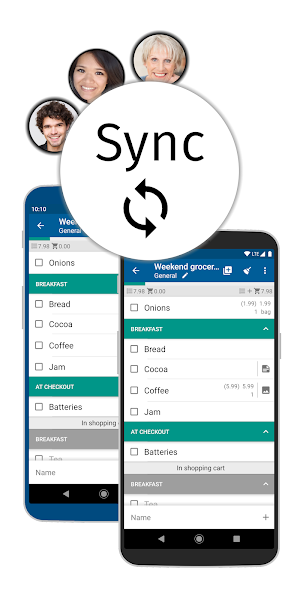
The synchronization keeps your lists up-to-date across multiple devices. In addition, you can create groups for different events, create multiple lists per group and invite multiple members. E.g. for family, roommates, office, wedding, vacation, party planning, etc.
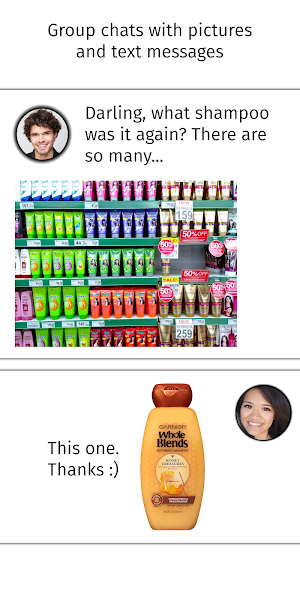
To briefly clarify, each group has its own chat with picture and text messages. Helpful if you don't know which shampoo to buy? Or who will bring the barbecue charcoal after Max has cancelled at short notice?
With the group chat you can rely on the fact that the messages are sent to all group members. You don't have to create a group in WhatsApp first. Or worry about whether everyone is on WhatsApp? Or Facebook Messenger, Telegram or Viber.
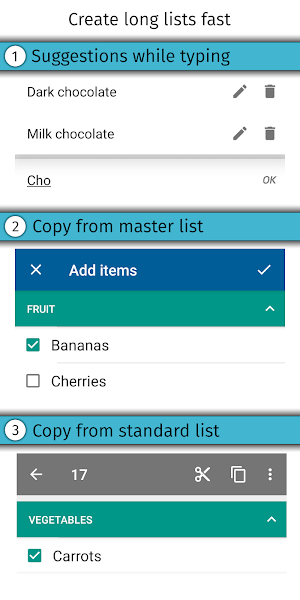
Here's how you can create long lists quickly: (see picture #3)
• Suggested items from your master list appear after you type two letters. Click on it to add the desired item.
• Select items from the master list and add them with one click.
• Create a shopping list of items you buy regularly, select all items with one click and add them to the preferred list.
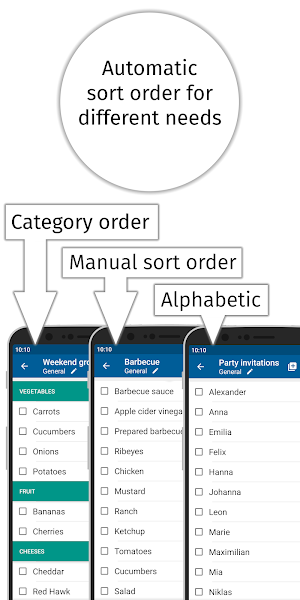
Display shopping lists either categorized, alphabetically sorted or manually sorted (see picture #4). Each shopping list can have its own sorting.
In the supermarket you do not have to scroll the list, because if you sort the items into categories and set the category order for the supermarket, the items will appear one after the other as you go through the supermarket. Crossed-off items and whole categories are placed at the end of the list (see picture #5).
Create recipes with ingredients, directions and pictures. With a few clicks you can add all ingredients to a shopping list (see picture #6).
Add pictures to items to always buy the right shampoo, cat food or coffee.
Do you still have something to do? Write it down in the task lists.
There are 4 different designs including Dark theme, 4 font sizes and 6 fonts to choose from.
Additional features:
• If necessary you can edit the master list (including categories, units, stores) in the management menu
• The shopping mode enlarges the lines and makes it easier to cross off items in the supermarket
• Reminders
• Barcode scanner
• Resolve inputs with quantity and price, e.g. 500g tomatoes 2.99
• Edit all items of a shopping list in a single view
• Customize layout in settings, e.g. hide/show progress bar, hyphens, select single-line layout
• and much more!
Convinced? Try it out! If you have any questions, please contact support by email at [email protected].
To briefly clarify, each group has its own chat with picture and text messages. Helpful if you don't know which shampoo to buy? Or who will bring the barbecue charcoal after Max has cancelled at short notice?
With the group chat you can rely on the fact that the messages are sent to all group members. You don't have to create a group in WhatsApp first. Or worry about whether everyone is on WhatsApp? Or Facebook Messenger, Telegram or Viber.
Here's how you can create long lists quickly: (see picture #3)
• Suggested items from your master list appear after you type two letters. Click on it to add the desired item.
• Select items from the master list and add them with one click.
• Create a shopping list of items you buy regularly, select all items with one click and add them to the preferred list.
Display shopping lists either categorized, alphabetically sorted or manually sorted (see picture #4). Each shopping list can have its own sorting.
In the supermarket you do not have to scroll the list, because if you sort the items into categories and set the category order for the supermarket, the items will appear one after the other as you go through the supermarket. Crossed-off items and whole categories are placed at the end of the list (see picture #5).
Create recipes with ingredients, directions and pictures. With a few clicks you can add all ingredients to a shopping list (see picture #6).
Add pictures to items to always buy the right shampoo, cat food or coffee.
Do you still have something to do? Write it down in the task lists.
There are 4 different designs including Dark theme, 4 font sizes and 6 fonts to choose from.
Additional features:
• If necessary you can edit the master list (including categories, units, stores) in the management menu
• The shopping mode enlarges the lines and makes it easier to cross off items in the supermarket
• Reminders
• Barcode scanner
• Resolve inputs with quantity and price, e.g. 500g tomatoes 2.99
• Edit all items of a shopping list in a single view
• Customize layout in settings, e.g. hide/show progress bar, hyphens, select single-line layout
• and much more!
Convinced? Try it out! If you have any questions, please contact support by email at [email protected].
What’s new
Updated August 11, 2026
Published over 400 updates in the past 14 years🎉 Changelog from previous updates: Christmas Theme New Price Trend layout Send multiline messages in chat Make sort order button more prominent in list creation view
User reviews

I've been using this for four years now, and am pleased with the functionality, ability to customize & ease of recovery due to their auto-sync with Google. Kudos also for the instant reply I received to my emailed request for assistance! Great customer service! I'll be using Lister for a long time to come.

Great app, developers very helpful in solving problems.

Suits my purpose well. Using Lister on LG phone linked to the Lister app my Samsung Galaxy Active2 watch. I make my shopping list on the phone. The list goes automatically to the watch app. I shop with my watch, marking off items on the watch as I shop. Very cool! Developer is responsive to questions.

Best shopping app and a must if you have a galaxy watch. Wish there was an paid option without ads.

I've used this app for years as it simply does a great job at helping me create shopping lists each week. Today I had an issue with linking it to my watch and received absolutely excellent support from the developer. It was soon working again and the fault wasn't down to the developer . Edit: After over a year of wo...

Developer was quick to answer my question and solved a problem I was having.
Alternatives to Shopping list — Lister
Looking for apps like Shopping list — Lister? Here are 6 similar Android apps on Google Play. The highest rated is Literal Word, NASB Bible (4.8/5), and all 6 are free to download.
-
Bring! Grocery Shopping List 4.4
-
Literal Word, NASB Bible 4.8
-
ToDodo: To Do List & Reminder
-
Tasks & Notes 4.1
-
Reminders: ToDo list & tasks 4.5
-
Shopamoji: Shopping List
| App | Rating | Price | Installs | Last updated | Compare |
|---|---|---|---|---|---|
| Shopping list — Lister | 4.0 / 5 | Free | 1,000,000+ | Aug 11, 2026 | |
| Bring! Grocery Shopping List | 4.4 / 5 | Free | 10,000,000+ | Sep 15, 2026 | Compare |
| Literal Word, NASB Bible | 4.8 / 5 | Free | 100,000+ | Aug 9, 2026 | Compare |
| ToDodo: To Do List & Reminder | – | Free | 100,000+ | Aug 19, 2026 | Compare |
| Tasks & Notes | 4.1 / 5 | Free | 100,000+ | May 1, 2026 | Compare |
| Reminders: ToDo list & tasks | 4.5 / 5 | Free | 100,000+ | Oct 14, 2026 | Compare |
| Shopamoji: Shopping List | – | Free | 5,000+ | Oct 17, 2026 | Compare |