
Crochet Chart
Art & Design In-app purchases Contains ads
Create crochet charts, stitch diagrams, and custom patterns with ease
- Downloads
- 1.7K+
- on Google Play
- Price
- Free
- In-app purchases
- Updated
- Aug 17
- 2026 · v1.0.0
Screenshots
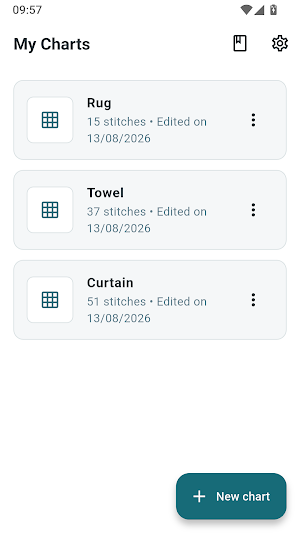

About Crochet Chart
Crochet Chart makes it easy to create beautiful crochet charts, stitch diagrams, and custom patterns right from your phone.
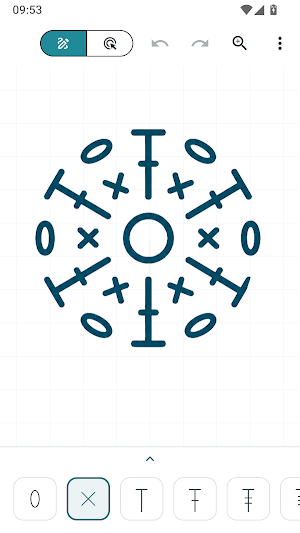
Turn your crochet ideas into clear, organized charts using standard crochet stitch symbols. Place stitches on a precise grid, arrange them exactly where you want, customize their colors, and create your own unique designs.
🧶 Create Your Own Crochet Charts
Design crochet charts from scratch with an intuitive visual editor.
Choose a stitch symbol and place it on the canvas. Move, align, resize, rotate, duplicate, and arrange your stitches to build your design exactly the way you imagine it.
Whether you're designing a simple motif or a more detailed crochet pattern, Crochet Chart gives you the tools to bring your ideas to life.
✨ Design With Crochet Stitch Symbols
Build your charts using standard crochet symbols, including:
• Chain stitches
• Single crochet
• Half double crochet
• Double crochet
• Treble crochet
• Increases
• Decreases
• Circles
• Shells
• And more
Create your own combinations and organize stitches into beautiful crochet diagrams.
📐 Precise Grid & Easy Alignment
The grid helps you position stitches accurately and keep your crochet chart clean and organized.
Place stitches exactly where you want them, align your design, and easily adjust the spacing as your pattern grows.
🎨 Customize Your Design
Make your crochet charts your own.
• Change stitch colors
• Resize symbols
• Rotate stitches
• Move and align elements
• Duplicate stitches
• Create colorful designs
• Zoom in for precise editing
• Pan around your canvas
From simple stitch diagrams to colorful crochet designs, you have complete visual control.
💡 Turn Ideas Into Crochet Patterns
Have an idea in your head, on paper, or in a sketch?
Use Crochet Chart to turn that idea into a digital crochet chart.
Create designs for:
• Crochet motifs
• Mandalas
• Doilies
• Blankets
• Amigurumi
• Granny squares
• Flowers
• Home decor
• Wearables
• Custom crochet patterns
👩🦱 For Beginners & Experienced Crocheters
You don't need to be a professional pattern designer to create your own charts.
Crochet Chart is designed to make crochet chart creation simple, visual, and accessible while giving experienced crocheters the flexibility they need.
📱 Create Anywhere
Design your crochet charts directly from your phone.
No complicated design software. No pen and paper. Just choose your stitches, place them on the canvas, and start creating.
📤 Export & Share
When your design is ready, export your crochet chart as an image and save or share it with others.
Create your design once and keep it ready for your next crochet project.
Create. Design. Crochet.
Crochet Chart puts a simple visual crochet chart maker in your hands.
Start creating your own crochet charts, stitch diagrams, and custom crochet patterns today.
Turn your crochet ideas into clear, organized charts using standard crochet stitch symbols. Place stitches on a precise grid, arrange them exactly where you want, customize their colors, and create your own unique designs.
🧶 Create Your Own Crochet Charts
Design crochet charts from scratch with an intuitive visual editor.
Choose a stitch symbol and place it on the canvas. Move, align, resize, rotate, duplicate, and arrange your stitches to build your design exactly the way you imagine it.
Whether you're designing a simple motif or a more detailed crochet pattern, Crochet Chart gives you the tools to bring your ideas to life.
✨ Design With Crochet Stitch Symbols
Build your charts using standard crochet symbols, including:
• Chain stitches
• Single crochet
• Half double crochet
• Double crochet
• Treble crochet
• Increases
• Decreases
• Circles
• Shells
• And more
Create your own combinations and organize stitches into beautiful crochet diagrams.
📐 Precise Grid & Easy Alignment
The grid helps you position stitches accurately and keep your crochet chart clean and organized.
Place stitches exactly where you want them, align your design, and easily adjust the spacing as your pattern grows.
🎨 Customize Your Design
Make your crochet charts your own.
• Change stitch colors
• Resize symbols
• Rotate stitches
• Move and align elements
• Duplicate stitches
• Create colorful designs
• Zoom in for precise editing
• Pan around your canvas
From simple stitch diagrams to colorful crochet designs, you have complete visual control.
💡 Turn Ideas Into Crochet Patterns
Have an idea in your head, on paper, or in a sketch?
Use Crochet Chart to turn that idea into a digital crochet chart.
Create designs for:
• Crochet motifs
• Mandalas
• Doilies
• Blankets
• Amigurumi
• Granny squares
• Flowers
• Home decor
• Wearables
• Custom crochet patterns
👩🦱 For Beginners & Experienced Crocheters
You don't need to be a professional pattern designer to create your own charts.
Crochet Chart is designed to make crochet chart creation simple, visual, and accessible while giving experienced crocheters the flexibility they need.
📱 Create Anywhere
Design your crochet charts directly from your phone.
No complicated design software. No pen and paper. Just choose your stitches, place them on the canvas, and start creating.
📤 Export & Share
When your design is ready, export your crochet chart as an image and save or share it with others.
Create your design once and keep it ready for your next crochet project.
Create. Design. Crochet.
Crochet Chart puts a simple visual crochet chart maker in your hands.
Start creating your own crochet charts, stitch diagrams, and custom crochet patterns today.
What’s new
Version 1.0.0 · Updated August 17, 2026
Create, edit, and export your crochet charts with ease. Improved stability and overall performance.
Alternatives to Crochet Chart
Looking for apps like Crochet Chart? Here are 6 similar Android apps on Google Play. The highest rated is Clove: Import & Save Recipes (4.9/5), and all 6 are free to download.
-
Clove: Import & Save Recipes 4.9
-
Fit Recipes for Weight Loss 4.5
-
365 Gratitude Journal & Diary 4.6
-
Design Space: DIY with Cricut 3.9
-
Skincare Routine: FeelinMySkin 4.6
-
OnSkin - Skincare Scanner 4.4
| App | Rating | Price | Installs | Last updated | Compare |
|---|---|---|---|---|---|
| Crochet Chart | – | Free | 1,000+ | Aug 17, 2026 | |
| Clove: Import & Save Recipes | 4.9 / 5 | Free | 50,000+ | Oct 1, 2026 | Compare |
| Fit Recipes for Weight Loss | 4.5 / 5 | Free | 100,000+ | – | Compare |
| 365 Gratitude Journal & Diary | 4.6 / 5 | Free | 500,000+ | Oct 27, 2026 | Compare |
| Design Space: DIY with Cricut | 3.9 / 5 | Free | 5,000,000+ | Oct 19, 2026 | Compare |
| Skincare Routine: FeelinMySkin | 4.6 / 5 | Free | 100,000+ | Oct 11, 2026 | Compare |
| OnSkin - Skincare Scanner | 4.4 / 5 | Free | 500,000+ | Jul 17, 2026 | Compare |
Compare Crochet Chart with the top alternatives: ratings, updates, ASO score and keyword gaps →
Similar apps on Google Play
- Clove: Import & Save Recipes
- Fit Recipes for Weight Loss
- 365 Gratitude Journal & Diary
- Design Space: DIY with Cricut
- Skincare Routine: FeelinMySkin
- OnSkin - Skincare Scanner
- Smartify: Arts and Culture
- PandaHall Beads
- AllModern
- Beekman 1802
- BeeDone: Gamified ADHD Planner
- Skincare Routine
- Pepper - Recipe Organizer
- obé | Fitness for women
- Personal Creations
- Ra Yoga
- Oh She Glows - Healthy Recipes