

Aero U-Robot Link
Tools
Universal Bluetooth/WiFi remote for Arduino, ESP, OrionStar, and LEGO MINDSTORMS
- Downloads
- 259+
- on Google Play
- Price
- Free
- No in-app purchases
- Updated
- Aug 1
- 2026 · v1.0.3
Screenshots


About Aero U-Robot Link
Aero is the universal robot controller for makers, students, and engineers. One app replaces a dozen hardware-specific remotes — control Arduino projects over HC-05/HC-06 Bluetooth, BLE peripherals over HM-10, ESP8266/ESP32 robots over WiFi, ESP32-CAM video robots, OrionStar AI robots, and LEGO MINDSTORMS NXT and EV3 bricks. All from one polished interface.
═══ HARDWARE SUPPORTED ═══
• Arduino Uno / Nano / Mega + HC-05 / HC-06 (Bluetooth Classic)
• Arduino + HM-10 (Bluetooth Low Energy)
• ESP8266 / ESP32 over WiFi TCP
• ESP32-CAM with live MJPEG video streaming
• OrionStar AI service robots
• LEGO MINDSTORMS NXT (motors A, B, C — stock LEGO firmware)
• LEGO MINDSTORMS EV3 (motors A, B, C, D — stock LEGO firmware)
No custom firmware needed for LEGO bricks. Aero speaks the official LEGO Direct Commands protocol over Bluetooth — pair with PIN 1234 and you're driving in seconds.
═══ CONTROL MODES ═══
• Custom Controls — drag, swap, resize buttons. Save unlimited layouts as named profiles.
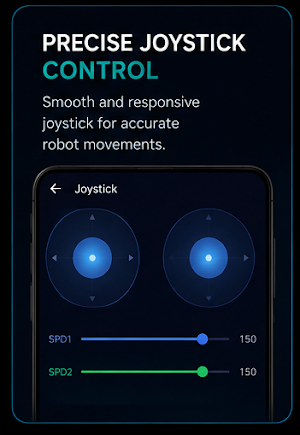
• Dual Joystick — differential drive with two independent speed sliders.
• Tilt — use the phone as a steering wheel.
• Gamepad — full PS4 / PS5 / Xbox controller support over Bluetooth.
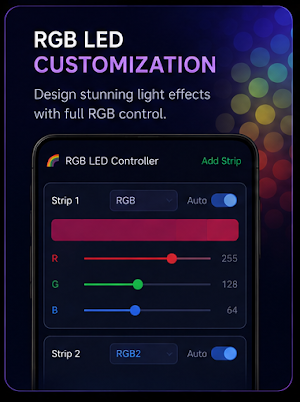
• RGB LED — colour picker with real-time auto-send to your project.
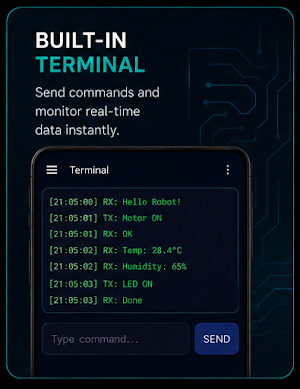
• Terminal — TX/RX serial monitor with timestamps and command history.
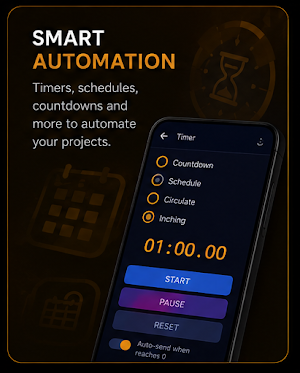
• Countdown Timer — auto-fire any command when the timer hits zero.
• IoT Dashboard — 10 widget types for live sensor data with a built-in web dashboard.
• Voice Control — Google Speech Recognition mapped to your custom commands.
• IP Camera — live video from any MJPEG stream on your network.
═══ LEGO MINDSTORMS FEATURES ═══
• Auto-pair and auto-reconnect
• Per-brick configurable drive port assignment
• Per-motor inversion (fix wiring without re-cabling)
• Aux motor mapping for grippers and arms (right joystick)
• Adjustable max-power cap, deadband, brake-on-stop, axis swap
• Custom commands: MOTOR:port:power, STOPALL, TONE:freq,dur, and more
═══ DEVELOPER-FRIENDLY ═══
• Plain-text protocol over Bluetooth, BLE, and WiFi — easy to learn, easy to debug
• Open-source on GitHub — fork it, modify it, contribute back
• AI-prompt template included for generating Arduino/ESP code in seconds
• No ads, no analytics, no tracking, no account required
Made with ♥ in the Philippines by Engr. J R Cabataña, ECT.
GitHub: https://github.com/engrpanda/Aero_U-Robot-Link
═══ HARDWARE SUPPORTED ═══
• Arduino Uno / Nano / Mega + HC-05 / HC-06 (Bluetooth Classic)
• Arduino + HM-10 (Bluetooth Low Energy)
• ESP8266 / ESP32 over WiFi TCP
• ESP32-CAM with live MJPEG video streaming
• OrionStar AI service robots
• LEGO MINDSTORMS NXT (motors A, B, C — stock LEGO firmware)
• LEGO MINDSTORMS EV3 (motors A, B, C, D — stock LEGO firmware)
No custom firmware needed for LEGO bricks. Aero speaks the official LEGO Direct Commands protocol over Bluetooth — pair with PIN 1234 and you're driving in seconds.
═══ CONTROL MODES ═══
• Custom Controls — drag, swap, resize buttons. Save unlimited layouts as named profiles.
• Dual Joystick — differential drive with two independent speed sliders.
• Tilt — use the phone as a steering wheel.
• Gamepad — full PS4 / PS5 / Xbox controller support over Bluetooth.
• RGB LED — colour picker with real-time auto-send to your project.
• Terminal — TX/RX serial monitor with timestamps and command history.
• Countdown Timer — auto-fire any command when the timer hits zero.
• IoT Dashboard — 10 widget types for live sensor data with a built-in web dashboard.
• Voice Control — Google Speech Recognition mapped to your custom commands.
• IP Camera — live video from any MJPEG stream on your network.
═══ LEGO MINDSTORMS FEATURES ═══
• Auto-pair and auto-reconnect
• Per-brick configurable drive port assignment
• Per-motor inversion (fix wiring without re-cabling)
• Aux motor mapping for grippers and arms (right joystick)
• Adjustable max-power cap, deadband, brake-on-stop, axis swap
• Custom commands: MOTOR:port:power, STOPALL, TONE:freq,dur, and more
═══ DEVELOPER-FRIENDLY ═══
• Plain-text protocol over Bluetooth, BLE, and WiFi — easy to learn, easy to debug
• Open-source on GitHub — fork it, modify it, contribute back
• AI-prompt template included for generating Arduino/ESP code in seconds
• No ads, no analytics, no tracking, no account required
Made with ♥ in the Philippines by Engr. J R Cabataña, ECT.
GitHub: https://github.com/engrpanda/Aero_U-Robot-Link
What’s new
Version 1.0.3 · Updated August 1, 2026
update targeting API 36, versionCode 8 / versionName 1.0.3.
User reviews

🩵👏👏

What a great app. Aside from no custom firmware needed, it works well with my ESP8266. No issues experienced so far.

App useful for controlling robots or robotic devices using a smartphone through a Wi-Fi connection. It can turn one phone into a controller and another into the robot system for wireless communication and monitoring. This is helpful for robotics projects, automation, and electronics engineering experiments.
Alternatives to Aero U-Robot Link
Looking for apps like Aero U-Robot Link? Here are 2 similar Android apps on Google Play. All of them are free to download.

| App | Rating | Price | Installs | Compare |
|---|---|---|---|---|
| Aero U-Robot Link | – | Free | 100+ | |
| Math x Time Adventure | – | Free | 10+ | Compare |
| Scanora - QR & Barcode Maker | – | Free | 5+ | Compare |
Compare Aero U-Robot Link with the top alternatives: ratings, updates, ASO score and keyword gaps →