

Markdown Viewer Editor
Productivity
Write Markdown on Android—preview, math, diagrams, export & sync.
- Downloads
- 1K+
- on Google Play
- Price
- Free
- No in-app purchases
- Updated
- Aug 2
- 2026 · v1.0.9
Screenshots


About Markdown Viewer Editor
Markdown Viewer Editor — a powerful Markdown editor and viewer for Android. Write notes, documentation, and long-form content with a clean, Typora-inspired workflow: switch between WYSIWYG editing, source mode with line numbers, live preview, or a split view—all in one app.
CORE EDITING
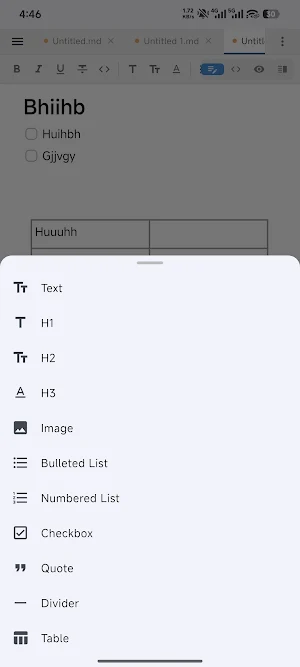
• Rich Markdown editing with a formatting toolbar (headings, lists, tables, code, links, images, and more)
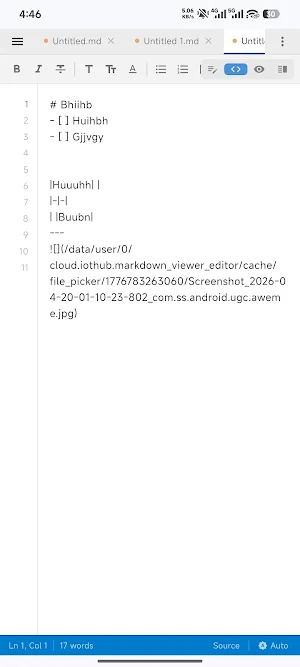
• Four modes: WYSIWYG, Source, Preview, and Split
• Focus mode and typewriter mode for distraction-free writing
• Find & replace with regex support; search across open documents
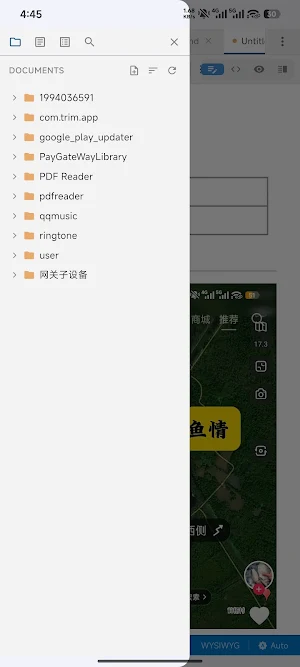
• Outline panel for quick navigation by headings
MARKDOWN & RICH CONTENT
• Full Markdown support including fenced code blocks with syntax highlighting
• Table of contents via [TOC]
• YAML front matter rendered as metadata
• GitHub-style alerts (NOTE, TIP, WARNING, and more)
• Footnotes, highlights, superscript/subscript
• KaTeX math: inline $...$ and block $$...$$
• Mermaid diagrams (flowcharts, sequence diagrams, Gantt, and more)
• Useful HTML embeds in preview (video, audio, details, and more)
• Copy code blocks to clipboard with one tap
FILES & WORKSPACE
• Open, save, and save-as; multi-tab editing
• Folder tree, flat file list, sorting, and quick open (fuzzy file search)
• Recent files on the welcome screen
• Auto-save with debounce (configurable); draft recovery after crashes
• External file change detection with reload prompts
IMAGES & MEDIA
• Paste images from clipboard; drag-and-drop where supported
• Relative/absolute image paths; configurable image storage folder
• Optional image upload via configurable shell command (e.g., PicGo-style workflows)
EXPORT & IMPORT
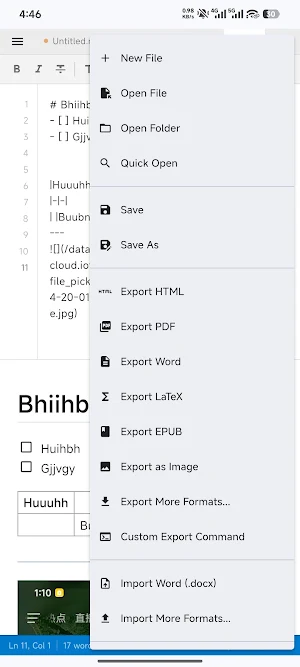
• Export to HTML (with GitHub-style styling options), PDF, Word (.docx), LaTeX (.tex), EPUB, and long PNG
• Import Word (.docx) to Markdown (basic conversion)
• Custom export shell templates; save Mermaid renders as PNG
VERSION CONTROL & SYNC
• Git history viewer for the current file
• Optional Git auto-sync on save (commit, pull --rebase, push) with status in the UI
OPTIONAL WRITING ASSISTANT (BYO API)
• Optional panel for compatible HTTP “chat completions” style endpoints—bring your own base URL, model name, and credentials. No built-in vendor; fully user-configured. Streaming responses supported for continue, summarize, translate, polish, explain, and custom prompts.
LOOK & FEEL
• Twelve built-in themes (light and dark), system or manual theme
• Custom preview CSS; adjustable font size and zoom
• Fullscreen; English/Chinese UI in settings
Perfect for developers, students, technical writers, and anyone who wants a serious Markdown app on Android—offline-friendly editing with optional sync and export when you need it.
Keywords users search for: markdown editor, markdown notes, md file editor, technical writing, documentation, KaTeX math, Mermaid diagram, PDF export, EPUB export, split markdown editor, dark mode markdown, git markdown.
CORE EDITING
• Rich Markdown editing with a formatting toolbar (headings, lists, tables, code, links, images, and more)
• Four modes: WYSIWYG, Source, Preview, and Split
• Focus mode and typewriter mode for distraction-free writing
• Find & replace with regex support; search across open documents
• Outline panel for quick navigation by headings
MARKDOWN & RICH CONTENT
• Full Markdown support including fenced code blocks with syntax highlighting
• Table of contents via [TOC]
• YAML front matter rendered as metadata
• GitHub-style alerts (NOTE, TIP, WARNING, and more)
• Footnotes, highlights, superscript/subscript
• KaTeX math: inline $...$ and block $$...$$
• Mermaid diagrams (flowcharts, sequence diagrams, Gantt, and more)
• Useful HTML embeds in preview (video, audio, details, and more)
• Copy code blocks to clipboard with one tap
FILES & WORKSPACE
• Open, save, and save-as; multi-tab editing
• Folder tree, flat file list, sorting, and quick open (fuzzy file search)
• Recent files on the welcome screen
• Auto-save with debounce (configurable); draft recovery after crashes
• External file change detection with reload prompts
IMAGES & MEDIA
• Paste images from clipboard; drag-and-drop where supported
• Relative/absolute image paths; configurable image storage folder
• Optional image upload via configurable shell command (e.g., PicGo-style workflows)
EXPORT & IMPORT
• Export to HTML (with GitHub-style styling options), PDF, Word (.docx), LaTeX (.tex), EPUB, and long PNG
• Import Word (.docx) to Markdown (basic conversion)
• Custom export shell templates; save Mermaid renders as PNG
VERSION CONTROL & SYNC
• Git history viewer for the current file
• Optional Git auto-sync on save (commit, pull --rebase, push) with status in the UI
OPTIONAL WRITING ASSISTANT (BYO API)
• Optional panel for compatible HTTP “chat completions” style endpoints—bring your own base URL, model name, and credentials. No built-in vendor; fully user-configured. Streaming responses supported for continue, summarize, translate, polish, explain, and custom prompts.
LOOK & FEEL
• Twelve built-in themes (light and dark), system or manual theme
• Custom preview CSS; adjustable font size and zoom
• Fullscreen; English/Chinese UI in settings
Perfect for developers, students, technical writers, and anyone who wants a serious Markdown app on Android—offline-friendly editing with optional sync and export when you need it.
Keywords users search for: markdown editor, markdown notes, md file editor, technical writing, documentation, KaTeX math, Mermaid diagram, PDF export, EPUB export, split markdown editor, dark mode markdown, git markdown.
What’s new
Version 1.0.9 · Updated August 2, 2026
fix some bugs
Alternatives to Markdown Viewer Editor
Looking for apps like Markdown Viewer Editor? Here are 6 similar Android apps on Google Play. 5 of the 6 are free to download.
-
DDNS Updater - Sync domain IP
-
CasaZimaCli - CasaOS & ZimaOS
-
Yalist - Multi-storage Alist
-
IPTV - IPTV live TV player
-
Mind Maps Ultra
-
Restful Api - like a postman
| App | Rating | Price | Installs | Last updated | Compare |
|---|---|---|---|---|---|
| Markdown Viewer Editor | – | Free | 1,000+ | Aug 2, 2026 | |
| DDNS Updater - Sync domain IP | – | Free | 1,000+ | Jul 26, 2026 | Compare |
| CasaZimaCli - CasaOS & ZimaOS | – | Free | 1,000+ | Apr 8, 2026 | Compare |
| Yalist - Multi-storage Alist | – | Free | 100+ | Jul 26, 2026 | Compare |
| IPTV - IPTV live TV player | – | Free | 1,000+ | Jul 27, 2026 | Compare |
| Mind Maps Ultra | – | Free | 500+ | Jul 28, 2026 | Compare |
| Restful Api - like a postman | – | 4.99 USD | 1+ | Jul 27, 2026 | Compare |