
Salva Meta
Maps & Navigation
Navigate, save and share your destinations without limits!
- Downloads
- 10+
- on Google Play
- Price
- Free
- No in-app purchases
- Updated
- Aug 15
- 2025 · v1.0.1
Screenshots
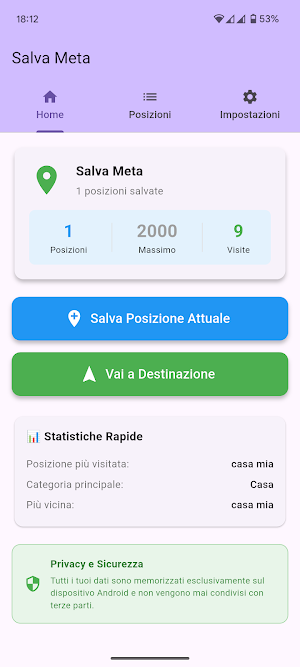
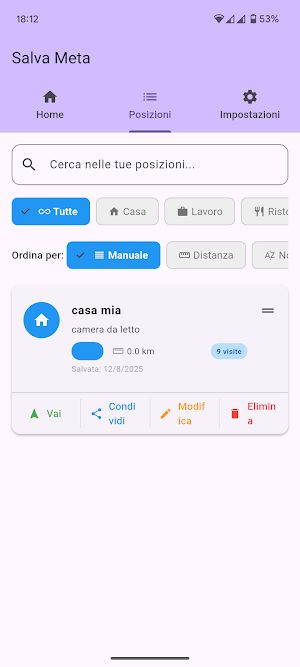
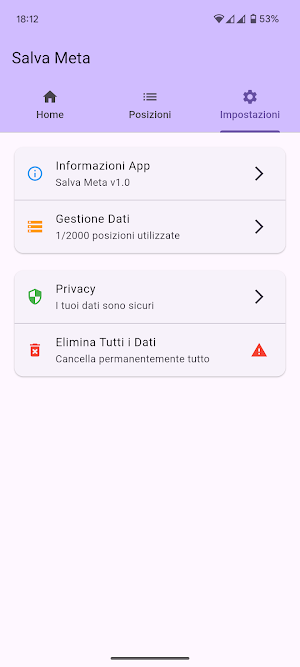
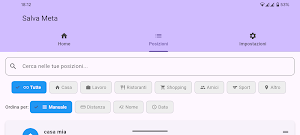


About Salva Meta
Salva Meta allows you to indulge in the luxury of being found by GPS, stress-free saving your location and sharing it, or navigating to your list of destinations—easy, useful, and free! Developed by BitnBit, this revolutionary app lets you manage your favorite places directly on your phone, hassle-free and with complete privacy. Forget remote databases: all your locations are saved locally, ensuring complete control over your data. Discover how Salva Meta can simplify your daily life! Why choose Salva Meta? Stress-Free Saving: Save your favorite places—home, work, restaurants, or special spots—with a single tap. No need for complicated steps, everything happens in seconds.
Intuitive Navigation: Access real-time navigation to your saved destinations with Google Maps. Select a location and get started right away with precise directions.
Easy Sharing: Share coordinates with friends or family via WhatsApp, email, or clipboard, always with your permission and without intermediaries.
Distance Calculation: Use GPS to instantly calculate the distance between your current location and saved destinations, perfect for planning your trips.
Smart Personalization: Organize your locations with custom categories (e.g., Home, Work, Shopping) and sort them by distance, name, or date, with a counter to track visits.
Guaranteed Privacy: No data leaves your device. Save Meta does not use external servers, offering a 100% secure and private experience.
How Does It Work? Save with Ease: Activate GPS and save your current location with name, description, and category in an instant.
Manage Your Destinations: View your list of saved locations, filter with search, or sort according to your preferences.
Navigate Without Worries: Select a destination and start navigation with Google Maps in just a few clicks.
Share Anytime: Open the sharing menu and send the coordinates to whoever you want, directly from your phone.
Who is it for? Salva Meta is perfect for travelers who want to mark points of interest, commuters looking for quick access to home or work, and anyone who wants a simple and secure way to organize their life. The absence of remote databases makes it unique: your data remains yours, without the risk of breaches! Important Notes: Permissions: The app requires location access to function, but all data is processed locally. You can disable permissions at any time from your device settings.
Internet Connection: Only required for navigation with Google Maps; otherwise, the app works offline.
100% Free: No hidden costs, just a useful service accessible to everyone.
Intuitive Navigation: Access real-time navigation to your saved destinations with Google Maps. Select a location and get started right away with precise directions.
Easy Sharing: Share coordinates with friends or family via WhatsApp, email, or clipboard, always with your permission and without intermediaries.
Distance Calculation: Use GPS to instantly calculate the distance between your current location and saved destinations, perfect for planning your trips.
Smart Personalization: Organize your locations with custom categories (e.g., Home, Work, Shopping) and sort them by distance, name, or date, with a counter to track visits.
Guaranteed Privacy: No data leaves your device. Save Meta does not use external servers, offering a 100% secure and private experience.
How Does It Work? Save with Ease: Activate GPS and save your current location with name, description, and category in an instant.
Manage Your Destinations: View your list of saved locations, filter with search, or sort according to your preferences.
Navigate Without Worries: Select a destination and start navigation with Google Maps in just a few clicks.
Share Anytime: Open the sharing menu and send the coordinates to whoever you want, directly from your phone.
Who is it for? Salva Meta is perfect for travelers who want to mark points of interest, commuters looking for quick access to home or work, and anyone who wants a simple and secure way to organize their life. The absence of remote databases makes it unique: your data remains yours, without the risk of breaches! Important Notes: Permissions: The app requires location access to function, but all data is processed locally. You can disable permissions at any time from your device settings.
Internet Connection: Only required for navigation with Google Maps; otherwise, the app works offline.
100% Free: No hidden costs, just a useful service accessible to everyone.
What’s new
Version 1.0.1 · Updated August 15, 2025
Aggiornamento versione: 2(1.0.1) di piccola entità
Alternatives to Salva Meta
Looking for apps like Salva Meta? Here are 4 similar Android apps on Google Play. All of them are free to download.



| App | Rating | Price | Installs | Last updated | Compare |
|---|---|---|---|---|---|
| Salva Meta | – | Free | 10+ | Aug 15, 2025 | |
| Ricorda - Workflow | – | Free | 1+ | Aug 14, 2026 | Compare |
| Obscura Go | – | Free | 100+ | Aug 29, 2025 | Compare |
| Eventi e Ricorrenze | – | Free | 10+ | Aug 13, 2025 | Compare |
| Gioca ad Obbligo o verità | – | Free | 100+ | – | Compare |
Compare Salva Meta with the top alternatives: ratings, updates, ASO score and keyword gaps →