

Customer Service Keyboard
EasyMeta Tools
One-tap replies in any chat box. All local — no network, no uploads.
- Downloads
- 15+
- on Google Play
- Price
- Free
- No in-app purchases
- Updated
- Jun 18
- 2026 · v1.0.0
Screenshots


About Customer Service Keyboard
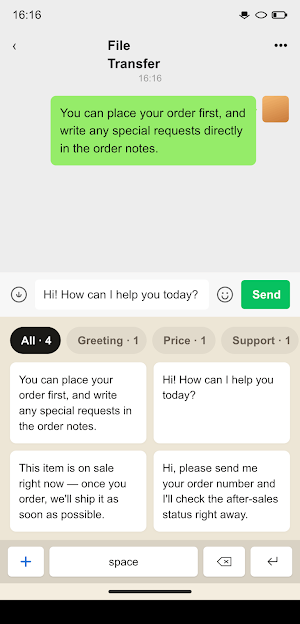
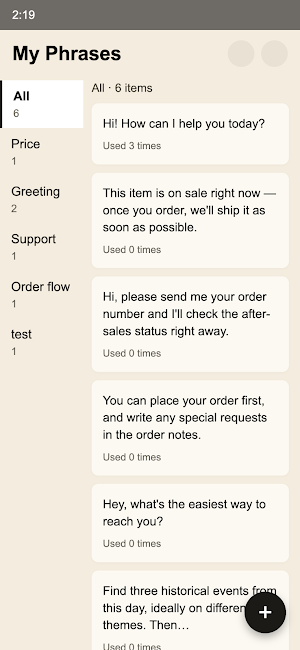
Customer Service Keyboard is a third-party Android keyboard (input method) for support teams. Save your most-used replies once, then send them with a single tap inside any chat box.
KEY FEATURES
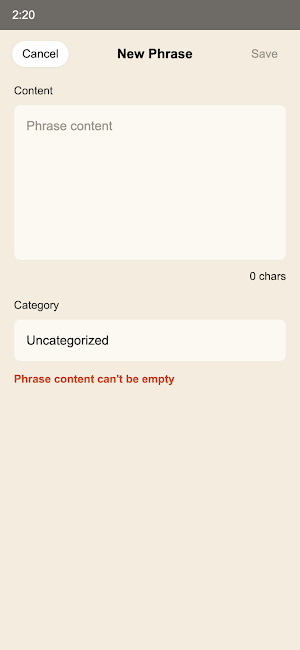
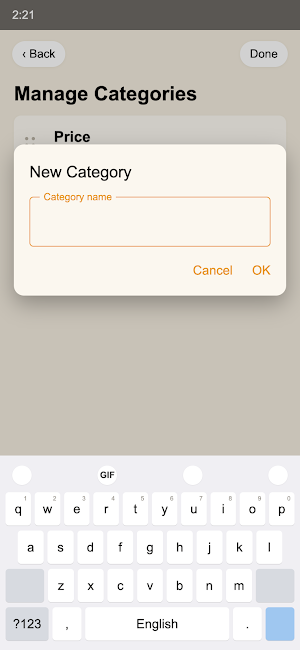
· Phrase library: create, categorize, and organize reply templates in the app
· One-tap insert: switch to the keyboard in any text field and tap to send
· Fast search: find the right phrase instantly by keyword
· Save selection: select text in any app and send it to Customer Service Keyboard to store it as a phrase
· Backup: import/export everything as JSON to move phrases between devices
PRIVACY: LOCAL ONLY · NO NETWORK · NO UPLOADS
Your phrases live only on your device, inside the app's private storage. This app does not declare the INTERNET permission at all — the system blocks every network connection, so nothing can be uploaded and no input is ever collected. No analytics SDKs.
WHO IT'S FOR
E-commerce support, community managers, and after-sales teams — anyone who sends the same replies again and again on mobile.
GET STARTED
1. Open Settings → System → Languages & input → On-screen keyboard → Manage keyboards, then enable "Customer Service Keyboard"
2. Tap the keyboard-switch button in any chat box and pick it
3. Browse or search your phrases and tap to send
Requires Android 8.0 or later.
KEY FEATURES
· Phrase library: create, categorize, and organize reply templates in the app
· One-tap insert: switch to the keyboard in any text field and tap to send
· Fast search: find the right phrase instantly by keyword
· Save selection: select text in any app and send it to Customer Service Keyboard to store it as a phrase
· Backup: import/export everything as JSON to move phrases between devices
PRIVACY: LOCAL ONLY · NO NETWORK · NO UPLOADS
Your phrases live only on your device, inside the app's private storage. This app does not declare the INTERNET permission at all — the system blocks every network connection, so nothing can be uploaded and no input is ever collected. No analytics SDKs.
WHO IT'S FOR
E-commerce support, community managers, and after-sales teams — anyone who sends the same replies again and again on mobile.
GET STARTED
1. Open Settings → System → Languages & input → On-screen keyboard → Manage keyboards, then enable "Customer Service Keyboard"
2. Tap the keyboard-switch button in any chat box and pick it
3. Browse or search your phrases and tap to send
Requires Android 8.0 or later.
What’s new
Version 1.0.0 · Updated June 18, 2026
fix theme
Alternatives to Customer Service Keyboard
Looking for apps like Customer Service Keyboard? Here are 4 similar Android apps on Google Play. All of them are free to download.




| App | Rating | Price | Installs | Last updated | Compare |
|---|---|---|---|---|---|
| Customer Service Keyboard | – | Free | 10+ | Jun 18, 2026 | |
| Authloom: 2FA Authenticator | – | Free | 10+ | – | Compare |
| Math Joy | – | Free | 50+ | – | Compare |
| DictoGo Pro | – | Free | 500+ | Aug 28, 2026 | Compare |
| DictoGo Lite | – | Free | 100+ | – | Compare |