

Authloom: 2FA Authenticator
EasyMeta Tools
Local-first 2FA codes with optional encrypted backup. No account or ads.
- Downloads
- 10+
- on Google Play
- Price
- Free
- No in-app purchases
- Updated
- Jul 25
- 2026 · v1.0.0
Screenshots

About Authloom: 2FA Authenticator
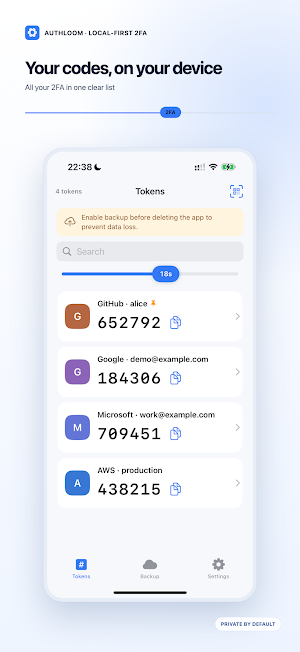
Authloom is a free, local-first two-factor authenticator. Your verification codes stay on your device by default, and core TOTP features work offline.
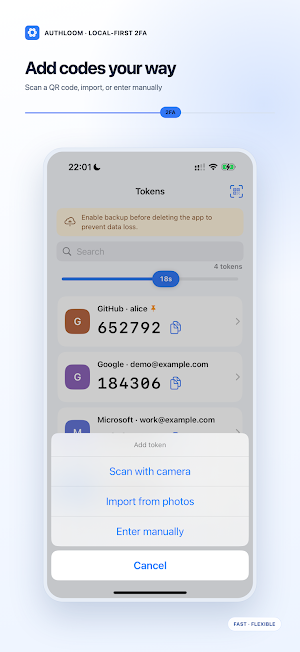
Add codes by scanning a QR code, importing an image, or entering a TOTP secret manually. Keep multiple codes in one clear list, search quickly, and copy the current code with one tap.
PRIVACY BY DEFAULT
• No Authloom account required
• No ads or in-app analytics
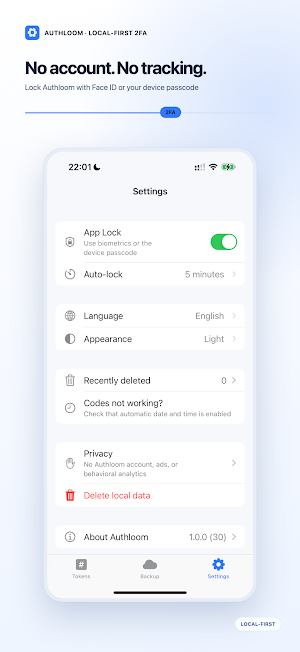
• Sensitive data is encrypted on your device
• Optional biometric or device-passcode lock
BACKUP IS YOUR CHOICE
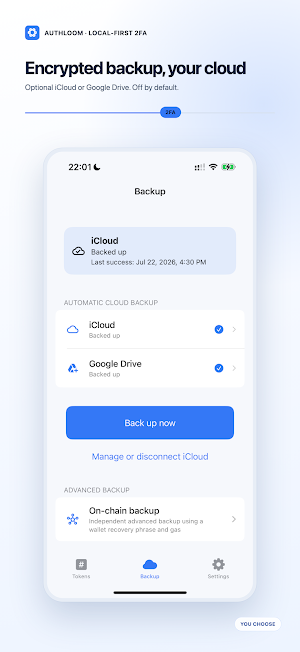
Cloud backup is off by default. You can optionally save an encrypted backup to Google Drive App Data. Google Drive backups use a separate Authloom backup password that is never uploaded. iCloud backup is also available on supported Apple devices.
Authloom offers an optional advanced on-chain backup channel that stores encrypted 2FA backup records on a supported public blockchain. Authloom is not a cryptocurrency wallet or financial service. It does not hold, buy, sell, trade, transfer, or manage digital assets. Public-network transactions require gas and cannot be reversed or deleted.
Before deleting Authloom or replacing a device, enable and verify a backup method if you want your codes to be recoverable. Never share a QR code, TOTP secret, backup password, or recovery phrase.
Add codes by scanning a QR code, importing an image, or entering a TOTP secret manually. Keep multiple codes in one clear list, search quickly, and copy the current code with one tap.
PRIVACY BY DEFAULT
• No Authloom account required
• No ads or in-app analytics
• Sensitive data is encrypted on your device
• Optional biometric or device-passcode lock
BACKUP IS YOUR CHOICE
Cloud backup is off by default. You can optionally save an encrypted backup to Google Drive App Data. Google Drive backups use a separate Authloom backup password that is never uploaded. iCloud backup is also available on supported Apple devices.
Authloom offers an optional advanced on-chain backup channel that stores encrypted 2FA backup records on a supported public blockchain. Authloom is not a cryptocurrency wallet or financial service. It does not hold, buy, sell, trade, transfer, or manage digital assets. Public-network transactions require gas and cannot be reversed or deleted.
Before deleting Authloom or replacing a device, enable and verify a backup method if you want your codes to be recoverable. Never share a QR code, TOTP secret, backup password, or recovery phrase.
Alternatives to Authloom: 2FA Authenticator
Looking for apps like Authloom: 2FA Authenticator? Here are 4 similar Android apps on Google Play. All of them are free to download.


| App | Rating | Price | Installs | Last updated | Compare |
|---|---|---|---|---|---|
| Authloom: 2FA Authenticator | – | Free | 10+ | Jul 25, 2026 | |
| Customer Service Keyboard | – | Free | 10+ | – | Compare |
| Math Joy | – | Free | 50+ | – | Compare |
| DictoGo Pro | – | Free | 500+ | Aug 28, 2026 | Compare |
| DictoGo Lite | – | Free | 100+ | – | Compare |