
Coral You - Icon Pack
Personalization
Adaptive icon pack inspired by Material You!
- Downloads
- 126+
- on Google Play
- Price
- $0.49
- No in-app purchases
- Updated
- Aug 31
- 2025 · v1.0.16
Screenshots
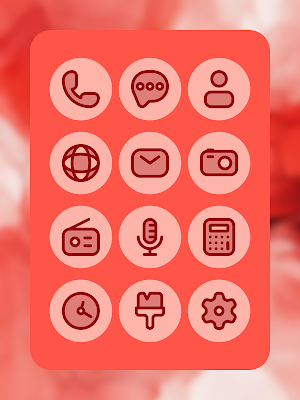
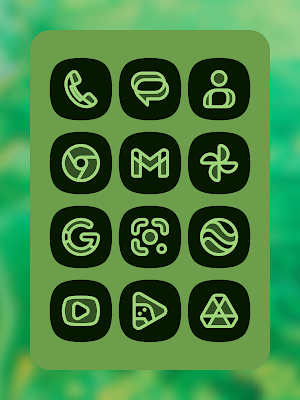
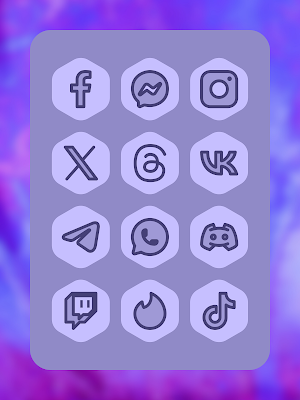
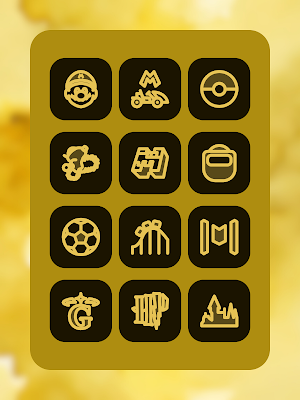


About Coral You - Icon Pack
Customize your home screen with this beautiful icon pack and be mesmerized by the magic of customization. Your phone will never look so stylish and captivating!
Each icon has been meticulously designed to ensure exceptional quality and a stunning visual experience, which in combination with the colors of Material You, make this a versatile and elegant icon pack.
Highlighted features:
• Icon preview and search.
• Intuitive and user-friendly interface.
• High-quality adaptive icons (vector icons).
• Icon masking for non-themed icons.
• Dynamic calendar icon.
• Icons organized by categories.
• Folder icons (manually apply).
• Icon request.
How to apply this icon pack?
1. Install a launcher that supports third-party icons.
2. Open Coral You icon pack and tap the floating button "Apply to Home."
* If your launcher is not listed under "Apply" or in the list of recommended launchers, make sure to apply it from the launcher's settings.
How to send an icon request for non-themed icons?
1. Open this app and tap the "Request" option in the navigation bar.
2. Mark all the icons you want to have a theme and submit the request by pressing the floating button "Send."
3. You will get a screen with sharing options, choose Gmail from the options and send the email as it is, DO NOT delete the generated zip file or change the email's structure.
* Optionally, you can send the requests to the support group on Telegram. To do this, select the "Telegram" option on the main screen of this icon pack and follow the instructions. Once you become a member of the group, you can select "Telegram" from the sharing options screen to share the icon requests. Please, DO NOT send the same request twice!
ATTENTION!
• Reapply this icon pack after switching between light/dark modes or after updating the wallpaper to change the colors of the icons.
• A compatible launcher is required to use this icon pack!
• Check the launcher's settings that support third-party icon packs!
• There is a Frequently Asked Questions (FAQ) section within the app that answers many questions you may have. Please read it before sending your question via email.
Recommended Launchers:
• Nova Launcher (better compatibility)
• Lawnchair 12
• Niagara
• Hyperion
• Shade Launcher
• Yandex Launcher
• Action Launcher
• Smart Launcher (icons without theme do not adapt correctly, launcher issue)
Each icon has been meticulously designed to ensure exceptional quality and a stunning visual experience, which in combination with the colors of Material You, make this a versatile and elegant icon pack.
Highlighted features:
• Icon preview and search.
• Intuitive and user-friendly interface.
• High-quality adaptive icons (vector icons).
• Icon masking for non-themed icons.
• Dynamic calendar icon.
• Icons organized by categories.
• Folder icons (manually apply).
• Icon request.
How to apply this icon pack?
1. Install a launcher that supports third-party icons.
2. Open Coral You icon pack and tap the floating button "Apply to Home."
* If your launcher is not listed under "Apply" or in the list of recommended launchers, make sure to apply it from the launcher's settings.
How to send an icon request for non-themed icons?
1. Open this app and tap the "Request" option in the navigation bar.
2. Mark all the icons you want to have a theme and submit the request by pressing the floating button "Send."
3. You will get a screen with sharing options, choose Gmail from the options and send the email as it is, DO NOT delete the generated zip file or change the email's structure.
* Optionally, you can send the requests to the support group on Telegram. To do this, select the "Telegram" option on the main screen of this icon pack and follow the instructions. Once you become a member of the group, you can select "Telegram" from the sharing options screen to share the icon requests. Please, DO NOT send the same request twice!
ATTENTION!
• Reapply this icon pack after switching between light/dark modes or after updating the wallpaper to change the colors of the icons.
• A compatible launcher is required to use this icon pack!
• Check the launcher's settings that support third-party icon packs!
• There is a Frequently Asked Questions (FAQ) section within the app that answers many questions you may have. Please read it before sending your question via email.
Recommended Launchers:
• Nova Launcher (better compatibility)
• Lawnchair 12
• Niagara
• Hyperion
• Shade Launcher
• Yandex Launcher
• Action Launcher
• Smart Launcher (icons without theme do not adapt correctly, launcher issue)
What’s new
Version 1.0.16 · Updated August 31, 2025
- Internal update, new icons will be added starting with the next update.
User reviews

This icon pack is lit 🔥❤️🔥
Alternatives to Coral You - Icon Pack
Looking for apps like Coral You - Icon Pack? Here are 6 similar Android apps on Google Play. The highest rated is Iris Monet [Substratum] (4.8/5), and 2 of the 6 are free to download.
-
Iris Addons [Substratum]
-
Iris Monet (F) - Substratum 4.8
-
Camaleon Theme Engine Unlocker
-
Coral - Icon Pack
-
Eclipse [Substratum]
-
Iris Monet [Substratum] 4.8
| App | Rating | Price | Installs | Last updated | Compare |
|---|---|---|---|---|---|
| Coral You - Icon Pack | – | $0.49 | 100+ | Aug 31, 2025 | |
| Iris Addons [Substratum] | – | Free | 1,000+ | Mar 31, 2023 | Compare |
| Iris Monet (F) - Substratum | 4.8 / 5 | Free | 10,000+ | Sep 15, 2025 | Compare |
| Camaleon Theme Engine Unlocker | – | 1.99 USD | 100+ | Sep 29, 2024 | Compare |
| Coral - Icon Pack | – | 0.49 USD | 50+ | Aug 31, 2025 | Compare |
| Eclipse [Substratum] | – | 1.99 USD | 50+ | Sep 16, 2025 | Compare |
| Iris Monet [Substratum] | 4.8 / 5 | 1.99 USD | 1,000+ | Aug 16, 2025 | Compare |