
Smart Car Tech
Education
Control App for SmartCarTech Programming Vehicles
- Downloads
- 50+
- on Google Play
- Price
- Free
- No in-app purchases
- Updated
- Oct 8
- 2023 · v1.5
Screenshots


About Smart Car Tech
Car Programming SmartCarTech:
+ Control via Bluetooth connection
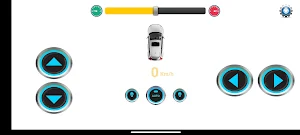
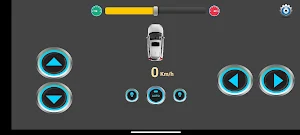
+ Controlled by App on phone
+ Has Automatic self-running mode
+ Equipped with 4 ultrasonic sensors to detect obstacles
+ Encoder speed sensor calculates and measures vehicle speed
+ Arduino Nano for controller programming
+ Balanced charging and 20A high discharge current battery
+ The chassis is sturdy and cool
Steps to connect between App and vehicle:
1. Bluetooth connection between phone and car.
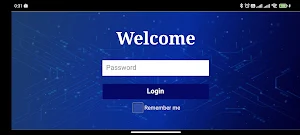
2. Log in to the SmartCarTech app.
3. Use the SmartCarTec app to connect to the car.
4. Comfortably control and program the vehicle.
For more details -> Visit Website: smartcartech.vn
+ Control via Bluetooth connection
+ Controlled by App on phone
+ Has Automatic self-running mode
+ Equipped with 4 ultrasonic sensors to detect obstacles
+ Encoder speed sensor calculates and measures vehicle speed
+ Arduino Nano for controller programming
+ Balanced charging and 20A high discharge current battery
+ The chassis is sturdy and cool
Steps to connect between App and vehicle:
1. Bluetooth connection between phone and car.
2. Log in to the SmartCarTech app.
3. Use the SmartCarTec app to connect to the car.
4. Comfortably control and program the vehicle.
For more details -> Visit Website: smartcartech.vn
What’s new
Version 1.5 · Updated October 8, 2023
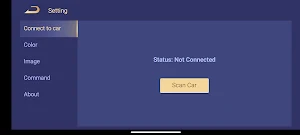
Update "Setting": + Mục "Color": khi chọn màu sẽ đổi màu của màn hình điều khiển. + Mục "Image": khi chọn một hình ảnh sẽ đổi hình ảnh của màn hình điều khiển. + Mục "Command": Liệt kê các lệnh điện thoại gửi tới xe. + Mục "About": hiển thị version App và trang web.
Alternatives to Smart Car Tech
Looking for apps like Smart Car Tech? Here are 2 similar Android apps on Google Play. All of them are free to download.
| App | Rating | Price | Installs | Last updated | Compare |
|---|---|---|---|---|---|
| Smart Car Tech | – | Free | 50+ | Oct 8, 2023 | |
| Smart Car Tech Light | – | Free | 10+ | Oct 21, 2023 | Compare |
| Bluetooth Car | – | Free | 100+ | – | Compare |
Compare Smart Car Tech with the top alternatives: ratings, updates, ASO score and keyword gaps →