
Triton Launcher
Productivity
Android Launcher
- Downloads
- 146+
- on Google Play
- Price
- $0.99
- No in-app purchases
- Updated
- Aug 19
- 2023 · v1.0.1 Dev (627f2d0)
Screenshots
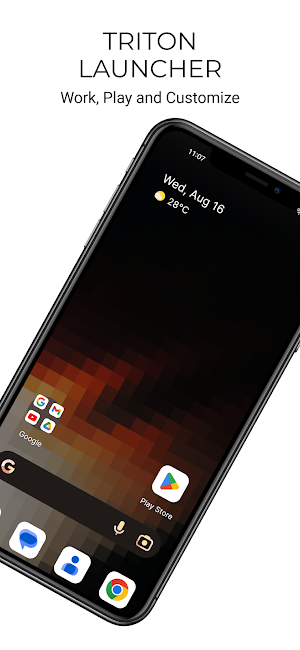
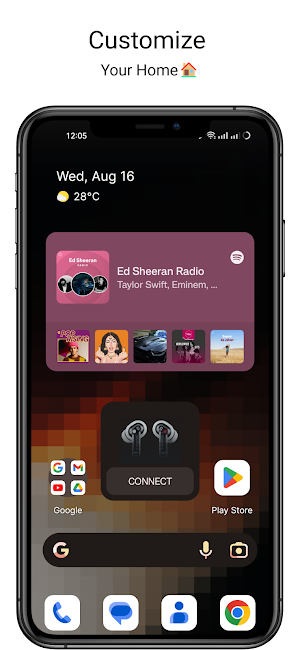
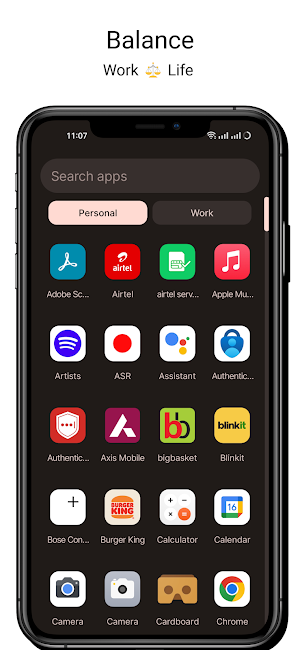
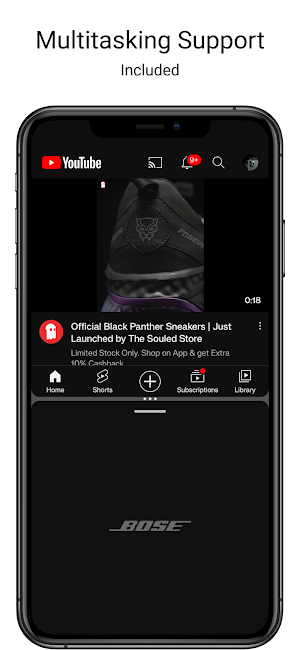


About Triton Launcher
Triton Launcher is a powerful and customizable launcher that lets you take control of your Android home screen. With Triton Launcher, you can:
Customize your home screen: Add and remove app icons, widgets, and folders to create a home screen that is perfect for you.
Organize your apps: The app drawer makes it easy to find the apps you need. You can even create folders to group your apps together.
Search for apps and settings: The search bar makes it quick and easy to find what you're looking for.
View and manage notifications: Triton Launcher lets you view and manage notifications from apps right on your home screen.
Use gestures: Triton Launcher supports gestures for launching apps, accessing widgets, and navigating the home screen.
Choose from a variety of themes: Triton Launcher comes with a variety of themes to choose from, so you can change the look and feel of your home screen to match your style.
Protect your privacy: Android Launcher provides privacy features to control who can see your home screen and app icons.
Keep your data safe: Android Launcher provides security features to protect your data and apps.
Sync your settings across devices: Android Launcher integrates with different installations to let you sync your home screen and app settings across devices.
Android Launcher is the perfect way to take control of your Android home screen and make it your own. Download it today and start customizing!
Support for multiple home screens: This would allow users to have different home screens for different purposes, such as work, personal, or gaming.
Widget customization: Users should be able to customize the size, shape, and color of widgets to match their home screen.
Theme editor: This would allow users to create their own themes by changing the colors, icons, and wallpapers of the home screen.
Notification filters: Users should be able to filter notifications by app or type to reduce clutter.
App shortcuts: Users should be able to create shortcuts to apps on the home screen for quick access.
Gesture support: Users should be able to use gestures to launch apps, open folders, and navigate the home screen. Users can Double Tap to Lock Device using the Accessibility API
Customize your home screen: Add and remove app icons, widgets, and folders to create a home screen that is perfect for you.
Organize your apps: The app drawer makes it easy to find the apps you need. You can even create folders to group your apps together.
Search for apps and settings: The search bar makes it quick and easy to find what you're looking for.
View and manage notifications: Triton Launcher lets you view and manage notifications from apps right on your home screen.
Use gestures: Triton Launcher supports gestures for launching apps, accessing widgets, and navigating the home screen.
Choose from a variety of themes: Triton Launcher comes with a variety of themes to choose from, so you can change the look and feel of your home screen to match your style.
Protect your privacy: Android Launcher provides privacy features to control who can see your home screen and app icons.
Keep your data safe: Android Launcher provides security features to protect your data and apps.
Sync your settings across devices: Android Launcher integrates with different installations to let you sync your home screen and app settings across devices.
Android Launcher is the perfect way to take control of your Android home screen and make it your own. Download it today and start customizing!
Support for multiple home screens: This would allow users to have different home screens for different purposes, such as work, personal, or gaming.
Widget customization: Users should be able to customize the size, shape, and color of widgets to match their home screen.
Theme editor: This would allow users to create their own themes by changing the colors, icons, and wallpapers of the home screen.
Notification filters: Users should be able to filter notifications by app or type to reduce clutter.
App shortcuts: Users should be able to create shortcuts to apps on the home screen for quick access.
Gesture support: Users should be able to use gestures to launch apps, open folders, and navigate the home screen. Users can Double Tap to Lock Device using the Accessibility API
What’s new
Version 1.0.1 Dev (627f2d0) · Updated August 19, 2023
Updated App Icon
User reviews

Great Pixel Launcher Alternative
Alternatives to Triton Launcher
Looking for apps like Triton Launcher? Here are 6 similar Android apps on Google Play. All of them are free to download.

| App | Rating | Price | Installs | Last updated | Compare |
|---|---|---|---|---|---|
| Triton Launcher | – | $0.99 | 100+ | Aug 19, 2023 | |
| Lunar Launcher | – | Free | 10,000+ | Aug 19, 2023 | Compare |
| Nothing Audio Recorder | – | Free | 5,000+ | Dec 8, 2023 | Compare |
| Calculator | – | Free | 1,000+ | Dec 14, 2023 | Compare |
| Data Usage | – | Free | 5,000+ | Mar 18, 2023 | Compare |
| Wallyball - Android Wallpapers | – | Free | 100+ | Jan 17, 2023 | Compare |
| Notes | – | Free | 5,000+ | Oct 10, 2022 | Compare |
Compare Triton Launcher with the top alternatives: ratings, updates, ASO score and keyword gaps →