
Fire in Phone Simulator
Flash Software Solution Entertainment Contains ads
Set your screen on fire and keep using your phone while it burns.
- Downloads
- 195+
- on Google Play
- Price
- Free
- No in-app purchases
- Updated
- Aug 19
- 2026 · v1.3
Screenshots

About Fire in Phone Simulator
Your screen catches fire, and you carry on using your phone.
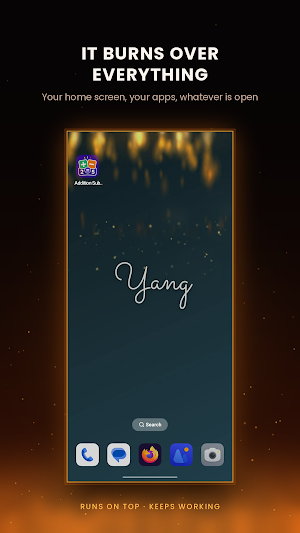
Fire in Phone Simulator paints real looking flames over everything on your screen. The fire keeps burning while you scroll, chat and play, because your taps go straight through it to the app underneath. Hand your phone to a friend and watch their face.
BUILD THE FIRE YOU WANT
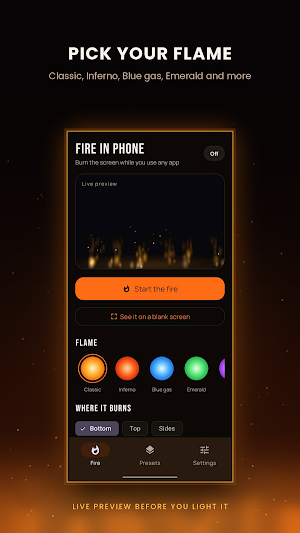
Six flames to pick from: Classic, Inferno, Blue gas, Emerald, Violet and White hot.
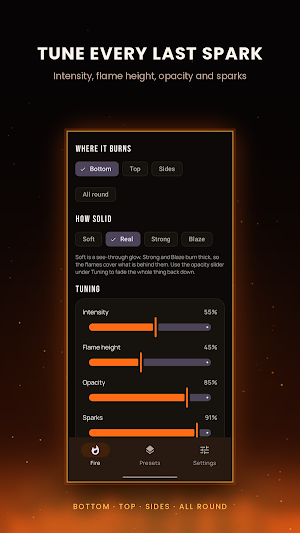
Choose where it burns. Along the bottom, down from the top, up both sides, or all the way round the screen.
Choose how solid it looks. Soft is a see through glow you can read through. Real is an honest fire. Strong and Blaze burn thick enough to cover what is behind them.
Then tune it properly: intensity, flame height, opacity, sparks, speed, wind gusts that make the flames lean and surge, and drifting smoke.
TOUCH THE FLAMES
Turn on Sparks and the whole fire leaps every time you tap, anywhere, while your phone keeps working as normal. Turn on Drag and the flames follow your finger around the screen. Drag catches your taps while it is on, so switch back when you need your phone.
SEE IT ON A BLANK SCREEN
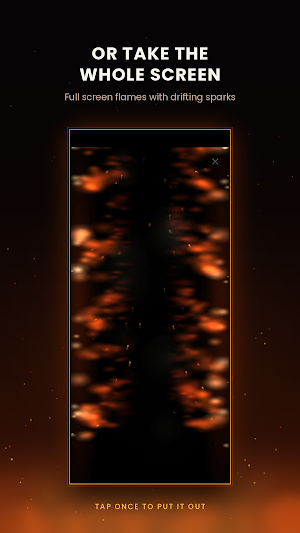
Open the full screen preview for nothing but fire on black. It makes a lovely fireplace to leave on the table, and your screen stays awake while it burns.
READY MADE PRESETS
Six to start with: Campfire, Inferno, Gas leak, Haunted, Slow embers and Ring of fire. Mix your own and save it with one tap.
IT LOOKS AFTER ITSELF
Put the fire out from the app or straight from its notification, any time. Set it to go out by itself after 15 minutes, 30 minutes or an hour. Every burn is saved to your history with how long it lasted and how many sparks flew, so you can see your longest fire and your total burn time.
HONEST ABOUT WHAT IT IS
This is a screen effect and nothing more. Your phone is not really hot and nothing is damaged. No account to make, and nothing you do is recorded or sent anywhere. The fire itself needs no internet.
Fire in Phone Simulator asks to draw over other apps. That permission is the whole trick: it is how the flames sit on top of whatever you are doing.
Fire in Phone Simulator paints real looking flames over everything on your screen. The fire keeps burning while you scroll, chat and play, because your taps go straight through it to the app underneath. Hand your phone to a friend and watch their face.
BUILD THE FIRE YOU WANT
Six flames to pick from: Classic, Inferno, Blue gas, Emerald, Violet and White hot.
Choose where it burns. Along the bottom, down from the top, up both sides, or all the way round the screen.
Choose how solid it looks. Soft is a see through glow you can read through. Real is an honest fire. Strong and Blaze burn thick enough to cover what is behind them.
Then tune it properly: intensity, flame height, opacity, sparks, speed, wind gusts that make the flames lean and surge, and drifting smoke.
TOUCH THE FLAMES
Turn on Sparks and the whole fire leaps every time you tap, anywhere, while your phone keeps working as normal. Turn on Drag and the flames follow your finger around the screen. Drag catches your taps while it is on, so switch back when you need your phone.
SEE IT ON A BLANK SCREEN
Open the full screen preview for nothing but fire on black. It makes a lovely fireplace to leave on the table, and your screen stays awake while it burns.
READY MADE PRESETS
Six to start with: Campfire, Inferno, Gas leak, Haunted, Slow embers and Ring of fire. Mix your own and save it with one tap.
IT LOOKS AFTER ITSELF
Put the fire out from the app or straight from its notification, any time. Set it to go out by itself after 15 minutes, 30 minutes or an hour. Every burn is saved to your history with how long it lasted and how many sparks flew, so you can see your longest fire and your total burn time.
HONEST ABOUT WHAT IT IS
This is a screen effect and nothing more. Your phone is not really hot and nothing is damaged. No account to make, and nothing you do is recorded or sent anywhere. The fire itself needs no internet.
Fire in Phone Simulator asks to draw over other apps. That permission is the whole trick: it is how the flames sit on top of whatever you are doing.
What’s new
Version 1.3 · Updated August 19, 2026
Bug fixes
Alternatives to Fire in Phone Simulator
Looking for apps like Fire in Phone Simulator? Here are 6 similar Android apps on Google Play. The highest rated is Fluid Simulation - Antistress (4.9/5), and 5 of the 6 are free to download.
-
Spatial Touch™ - Air Gestures 3.9
-
Castro Premium - system info 4.7
-
True Edge: Edge Lighting & AOD 4.2
-
Area 51 Fireworks 3.8
-
KYRO: Storm, Linemen & VM
-
Fluid Simulation - Antistress 4.9
| App | Rating | Price | Installs | Last updated | Compare |
|---|---|---|---|---|---|
| Fire in Phone Simulator | – | Free | 100+ | Aug 19, 2026 | |
| Spatial Touch™ - Air Gestures | 3.9 / 5 | Free | 10,000,000+ | Oct 22, 2026 | Compare |
| Castro Premium - system info | 4.7 / 5 | 2.99 USD | 10,000+ | Oct 12, 2026 | Compare |
| True Edge: Edge Lighting & AOD | 4.2 / 5 | Free | 5,000,000+ | Oct 26, 2026 | Compare |
| Area 51 Fireworks | 3.8 / 5 | Free | 5,000+ | Sep 30, 2026 | Compare |
| KYRO: Storm, Linemen & VM | – | Free | 1,000+ | – | Compare |
| Fluid Simulation - Antistress | 4.9 / 5 | Free | 10,000,000+ | Oct 24, 2026 | Compare |
Similar apps on Google Play
- Spatial Touch™ - Air Gestures
- Castro Premium - system info
- True Edge: Edge Lighting & AOD
- Area 51 Fireworks
- KYRO: Storm, Linemen & VM
- Fluid Simulation - Antistress
- TAP Kiln Control Mobile
- Lotus Lantern
- HappyLighting
- Avigilon Unity Video
- Hue Essentials
- OBDeleven – OBD2 car scanner
- Elgato Stream Deck Mobile
- IFSTA Instructor 9
- Typhur
- SPYPOINT