

Denoiser: Audio Noise Remover
Music & Audio In-app purchases Contains ads
Reduce background noise from audio and video.
- Downloads
- 4.1K+
- on Google Play
- Price
- Free
- In-app purchases
- Updated
- Jul 26
- 2026 · v1.0.8
Screenshots


About Denoiser: Audio Noise Remover
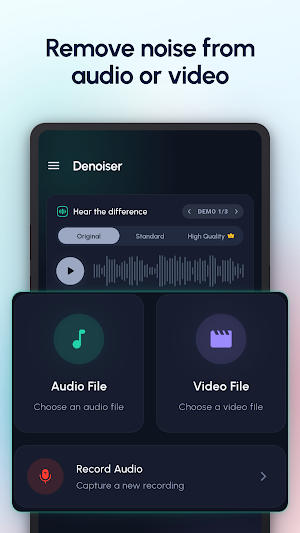
Denoiser helps you make noisy recordings easier to hear. Clean background noise from audio files, video clips, voice notes, interviews, lectures, screen recordings, podcasts, and everyday recordings with a focused noise removal workflow.
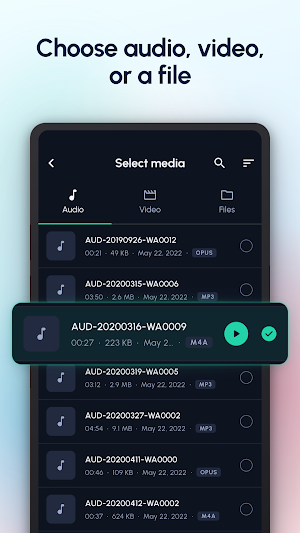
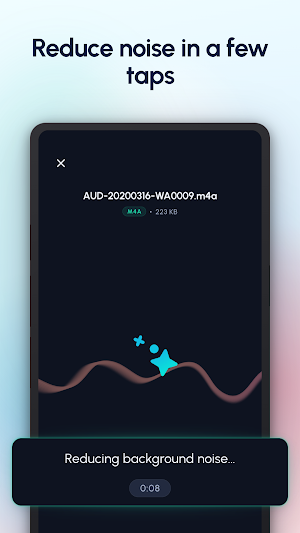
Pick a recording, reduce background noise, compare the original with the cleaned result, then export or share the version you want to keep. Denoiser is built for one clear purpose: helping speech and recordings sound cleaner without turning the process into a complicated editor.
🎵 Clean audio from many sources
Use Denoiser with audio files, video clips, and files selected from your device. You can also record directly in the app, then process your voice recording right away.
✨ Reduce background noise
Clean up rough voice notes, noisy clips, room noise, fan noise, street noise, and recordings where speech needs to stand out more clearly.
🎬 Audio and video support
Denoiser can clean the audio inside video clips, so you can keep the visual content while improving the listening experience.
🎧 Compare before you export
Switch between Original and Result to hear the difference before you export, share, or try High Quality mode.
🎚️ Choose the right quality mode
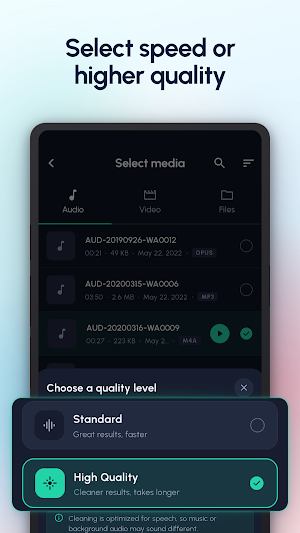
Use Standard mode for faster cleanup, or High Quality mode when an important recording needs an extra-clean pass.
🗂️ Keep a clean library
Processed projects are saved in your Library, where you can replay results, compare them again, and export when needed.
✅ Built for simple noise removal
Denoiser is not a full audio studio. It is a focused tool for cleaning recordings, comparing before and after, and exporting a clearer result.
📱 On-device processing
Noise reduction processing runs on your device. Your selected media is processed locally for denoising.
📴 Offline denoising
An internet connection is not required for the denoising process. Select a recording, reduce noise, compare the result, and keep the cleaned project even when you are offline.
Use Denoiser when you want to:
1️⃣ Reduce background noise from audio
2️⃣ Clean the sound inside video clips
3️⃣ Improve voice notes and spoken recordings
4️⃣ Compare original and cleaned audio
5️⃣ Export cleaner results for sharing or saving
6️⃣ Keep finished projects in a simple Library
Make every recording easier to hear with Denoiser.
Pick a recording, reduce background noise, compare the original with the cleaned result, then export or share the version you want to keep. Denoiser is built for one clear purpose: helping speech and recordings sound cleaner without turning the process into a complicated editor.
🎵 Clean audio from many sources
Use Denoiser with audio files, video clips, and files selected from your device. You can also record directly in the app, then process your voice recording right away.
✨ Reduce background noise
Clean up rough voice notes, noisy clips, room noise, fan noise, street noise, and recordings where speech needs to stand out more clearly.
🎬 Audio and video support
Denoiser can clean the audio inside video clips, so you can keep the visual content while improving the listening experience.
🎧 Compare before you export
Switch between Original and Result to hear the difference before you export, share, or try High Quality mode.
🎚️ Choose the right quality mode
Use Standard mode for faster cleanup, or High Quality mode when an important recording needs an extra-clean pass.
🗂️ Keep a clean library
Processed projects are saved in your Library, where you can replay results, compare them again, and export when needed.
✅ Built for simple noise removal
Denoiser is not a full audio studio. It is a focused tool for cleaning recordings, comparing before and after, and exporting a clearer result.
📱 On-device processing
Noise reduction processing runs on your device. Your selected media is processed locally for denoising.
📴 Offline denoising
An internet connection is not required for the denoising process. Select a recording, reduce noise, compare the result, and keep the cleaned project even when you are offline.
Use Denoiser when you want to:
1️⃣ Reduce background noise from audio
2️⃣ Clean the sound inside video clips
3️⃣ Improve voice notes and spoken recordings
4️⃣ Compare original and cleaned audio
5️⃣ Export cleaner results for sharing or saving
6️⃣ Keep finished projects in a simple Library
Make every recording easier to hear with Denoiser.
What’s new
Version 1.0.8 · Updated July 26, 2026
🎉 Denoiser is live! Reduce background noise in audio and video, compare the result, and share it easily.
User reviews

better than other but maybe 1 dollars for 1 week

I can't believe it it's working really good for professional

this app is much butiful music player d j voices is fine

very good app. 5600 PKR for lifetime access is not bad at all.
Alternatives to Denoiser: Audio Noise Remover
Looking for apps like Denoiser: Audio Noise Remover? Here are 2 similar Android apps on Google Play. All of them are free to download.


| App | Rating | Price | Installs | Last updated | Compare |
|---|---|---|---|---|---|
| Denoiser: Audio Noise Remover | – | Free | 1,000+ | Jul 26, 2026 | |
| Ritsu: Pomodoro Focus & Tasks | – | Free | 100+ | Jul 26, 2026 | Compare |
| JLPT Quiz: Kanji & Vocabulary | – | Free | 10,000+ | Oct 13, 2026 | Compare |