

FastRIS Ai: Image Search
Photography Contains ads
Local AI Reverse Image Search. Offline, Private & Multi-engine Web Search! 🛡️
- Downloads
- 500+
- on Google Play
- Price
- Free
- No in-app purchases
- Updated
- Feb 2
- 2026 · v1.0.5
Screenshots


About FastRIS Ai: Image Search
🔍 FastRIS AI - The First Local AI-Powered Reverse Image Search
Search your photos WITHOUT internet! FastRIS AI brings revolutionary on-device AI technology that searches your entire photo gallery locally - your photos NEVER leave your device. Plus, all the powerful web reverse image search features you love!
🛡️ PRIVACY FIRST - 100% LOCAL AI PROCESSING
Unlike other apps, FastRIS AI processes everything ON YOUR DEVICE. No cloud uploads, no data collection, no privacy concerns. Your photos stay yours!
🤖 NEW: LOCAL AI REVERSE IMAGE SEARCH
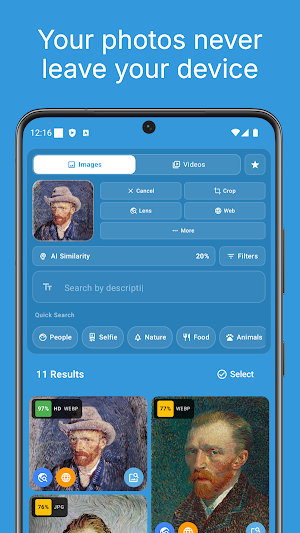
✨ Search Photos with Text - Type "beach sunset", "birthday party", or "red car" and instantly find matching photos from your gallery - all processed locally!
✨ Find Similar Images - Select any photo and find visually similar images in your gallery using AI-powered similarity detection
✨ AI Duplicate Finder - Intelligently detect and remove duplicate photos to free up storage
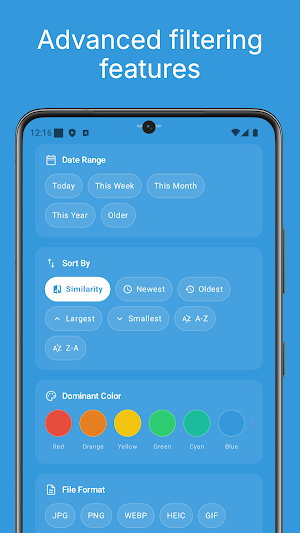
✨ Smart Albums - AI automatically organizes 40+ categories: Screenshots, Selfies, WhatsApp, Instagram, Animals, Vehicles, Night Photos, and more!
✨ Works Offline - No internet needed for local search. Your photos, your privacy!
🌐 POWERFUL WEB REVERSE IMAGE SEARCH
All the classic FastRIS features you love, now even better:
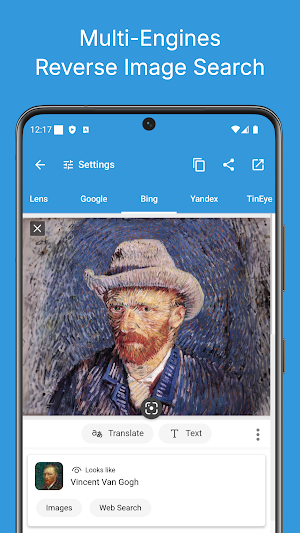
• Multi-Engine Search - Google, Bing, Yandex, TinEye and more
• Google Lens Integration - Quick visual search with Google Lens
• Direct Upload - Upload directly to search engines for best results
• Social Media URL Support - Extract and search images from social media links
📱 CLASSIC FEATURES (All Supported!)
• Select image from gallery or capture with camera
• Rotate image
• Flip image horizontally/vertically
• Crop part of the image
• Results from Google, Bing, Yandex, TinEye
• Share results screenshot
🎯 USE CASES
• Finding celebrity, politician, car names from photos
• Search someone's social network profile
• Find higher resolution version of a picture
• Search location photos while traveling
• Find similar products on the internet
• Find source of memes, screenshots, logos, characters
• Verify authenticity of images
• Organize thousands of photos with AI
• Find and delete duplicate photos
🛠️ ADVANCED AI TOOLS
• AI Background Remover - Remove backgrounds with one tap
• Auto Enhance - AI-powered brightness, contrast, sharpness
• Smart Image Comparison - Compare images with similarity scores
• QR Code Scanner - Scan QR codes from any image
• Format Converter - JPG, PNG, WebP, HEIC, BMP, GIF
• Image Resizer - HD, Full HD, 4K, Social Media sizes
• Collage Creator - Create beautiful photo collages
• Metadata Viewer - View EXIF data (camera, location, date)
📦 BATCH OPERATIONS
Select multiple images and:
• Batch convert formats
• Batch resize
• Batch enhance with AI
• Batch remove backgrounds
• Export to PDF
• Add tags
• Secure delete
🔒 SECURITY & PRIVACY
• Secure Vault - Hide photos with PIN/biometric
• Local Only Mode - 100% offline operation
• Secure Delete - Permanent erasure with data overwrite
• On-Device AI - No data leaves your phone
❤️ ORGANIZATION
• Favorites - Quick access to favorite images
• Search History - Track previous searches
• Custom Folders - Organized saving
• Tags System - Custom tags for organization
• Home Screen Widgets - Quick access widgets
📖 HOW TO USE
FOR LOCAL AI SEARCH:
1. Install FastRIS AI and grant storage permission
2. Let the app index your photos (one-time, ~1 min)
3. Type any description or select an image to search!
FOR WEB SEARCH:
1. Select an image from gallery or capture with camera
2. Choose search engine (Google, Bing, Yandex, TinEye)
3. Get results in seconds!
━━━━━━━━━━━━━━━━━━━━━━━━━━━━━━━━━━
For feature requests, bugs or questions:
📧 [email protected]
If you 💖 our App Please support us by
⭐️⭐️⭐️⭐️⭐️
Thank You.
Search your photos WITHOUT internet! FastRIS AI brings revolutionary on-device AI technology that searches your entire photo gallery locally - your photos NEVER leave your device. Plus, all the powerful web reverse image search features you love!
🛡️ PRIVACY FIRST - 100% LOCAL AI PROCESSING
Unlike other apps, FastRIS AI processes everything ON YOUR DEVICE. No cloud uploads, no data collection, no privacy concerns. Your photos stay yours!
🤖 NEW: LOCAL AI REVERSE IMAGE SEARCH
✨ Search Photos with Text - Type "beach sunset", "birthday party", or "red car" and instantly find matching photos from your gallery - all processed locally!
✨ Find Similar Images - Select any photo and find visually similar images in your gallery using AI-powered similarity detection
✨ AI Duplicate Finder - Intelligently detect and remove duplicate photos to free up storage
✨ Smart Albums - AI automatically organizes 40+ categories: Screenshots, Selfies, WhatsApp, Instagram, Animals, Vehicles, Night Photos, and more!
✨ Works Offline - No internet needed for local search. Your photos, your privacy!
🌐 POWERFUL WEB REVERSE IMAGE SEARCH
All the classic FastRIS features you love, now even better:
• Multi-Engine Search - Google, Bing, Yandex, TinEye and more
• Google Lens Integration - Quick visual search with Google Lens
• Direct Upload - Upload directly to search engines for best results
• Social Media URL Support - Extract and search images from social media links
📱 CLASSIC FEATURES (All Supported!)
• Select image from gallery or capture with camera
• Rotate image
• Flip image horizontally/vertically
• Crop part of the image
• Results from Google, Bing, Yandex, TinEye
• Share results screenshot
🎯 USE CASES
• Finding celebrity, politician, car names from photos
• Search someone's social network profile
• Find higher resolution version of a picture
• Search location photos while traveling
• Find similar products on the internet
• Find source of memes, screenshots, logos, characters
• Verify authenticity of images
• Organize thousands of photos with AI
• Find and delete duplicate photos
🛠️ ADVANCED AI TOOLS
• AI Background Remover - Remove backgrounds with one tap
• Auto Enhance - AI-powered brightness, contrast, sharpness
• Smart Image Comparison - Compare images with similarity scores
• QR Code Scanner - Scan QR codes from any image
• Format Converter - JPG, PNG, WebP, HEIC, BMP, GIF
• Image Resizer - HD, Full HD, 4K, Social Media sizes
• Collage Creator - Create beautiful photo collages
• Metadata Viewer - View EXIF data (camera, location, date)
📦 BATCH OPERATIONS
Select multiple images and:
• Batch convert formats
• Batch resize
• Batch enhance with AI
• Batch remove backgrounds
• Export to PDF
• Add tags
• Secure delete
🔒 SECURITY & PRIVACY
• Secure Vault - Hide photos with PIN/biometric
• Local Only Mode - 100% offline operation
• Secure Delete - Permanent erasure with data overwrite
• On-Device AI - No data leaves your phone
❤️ ORGANIZATION
• Favorites - Quick access to favorite images
• Search History - Track previous searches
• Custom Folders - Organized saving
• Tags System - Custom tags for organization
• Home Screen Widgets - Quick access widgets
📖 HOW TO USE
FOR LOCAL AI SEARCH:
1. Install FastRIS AI and grant storage permission
2. Let the app index your photos (one-time, ~1 min)
3. Type any description or select an image to search!
FOR WEB SEARCH:
1. Select an image from gallery or capture with camera
2. Choose search engine (Google, Bing, Yandex, TinEye)
3. Get results in seconds!
━━━━━━━━━━━━━━━━━━━━━━━━━━━━━━━━━━
For feature requests, bugs or questions:
📧 [email protected]
If you 💖 our App Please support us by
⭐️⭐️⭐️⭐️⭐️
Thank You.
What’s new
Version 1.0.5 · Updated February 2, 2026
Bug fixes, stability fixes and internal infrastructure improvements 🛠
User reviews

was GREAT but now their is lines through all the pictures on every browser
Alternatives to FastRIS Ai: Image Search
Looking for apps like FastRIS Ai: Image Search? Here are 6 similar Android apps on Google Play. The highest rated is FastRIS: Reverse Image Search (3.9/5), and all 6 are free to download.
-
ClashTrophy: CR Stats & Decks
-
C2PA AI Detector
-
FastingSense: Fasting Tracker
-
AI Image Detector - Fake Check 3.4
-
Image Search
-
FastRIS: Reverse Image Search 3.9
| App | Rating | Price | Installs | Last updated | Compare |
|---|---|---|---|---|---|
| FastRIS Ai: Image Search | – | Free | 500+ | Feb 2, 2026 | |
| ClashTrophy: CR Stats & Decks | – | Free | 10+ | Sep 6, 2026 | Compare |
| C2PA AI Detector | – | Free | 10+ | Sep 2, 2026 | Compare |
| FastingSense: Fasting Tracker | – | Free | 100+ | – | Compare |
| AI Image Detector - Fake Check | 3.4 / 5 | Free | 1,000+ | Aug 20, 2026 | Compare |
| Image Search | – | Free | 1,000+ | Dec 30, 2025 | Compare |
| FastRIS: Reverse Image Search | 3.9 / 5 | Free | 5,000+ | Dec 27, 2025 | Compare |