

Zipper Lock Screen: Zip Style
MGlobal Personalization Contains ads
Zipper Wallpaper & Lock Screen: Lock and unlock your phone with a stylish zipper
- Rating
- 4.8
- 5.2K ratings
- Downloads
- 1.3M+
- on Google Play
- Price
- Free
- No in-app purchases
- Updated
- Sep 24
- 2026 · v1.2609.25
Screenshots


About Zipper Lock Screen: Zip Style
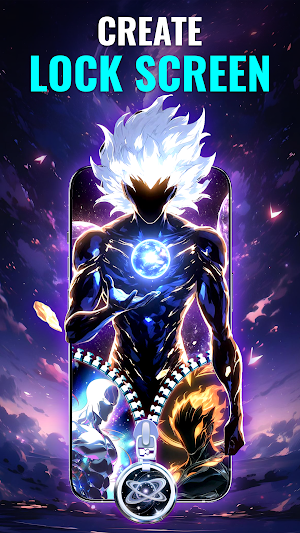
Zipper Lock Screen: Zip Style turns the simple act of opening your phone screen into a fun, stylish, and refreshing moment. With its unique zipper lock, ziplock effects, and a wide library of lock screen wallpapers, this zipper lock screen app gives your lockscreen a personalized look while still keeping your device safe through built-in protect app. Enjoy smooth animations, creative designs, and beautiful HD Wallpaper and screen 4k backgrounds that make every unlock feel more interesting - including festive Christmas wallpaper, Christmas lock screen, Santa Claus theme, and winter snow backgrounds for the holiday season.
✨ Main Features
🔐 Zipper Lock & Zip Style Choices: Choose from various zipper lock & zip designs to create your own screenlock look that makes unlocking phone more enjoyable. - including special Christmas zipper style and Santa zipper lock during Xmas.
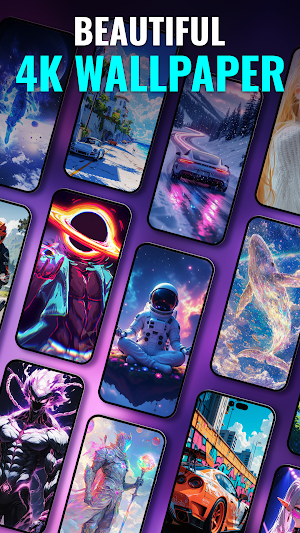
🖼️ Wallpapers & Themes: Explore a rich collection of lock screen wallpapers: HD wallpaper, 4K wallpaper, anime, car images, winter snow, cozy Christmas background wallpaper, Santa Claus and trending wallpapper to craft your perfect lock screen theme filled with holiday vibes.
🎨 Home Screen Customizer & Stylish Launcher: Transform your phone screen into a clean and unique stylish launcher layout using the powerful home screen customizer. Combine wallpapers, zipper effects, and layout styles for your own personal look for this Christmas holiday.
👀 Instant Preview: Preview your wallpaper, zipper style, and background instantly so your lockscreen always looks exactly how you imagine.
📱 How to Use
1. Open Zipper Lock Screen.
2. Select a lock screen theme, wallpapper, HD Wallpaper, or 4K background.
3. Customize zipper style, row style, and layout.
4. Tap “Apply” to activate your new screenlock.
5. Zip or unzip to unlock - turning a simple action into something fun.
💖 What You’ll Get
🎁Bring a warm Christmas atmosphere to your phone
🎀 A stylish, refreshed lockscreen that matches your personality and
🛡️ Secure protect app, screenlock, and app lock features for daily protection.
🌈 A fully personalized phone screen through deep customization tools.
⚡ Fast performance and smooth transitions on all Android devices.
With Zipper Lock Screen: Zip Style, every unlock feels like unwrapping a tiny Christmas gift — warm, joyful, and filled with holiday magic just for you. 🎄✨
✨ Main Features
🔐 Zipper Lock & Zip Style Choices: Choose from various zipper lock & zip designs to create your own screenlock look that makes unlocking phone more enjoyable. - including special Christmas zipper style and Santa zipper lock during Xmas.
🖼️ Wallpapers & Themes: Explore a rich collection of lock screen wallpapers: HD wallpaper, 4K wallpaper, anime, car images, winter snow, cozy Christmas background wallpaper, Santa Claus and trending wallpapper to craft your perfect lock screen theme filled with holiday vibes.
🎨 Home Screen Customizer & Stylish Launcher: Transform your phone screen into a clean and unique stylish launcher layout using the powerful home screen customizer. Combine wallpapers, zipper effects, and layout styles for your own personal look for this Christmas holiday.
👀 Instant Preview: Preview your wallpaper, zipper style, and background instantly so your lockscreen always looks exactly how you imagine.
📱 How to Use
1. Open Zipper Lock Screen.
2. Select a lock screen theme, wallpapper, HD Wallpaper, or 4K background.
3. Customize zipper style, row style, and layout.
4. Tap “Apply” to activate your new screenlock.
5. Zip or unzip to unlock - turning a simple action into something fun.
💖 What You’ll Get
🎁Bring a warm Christmas atmosphere to your phone
🎀 A stylish, refreshed lockscreen that matches your personality and
🛡️ Secure protect app, screenlock, and app lock features for daily protection.
🌈 A fully personalized phone screen through deep customization tools.
⚡ Fast performance and smooth transitions on all Android devices.
With Zipper Lock Screen: Zip Style, every unlock feels like unwrapping a tiny Christmas gift — warm, joyful, and filled with holiday magic just for you. 🎄✨
What’s new
Version 1.2609.25 · Updated September 24, 2026
optimize performance
Alternatives to Zipper Lock Screen: Zip Style
Looking for apps like Zipper Lock Screen: Zip Style? Here are 6 similar Android apps on Google Play. The highest rated is Vera Icon Pack: shapeless icon (4.8/5), and 4 of the 6 are free to download.
-
Vera Icon Pack: shapeless icon 4.8
-
Live Wallpapers, 4K Wallpapers 4.5
-
backiee (Wallpaper Studio 10) 4.5
-
Lena Icon Pack Shapeless Icons 4.7
-
HD Wallpapers, Wallpaper Maker 4.6
-
Bing Wallpapers 3.5
| App | Rating | Price | Installs | Last updated | Compare |
|---|---|---|---|---|---|
| Zipper Lock Screen: Zip Style | 4.8 / 5 | Free | 1,000,000+ | Sep 24, 2026 | |
| Vera Icon Pack: shapeless icon | 4.8 / 5 | 3.49 USD | 10,000+ | Oct 22, 2026 | Compare |
| Live Wallpapers, 4K Wallpapers | 4.5 / 5 | Free | 10,000,000+ | Aug 8, 2026 | Compare |
| backiee (Wallpaper Studio 10) | 4.4 / 5 | Free | 100,000+ | Mar 21, 2024 | Compare |
| Lena Icon Pack Shapeless Icons | 4.7 / 5 | 3.49 USD | 10,000+ | Oct 6, 2026 | Compare |
| HD Wallpapers, Wallpaper Maker | 4.6 / 5 | Free | 1,000,000+ | – | Compare |
| Bing Wallpapers | 3.5 / 5 | Free | 10,000,000+ | Oct 22, 2026 | Compare |
Similar apps on Google Play
- Vera Icon Pack: shapeless icon
- Live Wallpapers, 4K Wallpapers
- backiee (Wallpaper Studio 10)
- Lena Icon Pack Shapeless Icons
- HD Wallpapers, Wallpaper Maker
- Bing Wallpapers
- Typewise Offline Keyboard
- Football Pulse: Live Score
- Caddius: AI Golf Caddie
- Disc-ai
- Borealis - Icon Pack
- Glow Butterfly Launcher Theme
- PurpleLine Icon Pack : LineX
- BOLT Icon Pack
- Photo Widget Pro
- ADW Launcher 2
- Wallpaper 4K - Wallpapers Club
- LiveMic: Bluetooth Mic Speaker
- GranPlayer
- Wallpapers For Realme HD - 4K
- edjing PRO - Music DJ mixer
- Your Home Magazine