

TaxScanZA: SA Tax Scanner
asterixorobelix Finance In-app purchases
Scan tax documents. Get SARS-compliant files for eFiling. R49, once.
- Downloads
- 57+
- on Google Play
- Price
- Free
- In-app purchases
- Updated
- Oct 4
- 2026 · v1.7.2
Screenshots


About TaxScanZA: SA Tax Scanner
Every tax season, South African taxpayers photograph their documents, upload them to eFiling, and get rejected. Wrong file size. Wrong format. No explanation. Hours wasted searching for SARS upload requirements that keep changing.
TaxScanZA is a tax document scanner built for SARS eFiling upload problems.
TaxScanZA is an independent tax document scanner. It is not affiliated with, endorsed by, or representing SARS, the South African Revenue Service, or any government entity. TaxScanZA does not submit tax returns or provide government services. It only helps users prepare document files for upload.
Official SARS source for the upload requirements referenced in this app:
https://www.sars.gov.za/tax-practitioners/uploading-of-supporting-documents-relevant-material-on-efiling-website/
Scan any tax document with your phone camera. The app automatically compresses and optimises it to meet SARS requirements. In thirty seconds, you have a file that is ready to upload to eFiling.
HOW IT WORKS
1. Scan: point your camera at your IRP5, medical aid certificate, or any supporting document. Automatic edge detection captures the full page.
2. Optimise: the app compresses your scan to under 5MB (the SARS eFiling size limit) at 300 DPI resolution. The output is a PDF in the format SARS expects.
3. Export: share your SARS-compliant document via email, messaging apps, or save directly to your device. Ready for eFiling upload.
SARS COMPLIANCE CHECKER
Before you upload to eFiling, the compliance checker validates your document against SARS requirements:
- File size under 5MB
- Resolution at 300 DPI
- Correct PDF format
- Valid filename characters and length
- Page count within limits
Each criterion shows a clear pass or fail. You know your document will be accepted before you submit it.
ENCRYPTED PDF DETECTION
Many South African banks issue password-protected PDF statements. TaxScanZA detects encrypted PDFs and guides you to re-scan the physical document, so your eFiling submission is not rejected for an unreadable file.
DOCUMENT CATEGORIES
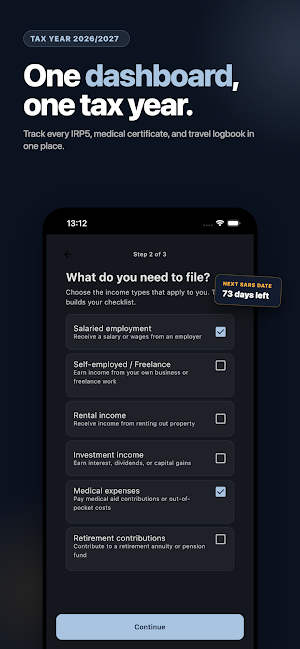
Organise your South Africa tax documents across 7 categories:
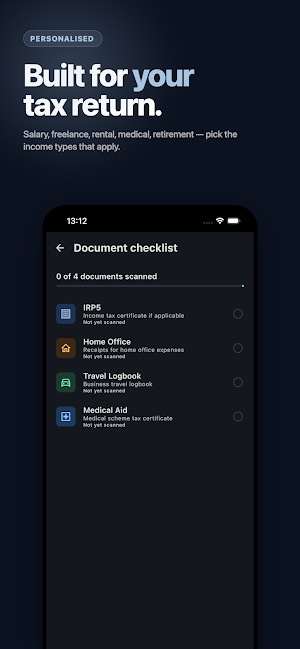
- IRP5 / IT3(a)
- Medical Aid
- Retirement Annuity
- Home Office
- Travel Logbook
- Donations (Section 18A)
- Other
WHAT MAKES IT DIFFERENT
This is not a general document scanner. TaxScanZA exists because SARS has specific requirements for eFiling uploads -- file size, DPI, format -- and generic scanner apps do not handle them. Every scan is optimised to meet those requirements automatically. The SARS PDF size and format are handled without manual adjustment.
If you have ever searched for "SARS file too large" or "tax document scanner SA" after a failed eFiling upload, this is the app that solves that problem.
PRICING
Free: scan and store up to 5 documents.
Pro: unlimited documents and export. R49, once. No subscription.
Built for South African taxpayers who need SARS-compliant documents that work the first time.
TaxScanZA is a tax document scanner built for SARS eFiling upload problems.
TaxScanZA is an independent tax document scanner. It is not affiliated with, endorsed by, or representing SARS, the South African Revenue Service, or any government entity. TaxScanZA does not submit tax returns or provide government services. It only helps users prepare document files for upload.
Official SARS source for the upload requirements referenced in this app:
https://www.sars.gov.za/tax-practitioners/uploading-of-supporting-documents-relevant-material-on-efiling-website/
Scan any tax document with your phone camera. The app automatically compresses and optimises it to meet SARS requirements. In thirty seconds, you have a file that is ready to upload to eFiling.
HOW IT WORKS
1. Scan: point your camera at your IRP5, medical aid certificate, or any supporting document. Automatic edge detection captures the full page.
2. Optimise: the app compresses your scan to under 5MB (the SARS eFiling size limit) at 300 DPI resolution. The output is a PDF in the format SARS expects.
3. Export: share your SARS-compliant document via email, messaging apps, or save directly to your device. Ready for eFiling upload.
SARS COMPLIANCE CHECKER
Before you upload to eFiling, the compliance checker validates your document against SARS requirements:
- File size under 5MB
- Resolution at 300 DPI
- Correct PDF format
- Valid filename characters and length
- Page count within limits
Each criterion shows a clear pass or fail. You know your document will be accepted before you submit it.
ENCRYPTED PDF DETECTION
Many South African banks issue password-protected PDF statements. TaxScanZA detects encrypted PDFs and guides you to re-scan the physical document, so your eFiling submission is not rejected for an unreadable file.
DOCUMENT CATEGORIES
Organise your South Africa tax documents across 7 categories:
- IRP5 / IT3(a)
- Medical Aid
- Retirement Annuity
- Home Office
- Travel Logbook
- Donations (Section 18A)
- Other
WHAT MAKES IT DIFFERENT
This is not a general document scanner. TaxScanZA exists because SARS has specific requirements for eFiling uploads -- file size, DPI, format -- and generic scanner apps do not handle them. Every scan is optimised to meet those requirements automatically. The SARS PDF size and format are handled without manual adjustment.
If you have ever searched for "SARS file too large" or "tax document scanner SA" after a failed eFiling upload, this is the app that solves that problem.
PRICING
Free: scan and store up to 5 documents.
Pro: unlimited documents and export. R49, once. No subscription.
Built for South African taxpayers who need SARS-compliant documents that work the first time.
What’s new
Version 1.7.2 · Updated October 4, 2026
Scanner bugfix
Alternatives to TaxScanZA: SA Tax Scanner
Looking for apps like TaxScanZA: SA Tax Scanner? Here are 3 similar Android apps on Google Play. The highest rated is Engage (SmartSpending) (3.8/5), and all 3 are free to download.



| App | Rating | Price | Installs | Last updated | Compare |
|---|---|---|---|---|---|
| TaxScanZA: SA Tax Scanner | – | Free | 50+ | Oct 4, 2026 | |
| Whip Around - DVIR | 3.4 / 5 | Free | 100,000+ | Sep 23, 2026 | Compare |
| Engage (SmartSpending) | 3.8 / 5 | Free | 100,000+ | – | Compare |
| Bark for Professionals | 3.0 / 5 | Free | 100,000+ | Oct 14, 2026 | Compare |